
Start Node, Global Variables, and System Variables Reference
Reference guide for workflow start node outputs, 12 global variable types, read-only system variables, and node I/O data types.
In FastGPT workflows, data flows across the canvas from three variable sources: Start node outputs, application-level global variables, and read-only runtime system variables.
1. Workflow Start Node (workflowStart)
Every main workflow canvas contains a single Workflow Start node that serves as the entry point for incoming conversation requests.
| Output Field | Internal Key | Value Type | Description |
|---|---|---|---|
| User question | userChatInput | String | Text message submitted by the user in the current turn |
| File URLs | userFiles | Array<string> | Temporary signed URLs of documents and images uploaded in the current turn when File Input is enabled |
2. Global Variables
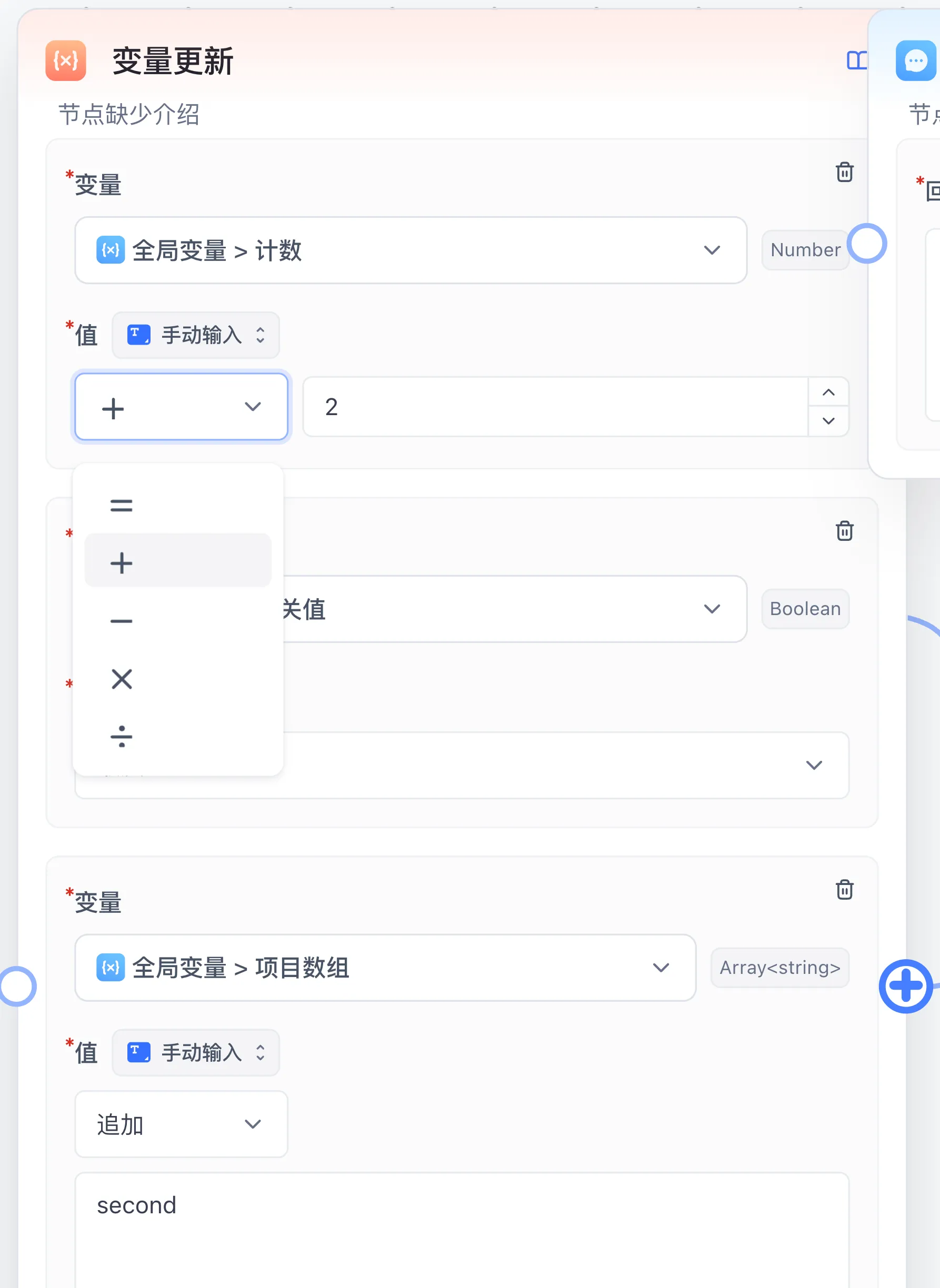
Declare global variables under System configuration → Global Variable in the workflow editor or in the Global Variable section of a Chat Agent. Global variables can be referenced in any node via the variable picker and updated at runtime by the Variable Update node.
1. Pre-Chat Form Variables (User-Facing)
When configured, users see the corresponding form controls before starting a new conversation:
| Variable Type | Enum Key | Default Value Type | Typical Use Case |
|---|---|---|---|
| Text Input box | input | String (or Object / typed arrays) | Name, ticket number, background context, or structured input |
| Number Input Box | numberInput | Number | Result count limit, budget cap, or numeric threshold |
| Single Select Box | select | String | Business category, target language, or output tone |
| Multiple selection boxes | multipleSelect | Array<string> | Multiple review dimensions or delivery channels |
| Switch | switch | Boolean | Toggle web search, deep analysis, or strict review branches |
| Password | password | String | Masked temporary access token or secret |
| Time point | timePointSelect | String | Specific deadline or query timestamp |
| Time range | timeRangeSelect | Array<string> | Start and end time pair |
| Chat Model Selection | llmSelect | String | Allow the user to switch the underlying chat model |
| File upload | file | Array<string> | Supply pre-chat attachment file URLs |
2. Hidden and Internal State Variables
| Variable Type | Enum Key | Visibility | Initialization and Update |
|---|---|---|---|
| External Variable (Custom) | custom | Hidden only in share links; the input box is shown in in-app chat and run preview | Supplied via embedded URL query parameters, share-auth callbacks, or OpenAPI variables |
| Internal variables (Internal) | internal | Hidden from end users and external APIs | Initialized with its default value inside the workflow and mutated across nodes or loop iterations via Variable Update |
3. Runtime System Variables
System variables are injected automatically by the workflow engine on each run and are always available in the variable picker:
| System Variable | Internal Key | Value Type | Description |
|---|---|---|---|
| User ID | userId | String | Authenticated member ID or external customUid, often passed to HTTP nodes for permission lookup |
| App ID | appId | String | Unique identifier of the running application |
| Current Chat ID | chatId | String | Unique identifier of the active multi-turn conversation |
| AI Response ID | responseChatItemId | String | Unique record ID of the current assistant response item |
| Chat history | histories | ChatHistory | Conversation history array formatted as { obj: 'System' | 'Human' | 'AI', value: string }[] |
| Current time | cTime | String | Timestamp string with timezone context when the run started |
4. Node I/O Value Types (WorkflowIOValueTypeEnum)
Canvas connections and variable pickers validate compatibility using the declared port value types:
| Type Key | Display Label | Structure |
|---|---|---|
string / number / boolean | String / Number / Boolean | Scalar primitive types |
object | Object | JSON key-value object |
arrayString / arrayNumber / arrayBoolean / arrayObject | Array<T> | Strongly typed arrays used directly by Loop or Parallel Run |
arrayAny / any | Array / Any | Untyped array or dynamic value (common in Code Run and HTTP Request outputs) |
chatHistory | History | Multi-turn context array consumed by AI Chat and Question Classification |
datasetQuote | Dataset citations | Retrieved chunk array { id, datasetId, collectionId, sourceName, q, a }[] |
selectDataset | Select Dataset | Target knowledge base ID list passed into a workflow tool |
Next: Learn how to mutate state with Variable Update or check Workflow Connection Rules.
Last updated
Virtual Machine Sandbox Environment
Master Agent virtual machine execution environments, session directory isolation, persistent volume mounts, startup scripts, and troubleshooting.
Workflow validation rules
Learn about connection types, workflow boundaries, tool entry ownership, conditional feedback, and how connection points are displayed, deleted, and validated.