
Dataset Search Methods and Parameters
This section covers FastGPT's Dataset architecture, including its QA storage format and multi-vector mapping, to help you build better datasets. It also explains each search parameter. This guide focuses on practical usage rather than in-depth theory.
Understanding Vectors
FastGPT uses an embedding-based RAG approach to build Datasets. To use FastGPT effectively, you need a basic understanding of how embedding vectors work and their characteristics.
Human text, images, and other media cannot be directly understood by computers. To determine whether two pieces of text are similar or related, they typically need to be converted into a computer-readable format — vectors are one such method.
A vector is essentially an array of numbers. The "distance" between two vectors can be calculated using mathematical formulas — the smaller the distance, the more similar the vectors. This maps back to text, images, and other media to measure similarity between them. Vector search uses this principle.
Since text comes in many types with countless combinations, exact matching is hard to guarantee when converting it to vectors for similarity comparison. Vector-based Datasets typically use a top-k recall approach: find the top k most similar results, then pass them to an LLM for semantic evaluation, logical reasoning, and summarization. This makes vector search one of the most critical steps in Dataset Q&A.
Many factors affect vector search accuracy, including: vector model quality, data quality (length, completeness, diversity), and retriever precision (the speed vs. accuracy tradeoff). Search query quality is equally important.
Retriever precision is relatively straightforward to address, and training vector models is more complex, so optimizing data and query quality becomes a key focus.
Improving Vector Search Accuracy
- Better tokenization and chunking: When a text segment has complete and singular structure and semantics, accuracy improves. Many systems optimize their tokenizers to preserve data completeness.
- Streamline
indexcontent by reducing vector content length: Shorter, more preciseindexcontent improves search accuracy, though it may narrow the search scope. Best suited for scenarios requiring strict answers. - Increase
indexquantity: Add multipleindexentries for the samechunkto improve recall. - Optimize search queries: In practice, user questions are often vague or incomplete. Refining the query (search term) can significantly improve accuracy.
- Fine-tune vector models: Off-the-shelf vector models are general-purpose and may underperform in specific domains. Fine-tuning can greatly improve domain-specific search results.
FastGPT Dataset Architecture
Data Storage Structure
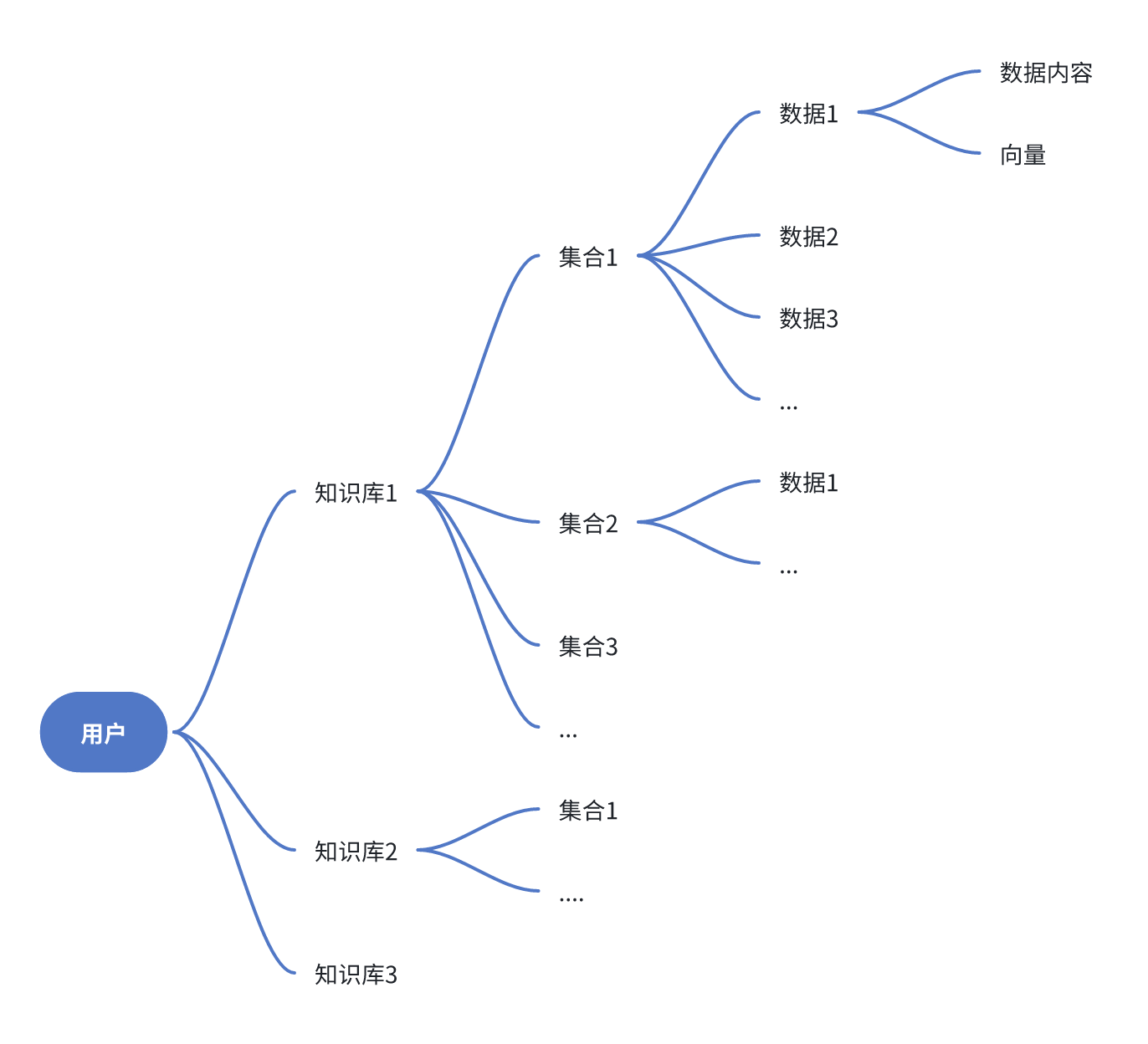
In FastGPT, a Dataset contains Collections, and each Collection contains data entries. A Collection can be thought of as a file. By default, Dataset search covers the selected Dataset, while Collections organize entries for management.
Vector Storage Structure
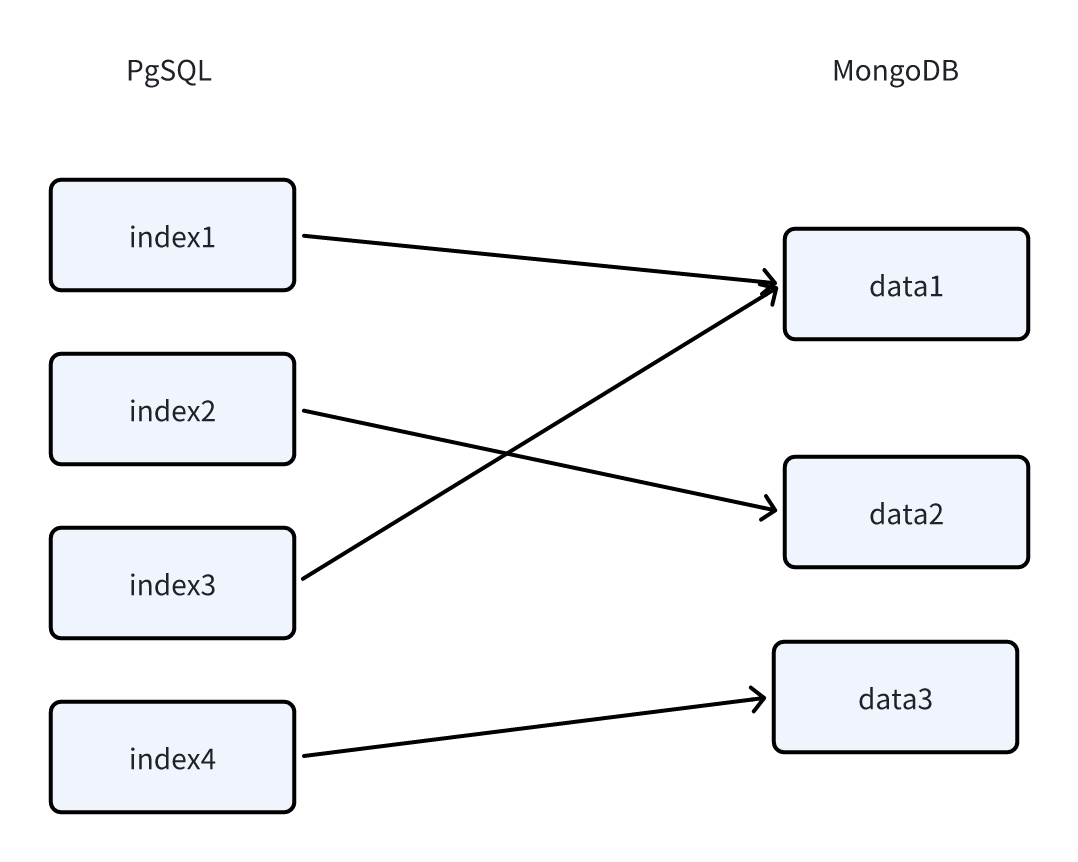
FastGPT uses PostgreSQL's PG Vector extension as the vector retriever, with HNSW indexing. PostgreSQL is used solely for vector search (this engine can be swapped for other databases), while MongoDB handles all other data storage.
In MongoDB's dataset.datas collection, vector source data is stored along with an indexes field that records corresponding vector IDs. This is an array, meaning a single data entry can map to multiple vectors. In addition to default text indexes, image content can also generate image description indexes or image vector indexes when the configured models support it.
In PostgreSQL, a vector field stores the vectors. During search, vectors are recalled first, then their IDs are used to look up the original data in MongoDB. If multiple vectors map to the same source data, they are merged and the highest vector score is used.
Purpose and Usage of Multi-Vector Mapping
In a single vector, content length and semantic richness are often at odds. FastGPT uses multi-vector mapping to map a single data entry to multiple vectors, preserving both data completeness and semantic richness.
You can add multiple vectors to a longer text so that if any one vector is matched during search, the entire data entry is recalled.
This means you can continuously improve data chunk accuracy through annotation.
Overall Search Strategy
Depending on the input and search parameters, FastGPT combines text, images, semantic recall, full-text recall, query rewriting, and reranking, then fuses multiple result paths into the final cited content.
- Use
Query rewritingfor coreference resolution and query expansion, improving multi-turn conversation search capability and semantic richness. - Use
Semantic Search,Full-Text Search, orHybrid Searchto recall candidate content. - If the input contains images, use image description search or image vector search depending on model capability.
- Use
RRF(Reciprocal Rank Fusion) to merge results from multiple search channels. - Use
Rerankfor secondary sorting to improve text result relevance. - Apply similarity filtering and the citation limit to produce the final cited content sent to the model.
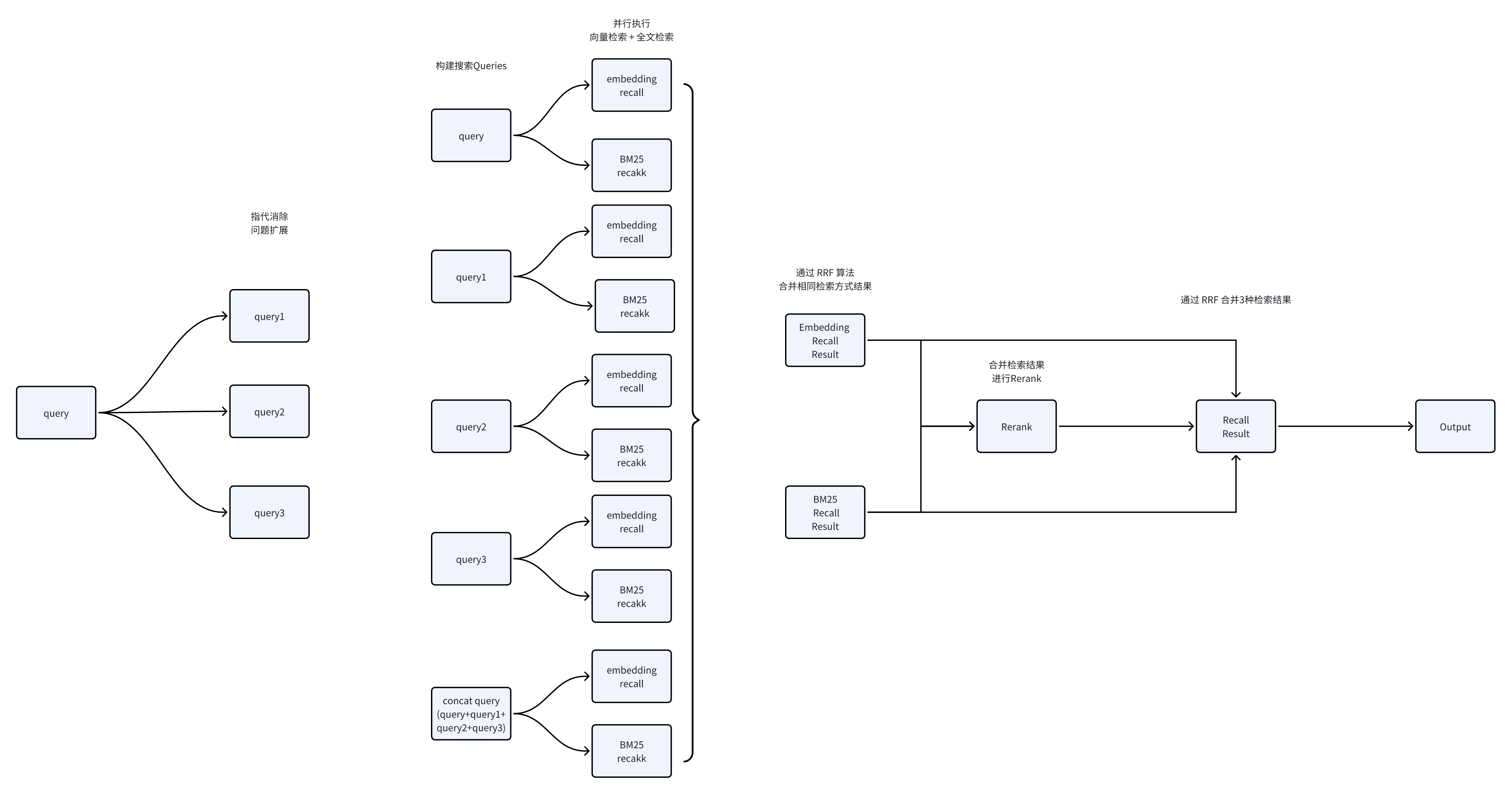
Image Search Method
In Dataset search, images can participate in retrieval in addition to text questions. FastGPT handles images differently depending on the configured model capabilities.
Image search mainly works in two ways:
- Image description search: If an available vision model is configured, the system can understand the image first, generate a text description, and use that description in regular text retrieval.
- Image vector search: If the selected embedding model supports image input, the system can generate vectors for images directly and match them against image vectors in the Dataset.
Image search adds an image-input path to the existing Dataset search pipeline.
Common usage patterns include:
- Text-to-image search: enter text to find semantically related image content.
- Image-to-image search: enter an image to find visually or semantically similar image content.
- Text + image search: enter both text and an image, using the text question as an additional constraint on image search results.
Image search quality usually depends on image clarity, whether the image content is easy for the model to understand, whether a vision model is configured, and whether the embedding model supports image vectors.
Image retrieval depends on the query input and the indexes created during ingestion:
| Dataset capability | Text-only query | Image-only query | Text + image query |
|---|---|---|---|
| Regular embedding model, no vision model | Normal text retrieval | Usually unavailable | Mainly uses the text part |
| Regular embedding model with a vision model | Normal text retrieval | Converts the image into a description, then uses text retrieval | Text + image description participate in retrieval |
| Image-capable embedding model, no vision model | Normal text retrieval | Image vector retrieval | Text retrieval + image vector retrieval |
| Image-capable embedding model with a vision model | Text retrieval, including image descriptions | Image description + image vector retrieval | Text + image description + image vector retrieval |
When image-to-image search performs poorly, review the search parameters and check whether the Dataset is configured with a vision model or an image-capable embedding model, and whether valid image indexes were generated during ingestion.
Result Ranking and Fusion
FastGPT fuses results from multiple recall paths. Common paths include text vector recall, full-text recall, image description recall, image vector recall, and reranked results.
Keep these points in mind:
Semantic Searchrelies more on vector similarity and is better for natural-language questions and semantically related content.Full-Text Searchrelies more on keyword matches and is better for IDs, model numbers, proper nouns, error codes, and other exact queries.Hybrid Searchuses both semantic recall and full-text recall, then merges the results withRRF.Rerankre-sorts candidate text results and works best when the question is clear and there are enough candidates.- Image search adds image description or image vector results, which are then fused with text-side results.
This means the final cited content may not be strictly sorted by a single vector similarity score. Content matched by multiple recall paths is usually more likely to rank higher.
Search Parameters
 |  |  |
Search Modes
Semantic Search
Semantic search calculates the vector distance between the user's query and Dataset content to measure mathematical similarity.
Pros:
- Understands similar semantics
- Cross-language understanding (e.g., Chinese query matching English content)
- Multimodal understanding (text, images, etc., depending on model capability)
Cons:
- Depends on model training quality
- Inconsistent accuracy
- Affected by keywords and sentence completeness
Full-Text Search
Uses traditional full-text search. Best for finding key subjects, predicates, and other specific terms.
- When the vector store is Milvus (≥ 2.5.16): full-text search uses Milvus BM25 (vectors and full-text live in the single
modeldata_v2collection); language identification defaults tolingua(switchable viaMILVUS_LANGUAGE_IDENTIFIER=whatlang;linguais more accurate, whilewhatlangis faster). - Other vector stores (PG / OceanBase / SeekDB / openGauss): full-text search uses MongoDB
$text+ jieba tokenization.
Hybrid Search
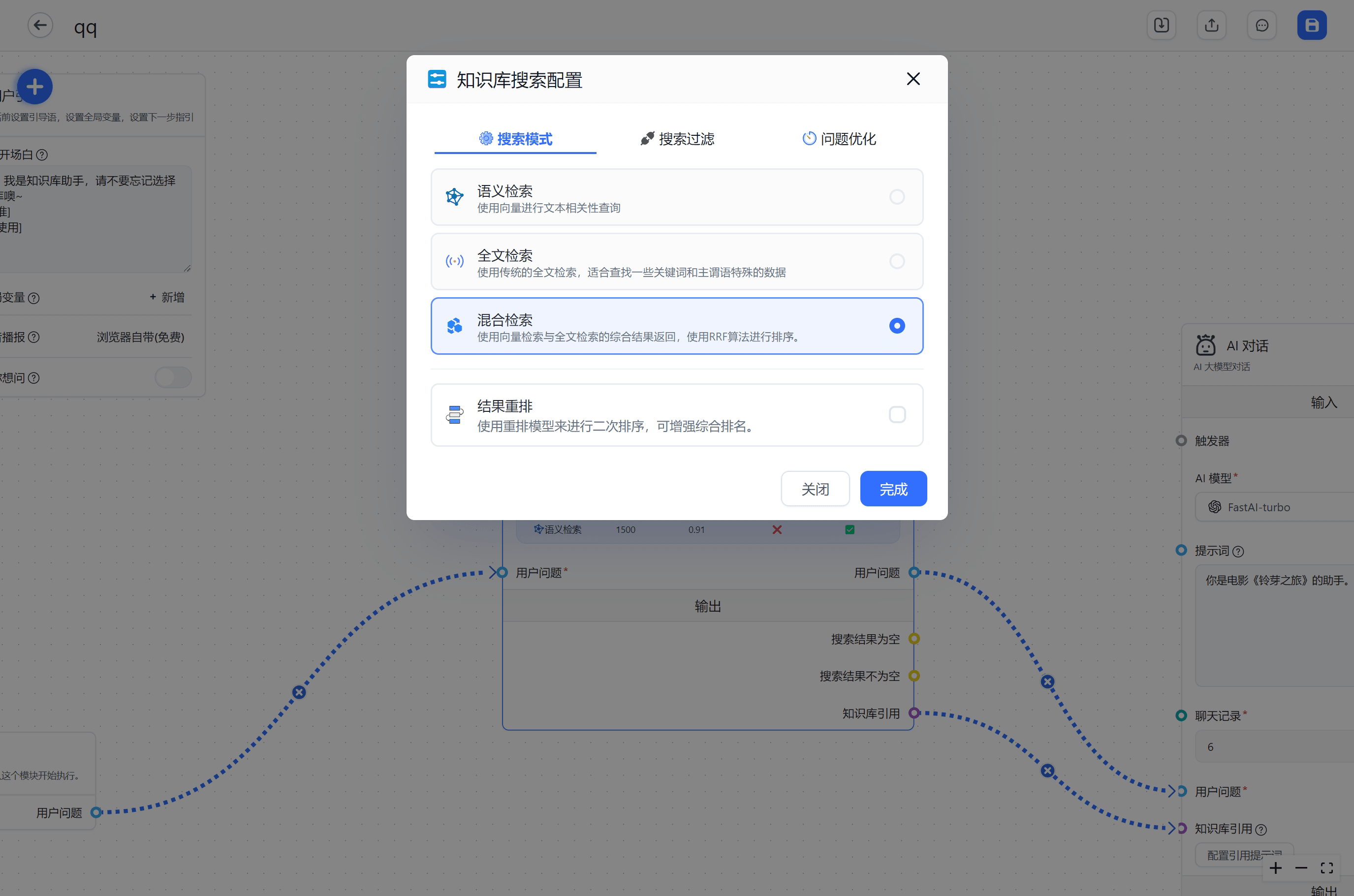
Combines vector search and full-text search, merging results using the RRF formula. Generally produces richer and more accurate results.
Since hybrid search covers a large range and cannot directly filter by similarity, a rerank model is typically used to re-sort results and filter by rerank scores.
Result Reranking
Uses a Rerank model to re-sort search results. In most cases, this significantly improves accuracy. Rerank models work better with complete questions (with proper subjects and predicates), so query rewriting is usually applied before search and reranking. Reranking produces a score between 0-1 representing the relevance between the search content and the query — this score is typically more accurate than vector similarity scores and can be used for filtering.
FastGPT uses RRF to merge rerank results, vector search results, and full-text search results into the final output.
Search Filters
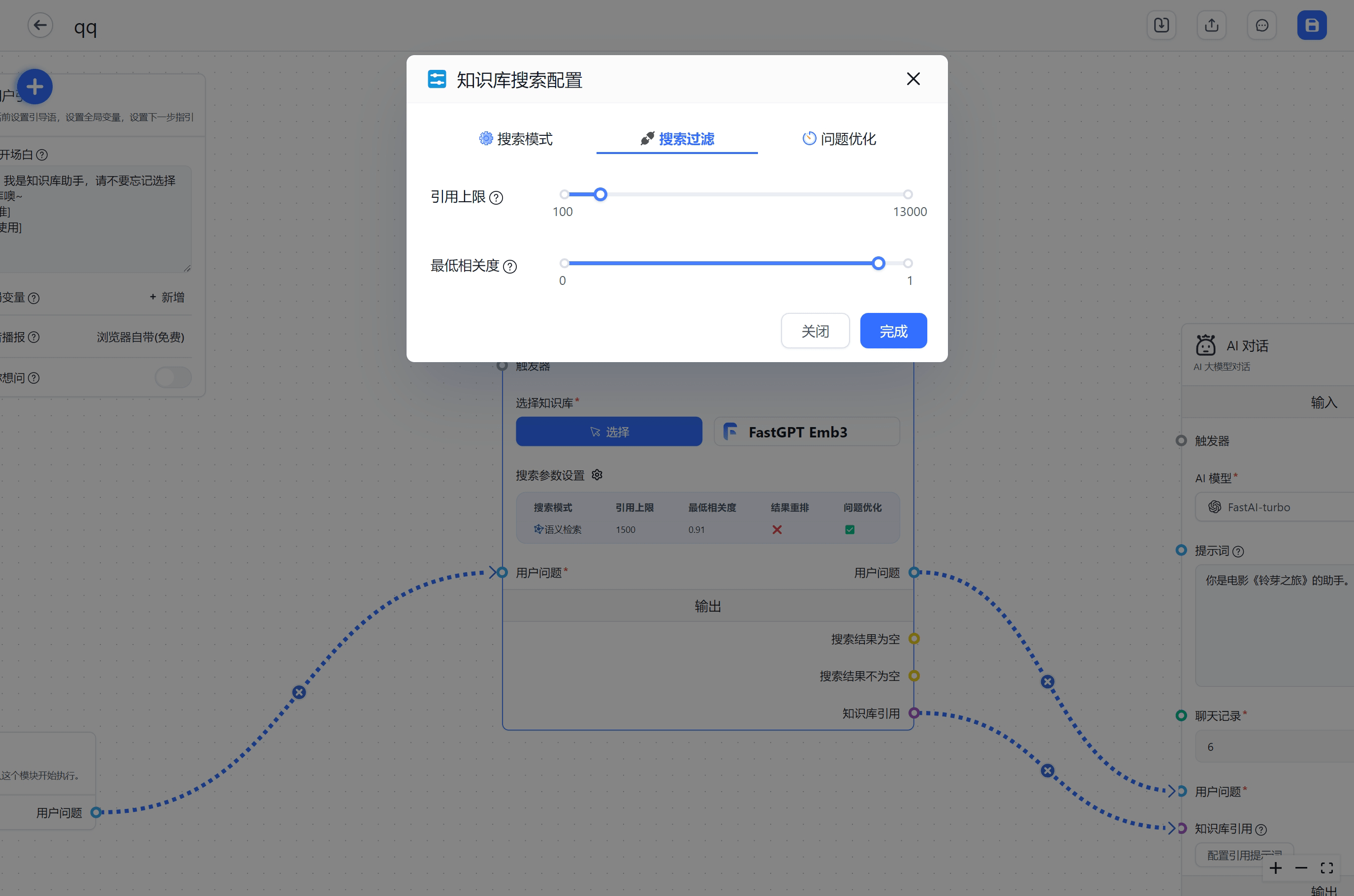
Citation Limit
The maximum number of tokens that citations can contain per search.
In mixed Datasets containing Q&A entries and documents, chunk lengths can vary significantly. A fixed top k can therefore return inconsistent amounts of content. A token limit controls the total citation size more consistently.
Minimum Relevance
A value between 0-1 that filters out low-relevance search results.
This only takes effect when using Semantic Search or Result Reranking.
Minimum relevance controls which results pass the filter. Ranking is determined by the retrieval and fusion steps. After query rewriting, hybrid search, image search, or result reranking is enabled, final results may be fused from multiple recall paths and may not be strictly sorted by a single vector similarity score.
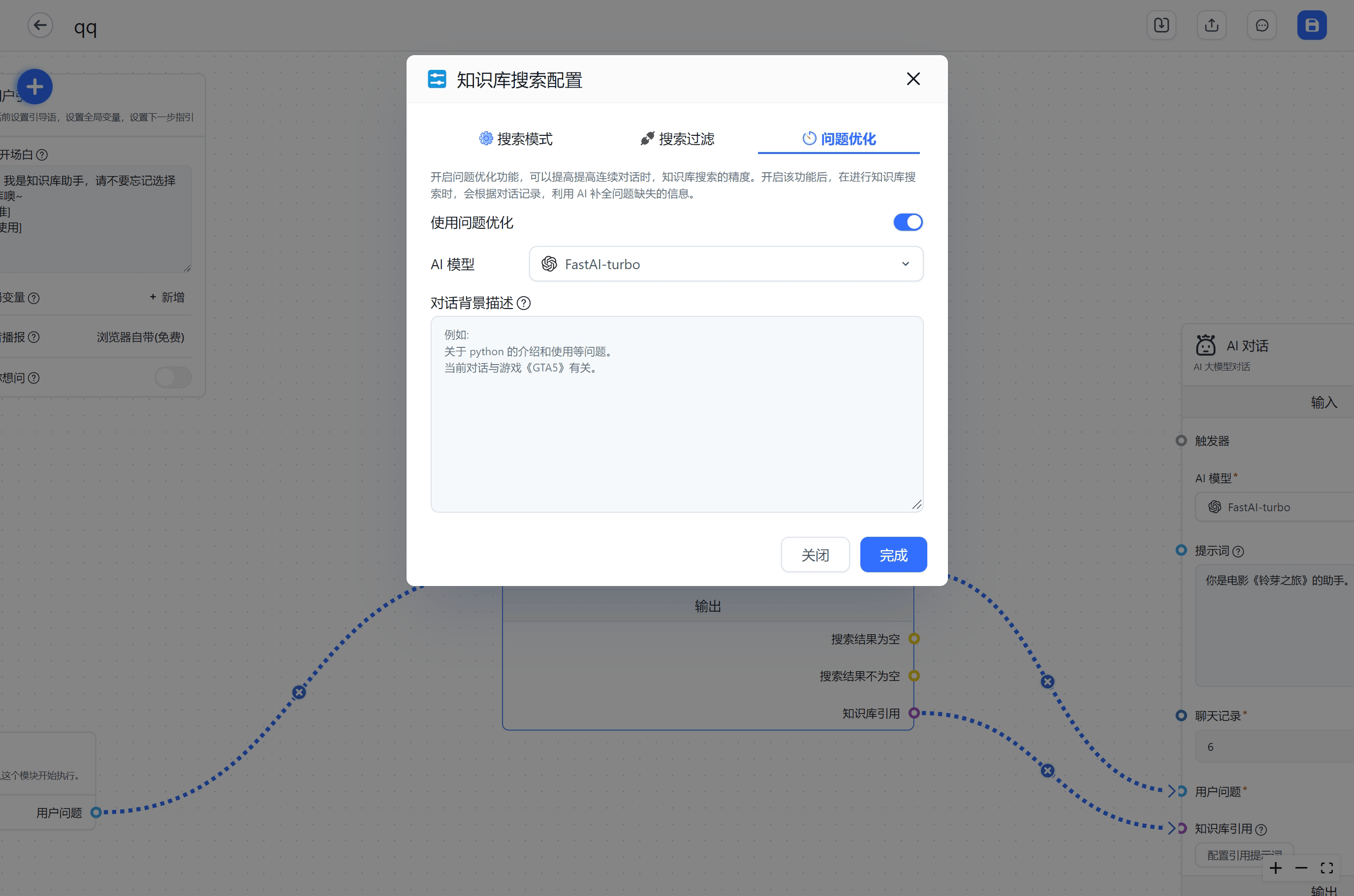
Query Rewriting
Background
In RAG, we need to perform embedding searches against the database based on the input query to find similar content (i.e., Dataset search).
During search — especially in multi-turn conversations — follow-up questions often fail to find relevant content because Dataset search only uses the "current" question. Consider this example:
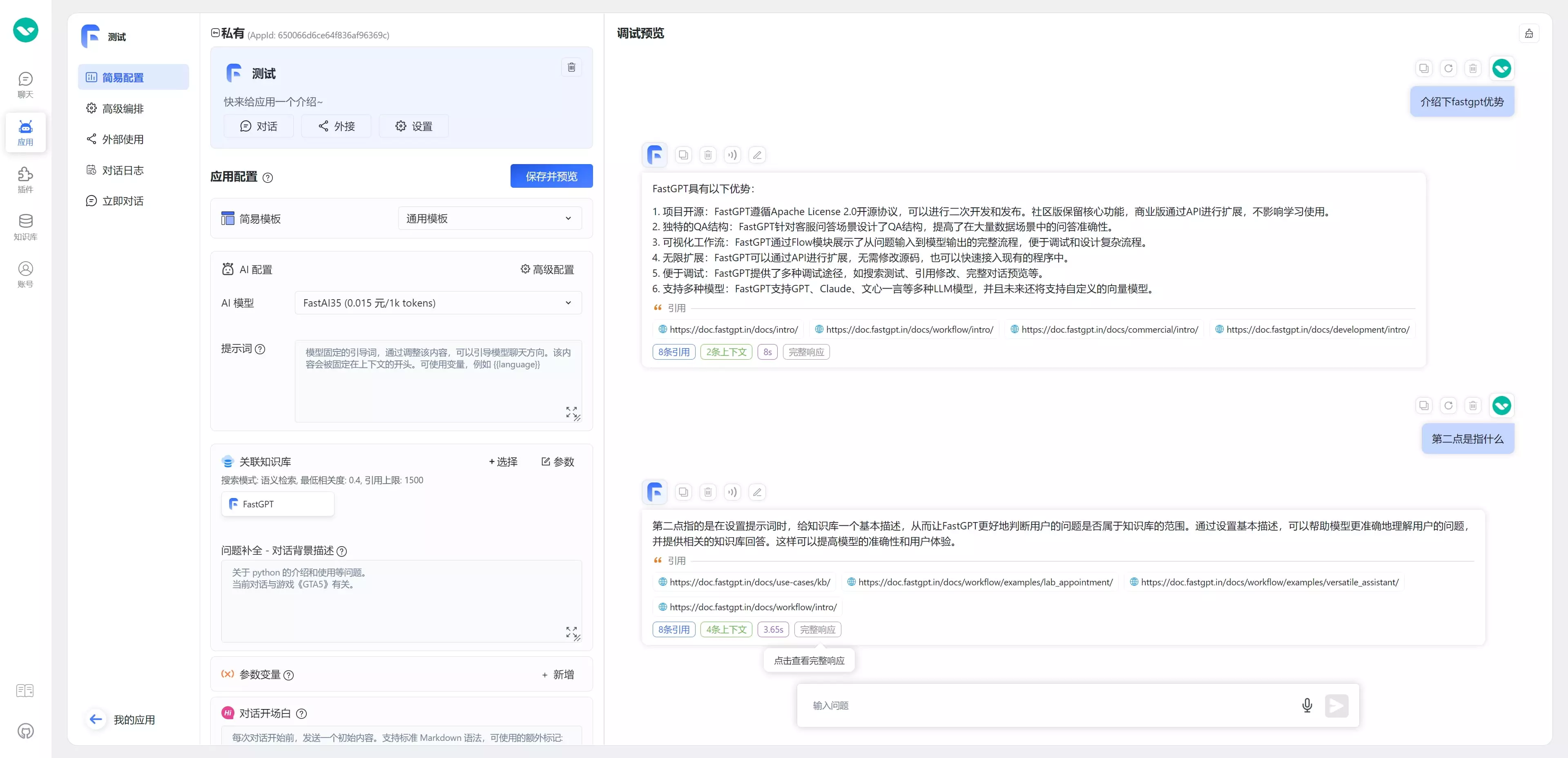
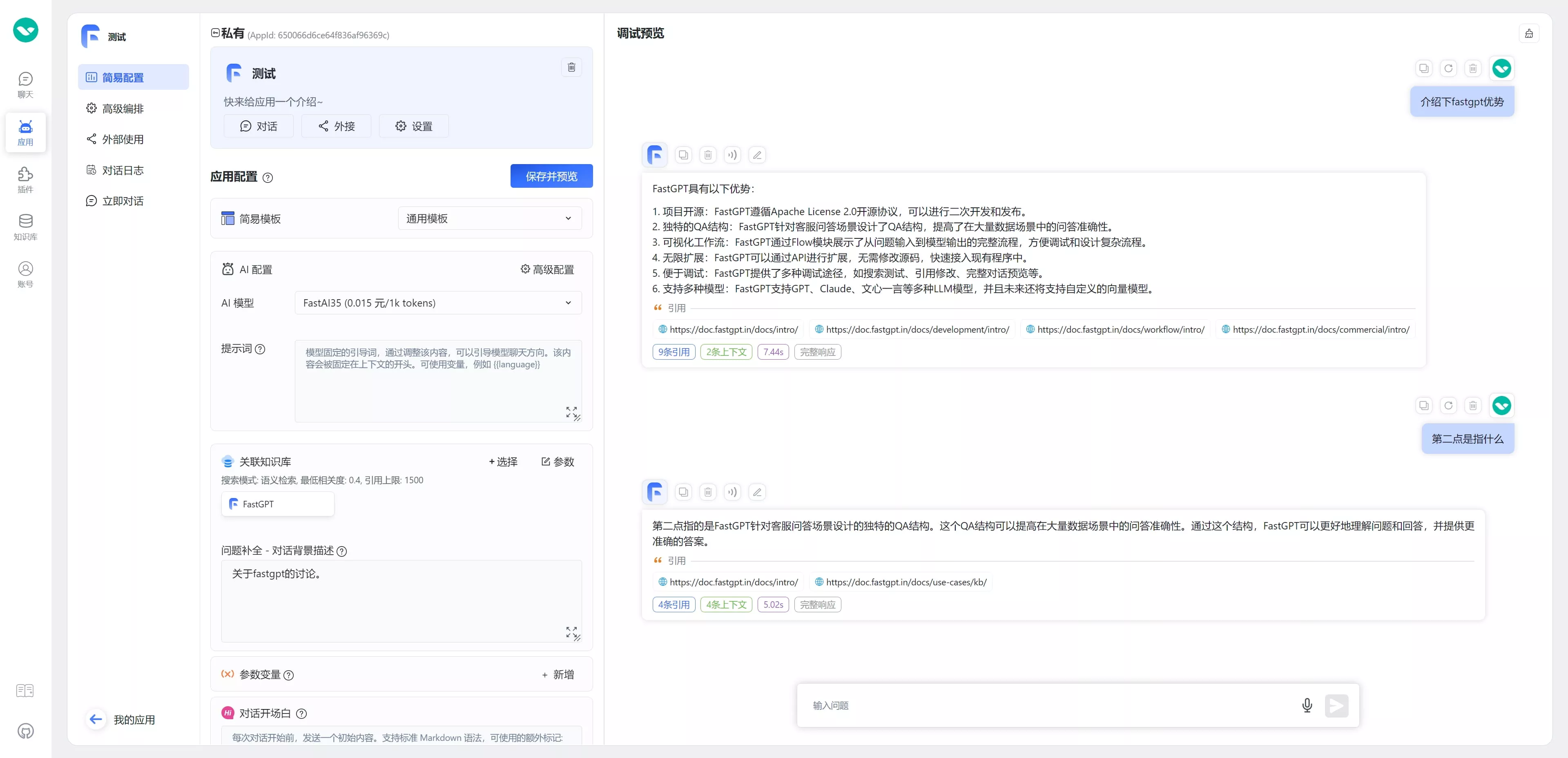
When the user asks "What's the second point?", the system searches for "What's the second point?" in the Dataset, which returns nothing useful. The actual query should be "What is the QA structure?" This is why the Query Rewriting node expands the user's current question so Dataset search can find relevant content. Here's the result after rewriting:
How It Works
Before performing data retrieval, the model first performs coreference resolution and query expansion. This resolves ambiguous references and enriches the query's semantic content. You can view the optimized query in the conversation details after each interaction.
Query rewriting adds an extra model call before the actual search. It often improves retrieval in multi-turn conversations, but it also increases total latency. If the current question is already clear, or response speed is more important, decide whether to enable it based on actual results.
Common Tuning Tips
If search results are not as expected, start from the symptom. Avoid changing every parameter at once.
| Symptom | What to check or adjust first |
|---|---|
| No results found | Confirm the data has finished indexing; lower the minimum relevance; increase the citation limit; check whether the question is too short or missing a subject |
| Results are too broad or off-topic | Raise the minimum relevance; reduce the citation limit; improve chunking; check whether recalled content contains too many unrelated chunks |
| IDs, model numbers, or proper nouns are inaccurate | Use full-text or hybrid search; reduce semantic search weight; avoid overusing query rewriting for exact ID queries |
| Natural-language questions do not retrieve well | Use semantic or hybrid search; enable query rewriting; add more accurate indexes to the data |
| Query rewriting makes search slower | Query rewriting adds an extra model call. Use a faster optimization model, or enable it only for follow-up questions and short queries |
| Rerank still gives poor ordering | Check whether the user question is complete; make sure enough candidates are recalled; adjust minimum relevance and citation limit |
| Image-to-image search is weak | Confirm the embedding model supports image input; confirm image vector indexes were generated during ingestion; check whether the image is clear and has an obvious subject |
| Text + image search is unstable | Clarify whether text or image should be more important; if you only want visual similarity, reduce extra text constraints |
Last updated