
Data Maintenance and Incremental Updates
Master data chunk fine-tuning, whole-file overwriting, hash-based content diffing, and batch index rebuilding.
Enterprise knowledge assets evolve continuously as policies update and business workflows iterate. FastGPT supports inline chunk fine-tuning, file replacement, and full-library index rebuilding, keeping knowledge bases synchronized with production reality.
Scenario 1: Fine-Tune Individual Data Chunks Online
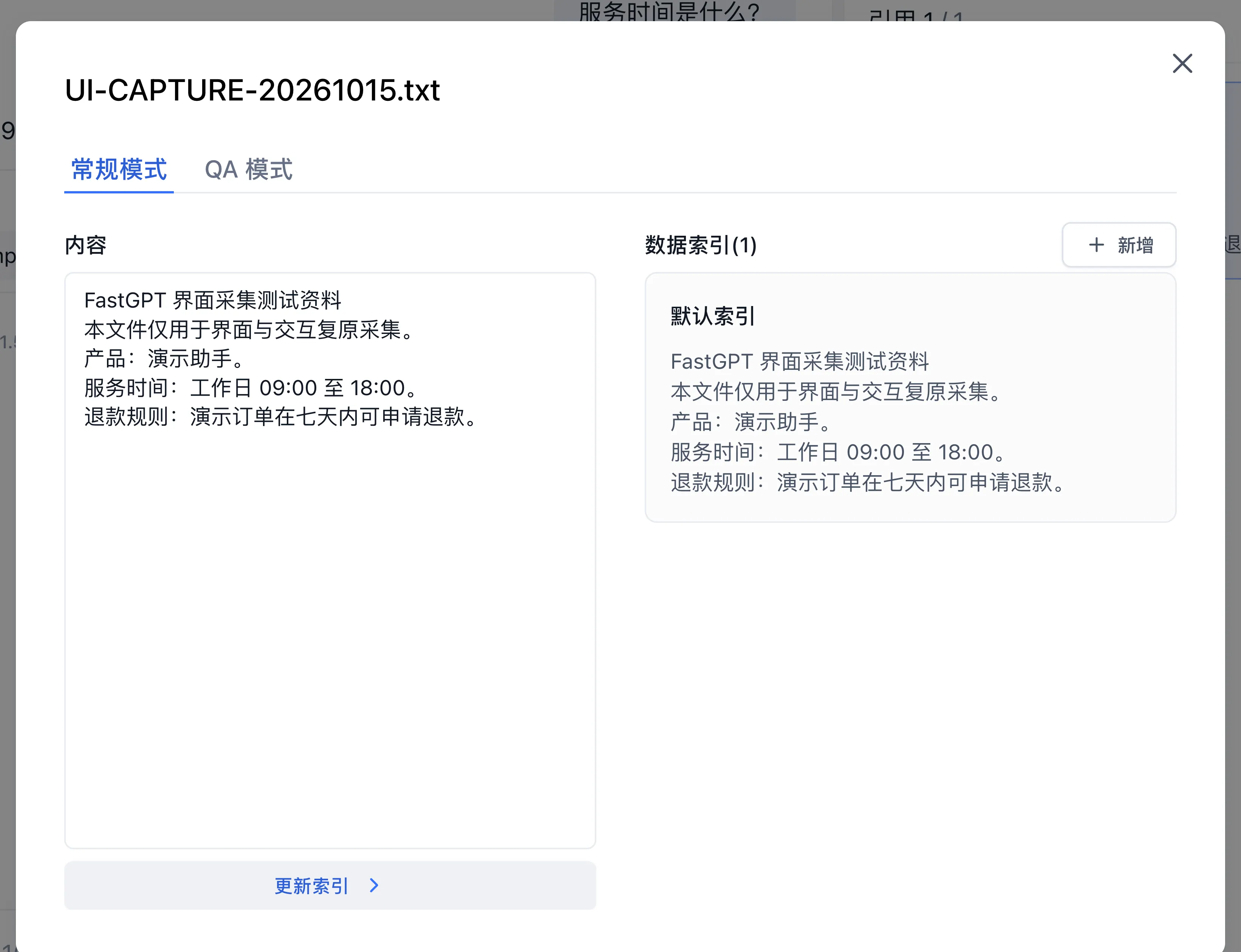
When a specific policy clause requires minor phrasing adjustments or demands supplementary query variations, use inline chunk editing:
- Open your target knowledge base and click a collection to expand its data chunk list.
- Click the target data chunk card to open the chunk edit dialog.
- Update Chunk Content: Modify the primary text directly. The platform recalculates textual representations upon saving.
- Add Indexes (Query Variants): In the Data Index (N) section at the bottom of the dialog, click New and enter alternative phrasing that end users frequently submit. These entries act as independent retrieval anchors in vector space.
- Save Changes: Click Update Index. Wait for the save and indexing operations to complete, then verify the updated chunk in Search Test.
Scenario 2: Whole-File Overwrites and Hash-Based Updates
Choose the update path according to the source type:
- Uploaded files: Keep a copy of the previous document, import the revision, wait for processing, and verify it in Search Test. Review tags and permissions before retiring the old collection; overlapping versions can both appear in results.
- Synchronizable web or API sources: Trigger the collection's synchronization operation. The server reads the source text and compares its hash; unchanged text can retain its vectors while the title is updated.
- Changed source text: When a stored hash detects a change, synchronization deletes the old collection and recreates it with a new ID, carrying over tags and permission records. Training runs asynchronously, so plan for a retrieval gap and verify completion.
Record collection IDs used by external integrations and update references after replacement.
Scenario 3: Collection-Level Disabling and Chunk Cleanup
Knowledge bases support toggling retrieval eligibility at the collection level and cleaning up individual chunks inside a collection:
- Disable a Collection (Affects All Chunks in the Collection): Toggle the status switch on the target collection row in the collection list (requires Manage permission on the collection). Disabling a collection excludes all chunks in that collection from active retrieval while preserving its stored chunks for later re-enablement.
- Delete Individual Chunks: For permanently obsolete clauses, click "Delete" on the chunk card inside the collection details view. The platform removes the chunk from both the vector database and the full-text search index.
Scenario 4: Rebuild Vector and Supplementary Indexes
When switching embedding models and refreshing all vector indexes across a dataset:
- Open the target dataset and locate the Embedding model selector in the right-side information panel.
- Select the new embedding model and confirm the switch (when synonym capability is enabled via
DATASET_SYNONYM_ENABLED, updating synonym rules also triggers synonym index rebuilding automatically). - Confirm the operation. The platform generates batch task records in the background for all ready data chunks.
- Workers recompute and commit indexes per chunk, checking that source content still matches the task snapshot. Old vectors are cleaned up after each successful commit. Monitor partial completion and retry failed tasks.
Next Steps
- Multidimensional tagging: Explore Collection Tag System.
- Access governance: Study Collection Permission Control.
- Error recovery: Review Knowledge Base Troubleshooting.
Last updated
Connecting Knowledge Bases to Applications
Master attaching knowledge bases to Chat Agents, Chat Agent V2, and Workflows, configuring retrieval parameters, and authoring grounding templates.
Collection Tag System and Scope Filtering
Master creating knowledge base tags, assigning multidimensional attributes, and filtering retrieval scopes in applications.