
Choose tools and Skills
Choose system tools, workflow tools, HTTP tools, MCP tools, or Skills for a task.
FastGPT provides five capability extension mechanisms: System Tools (Plugins), Workflow Tools, HTTP Tools (HTTP Tool Sets), MCP Tools (MCP Tool Sets), and Agent Skills. A Tool is a callable operation with a defined input/output schema; a Skill packages versioned instructions (SKILL.md) and supporting scripts for an Agent to load inside a sandbox execution environment.
Selection Matrix
| Extension Type | Role | Configuration Method | Execution Runtime | Primary Use Cases and Guide |
|---|---|---|---|---|
| System Tool / Team Plugin | Standardized tool packages from the marketplace or local .pkg | Install in Marketplace + configure secrets | fastgpt-plugin runtime | Web search, image generation, IM notifications, database queries; see Team Plugin Installation |
| Workflow Tool | Multi-node canvas workflow wrapped as a reusable function | Configure the Plugin start / Custom Plugin output nodes (pluginInput / pluginOutput) on canvas | FastGPT workflow engine | Combine internal retrieval, data cleaning, and API steps; see Create and Reuse Workflow Tools |
| HTTP Tools (Tool Set) | Turn external REST APIs into single or batch callable tools | Import OpenAPI Schema or configure endpoints manually | Direct HTTP call from FastGPT server | Connect internal CRM, ERP, or ticketing REST APIs; see Create and Debug HTTP Tools |
| MCP Tools (Tool Set) | Connect external servers implementing Model Context Protocol | Configure MCP Address and auth settings | External MCP Server (Streamable HTTP / SSE) | Reuse ecosystem or enterprise MCP servers; see Connect an MCP Tool Set |
| Agent Skill | Versioned package of instructions and scripts for sandbox execution | Author SKILL.md + scripts and init hooks | Agent VM sandbox (OpenSandbox / Devbox) | Complex spreadsheet analysis, document generation, multi-command workflows; see Skill Introduction |
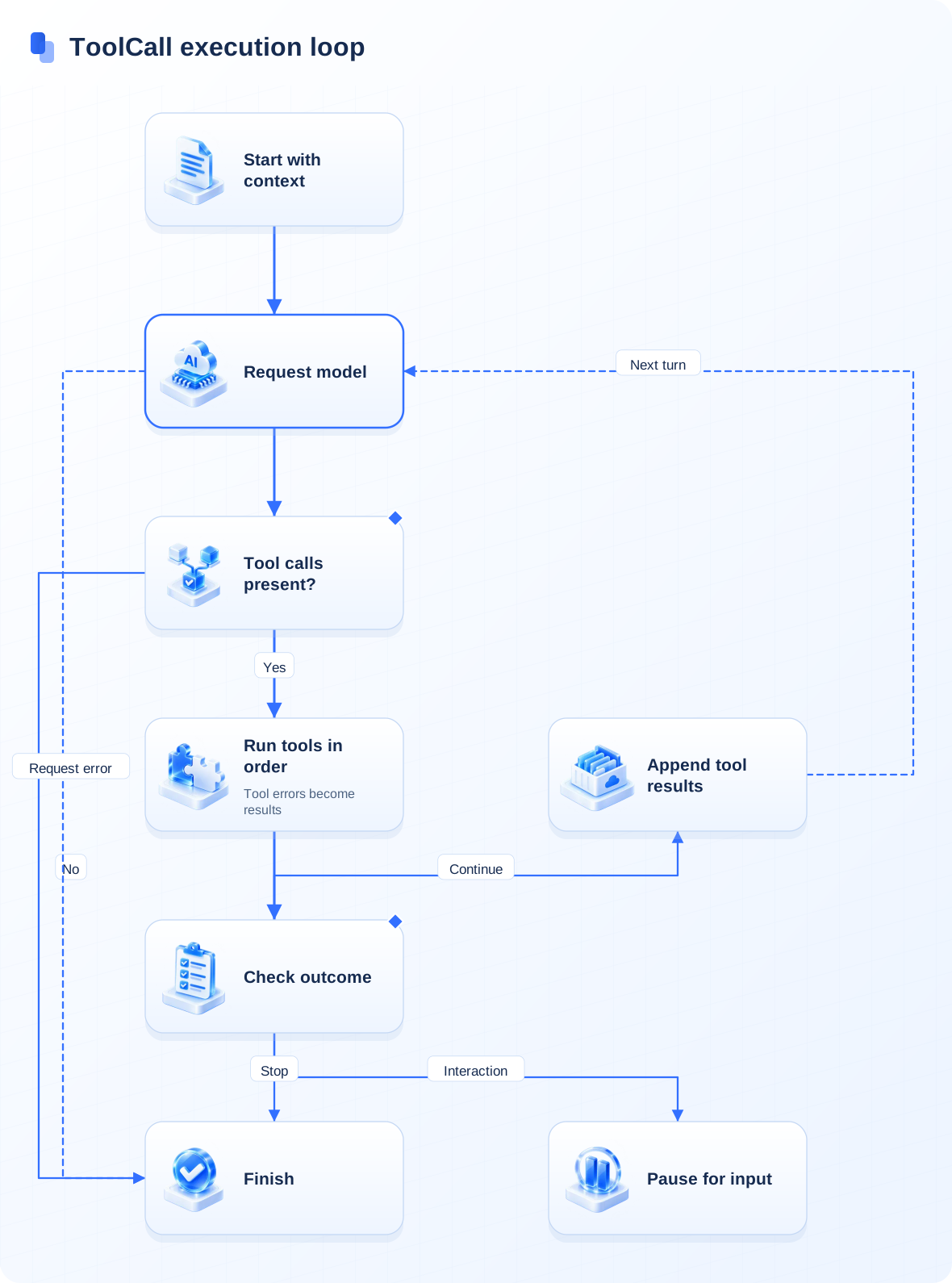
Workflow tools
Create a workflow tool, declare caller-supplied parameters and types in Custom Inputs on the Plugin start node, reference them in the flow, and declare returned values in Custom Outputs on the Custom Plugin output node. Run it independently with a known input and inspect the output structure. After publishing, select it from another application and verify argument mapping and execution results.
Tool descriptions help models decide when to call an operation; parameter descriptions help them supply values. Describe external write operations clearly and verify permissions and business confirmation requirements before production use.
Use in applications
- Chat Agent: Click + Choose in the left Tools section to attach tools for automatic Function Calling; see Build a Chat Agent.
- Chat Agent V2: Attach both tool sets and Agent Skills for multi-step autonomous execution inside a virtual machine; see Chat Agent V2 Settings.
- Workflow: Place tools directly on the canvas as deterministic steps, attach them to a Tool Call node, or invoke a tool-enabled Chat Agent V2 from the Agent tab of the node panel (legacy workflows also support the standalone Agent node).
See team tool installation, system tool development, and Skill integration for the two Agent integration surfaces.
Last updated
Collection Permission Control
Master enabling independent collection permissions, directory inheritance trees, collaborator roles, and cross-team data isolation.
Create and Reuse Workflow Tools
Package a visual workflow with a typed input/output contract so Chat Agents, Agent V2 apps, and other workflows can invoke it as a tool.