
Loop
FastGPT Loop node overview and usage (applicable to version 4.15.0 and above)
Node Overview
The Loop Node allows you to repeatedly execute a sub-workflow. Whether you want to process a batch of data item by item (Array Loop), or iteratively optimize a task until it meets a specific standard (Conditional Loop), the Loop Node makes it easy.
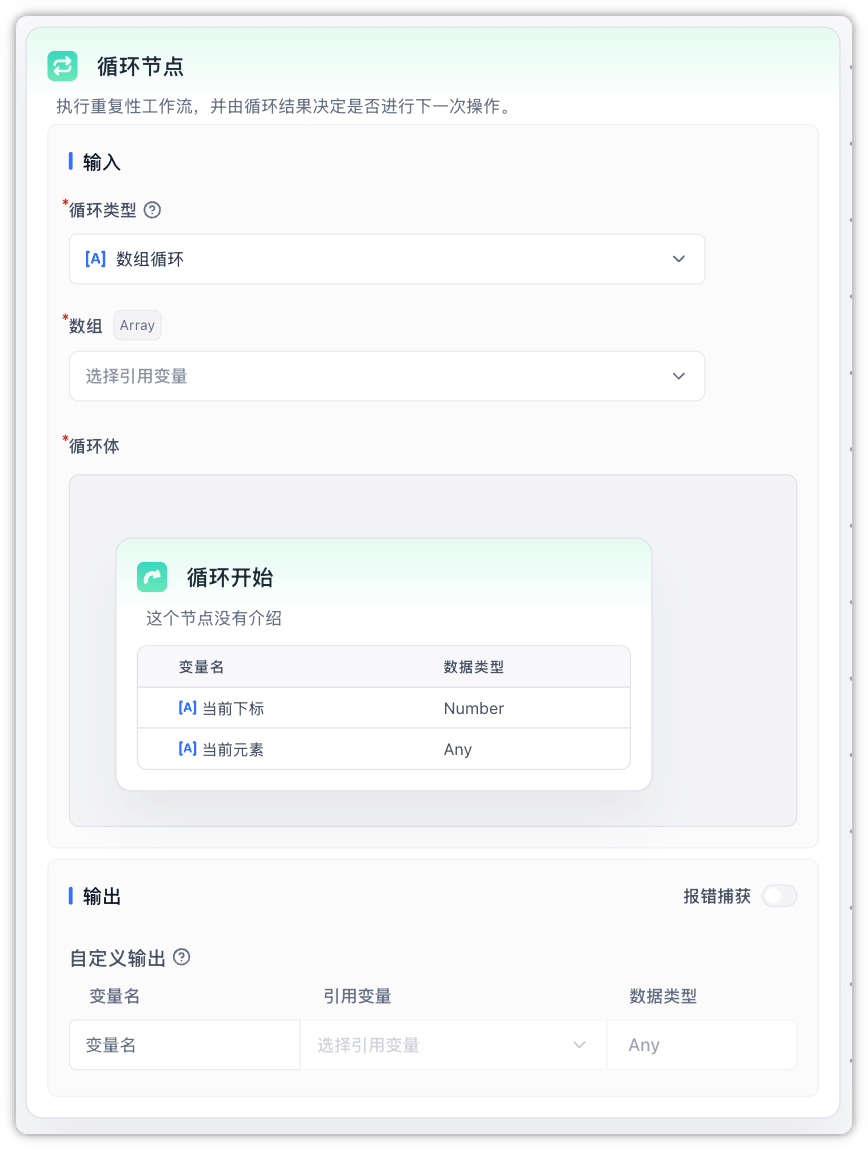
Ideal for scenarios such as:
- Summarizing paragraph chunks of a long article one by one (Array Loop)
- Refining an AI draft and repeatedly revising it if the score is below 80, until it passes (Conditional Loop)
- Calling external APIs sequentially in batches
Core Features & Loop Modes
The Loop Node provides two running modes.
1. Array Loop
- How it works: Iterates through a provided array (e.g., article paragraphs), processing one element per iteration.
- Data Injection: During each iteration, the Loop Start node automatically outputs
Current ItemandCurrent Index(0-based).
2. Conditional Loop
- How it works: Runs repeatedly based on conditions instead of an array, until a Loop Break node is executed.
- Requirement: Must contain at least one Loop Break node inside the loop container, otherwise saving or running the workflow will result in an error.
- Data Injection: During each iteration, the Loop Start node automatically outputs
Current Loop Count(1-based).
3. Error Handling & User Interaction
- Preserving Prior Run Logs: If a loop fails at some point, the logs and results from previous successful iterations are kept. You can inspect the step-by-step trace in "Execution Details" to easily spot what went wrong.
- User Interaction Support: Supports nodes that require user input (like Form Input) inside the loop. The loop will temporarily pause when reaching these nodes and automatically resume running from where it paused once the user completes the input.
Parameter Descriptions
Inputs
| Parameter | Required | Default | Description |
|---|---|---|---|
| Loop Type | Yes | Array Loop | Choose between Array Loop (array) or Conditional Loop (conditional). |
| Array | Yes | - | (Visible only in Array Loop mode) The list of data to process. Typically referenced from a preceding node's array output. |
| Loop Body | Yes | - | The sub-workflow to execute inside the container, starting from the Loop Start node (can be exited via the Loop Break node). |
Outputs
| Parameter | Type | Description |
|---|---|---|
| Error Text | string | The error message if the loop terminates abnormally due to an error. |
| Custom Outputs | Any | Users can add custom outputs by typing a variable name in the node's Output area and binding it to an internal node's variable reference. When the node finishes running, it outputs the values from the final iteration (or upon termination). |
Important Caveats & Best Practices
- No Nesting
- You cannot place another Loop Node or Parallel Run node inside a Loop Node.
- Returns the Final Iteration Only
- The custom outputs on the Loop Node only hold the values from the last iteration when the loop exits (it no longer aggregates all outputs into a single array).
- How to aggregate results from all iterations?
If you need to collect and aggregate data from all runs into a list, declare an array variable outside the Loop Node as a global variable, and use a Variable Update node inside the loop body to append the result of each iteration into that global array.
- Variable and External Output Writeback
- After each successful iteration, global variable changes made inside the loop body are written back to the main flow. If a Variable Update node changes an output on a node outside the loop container, that output is also written back after that iteration succeeds.
- Failed iterations do not commit variable or external output changes from that iteration. When an interactive node pauses execution, the completed changes before the pause are kept as a resumable checkpoint so the loop can continue after the user submits input.
- Prevent Infinite Loops
- For Conditional Loops, ensure that a Loop Break node is reachable under certain conditions.
- The system enforces a maximum iteration limit (default 100). The loop will automatically terminate and throw an error if this limit is reached.
Deployment Settings
For self-hosted developers or operators, you can adjust the execution limits of the Loop Node via the following environment variable:
| Environment Variable | Default | Description |
|---|---|---|
WORKFLOW_MAX_LOOP_TIMES | 100 | The maximum length of input arrays and the maximum iteration limit for Conditional Loops (shared by both Loop and Parallel Run nodes). |
Example Scenario: AI Copy Refinement Until Approval
This example demonstrates how to use the Conditional Loop mode to allow the AI to optimize copy over multiple rounds, evaluating it through scoring logic at each iteration until the score passes a set threshold. This represents a key advantage of the Loop node—correcting drafts based on feedback from previous runs.
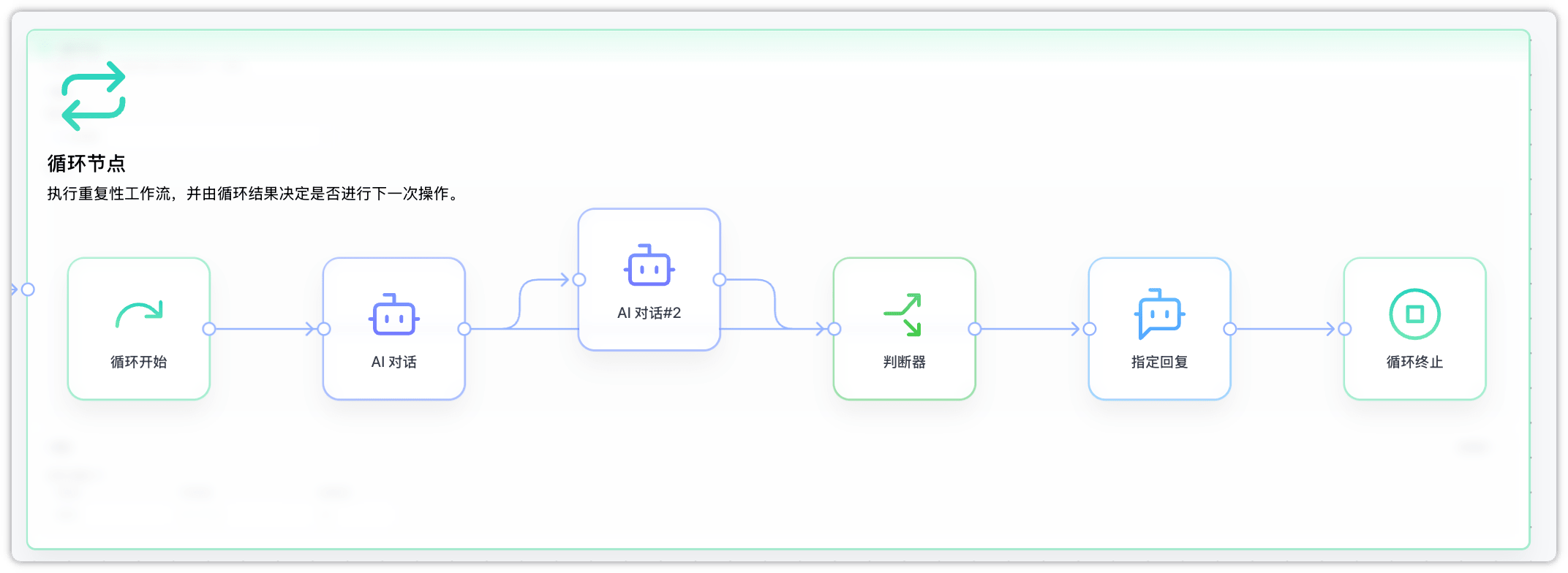
Implementation Steps
-
Set Loop Type
- Loop Type:
Conditional Loop.
- Loop Type:
-
Configure Sub-Workflow inside the Loop Body
- AI Chat (Copy Refinement): Receives and refines the input draft.
- AI Chat#2 (Evaluation): Grades the refined draft, outputting a numeric score.
- Condition:
- If the score meets the requirements: Route to the Specified Reply node (to output the final copy to the user), then connect it to the Loop Break node to exit the loop.
- If the score does not meet the requirements: Do not trigger any subsequent connections. The loop will automatically start the next refinement iteration.
-
Configure Outputs
- Add a custom output
final_textin the Outputs panel of the Loop Node, referencing the reply of the AI Chat (Copy Refinement) node inside. - Once the loop exits, downstream nodes can reference this
final_textvariable to receive the final polished copy.
- Add a custom output
Execution Flow & Details
After the execution completes, you can expand and inspect the detailed execution path of each iteration in the "Complete Response" panel:

- First Optimization Round: Runs
Loop Start➡️AI Chat➡️AI Chat#2➡️Condition. Since the score did not meet the requirements, the break node was not triggered, and the system automatically proceeded to the next iteration. - Second Optimization Round: Continues running
AI Chat➡️AI Chat#2➡️Condition. This time the score meets the requirements, routing to theSpecified Replyand triggering theLoop Breaknode. The entire loop exits safely.
Last updated