
Call Application and Workflow Tool I/O Nodes
Call sub-applications (runApp) in a workflow and configure pluginInput, pluginOutput, and toolParams for workflow tools.
FastGPT lets you embed published applications or workflow tools inside other workflows for modular orchestration. This reference covers the sub-application node and the three dedicated system nodes used in workflow tools.
1. Call Application Node (appModule / runApp)
Run an existing Chat Agent, Chat Agent V2, or Workflow as a step on your current canvas, or attach it to a Tool calling node for model-driven invocation.
Inputs, Configuration, and Outputs
| Item | Type | Description |
|---|---|---|
| Target application | Resource binding | Select a team application you have permission to use; the version selector in the node title bar offers "Keep the latest" or a specific published version |
User question (userChatInput) | String | Input text passed to the sub-application from fixed text or an upstream variable |
Chat history (history) | ChatHistory | Context turns or upstream chat history passed into the sub-application |
File links (fileUrlList) | Array<string> | File URLs passed to the sub-application |
| Sub-app global variables | Dynamic fields | Automatically exposes global variables declared by the target application |
AI Response Content (answerText) | String | Text response returned by the sub-application |
New Context (history) | ChatHistory | Updated chat history including the sub-application's turn |
The node provides an Error catch switch to the right of the output section title. When enabled, sub-application run errors can be routed to a fallback branch; see Debugging and Error Handling.
2. Workflow Tool System Nodes
When you create a workflow tool from the Create card in Studio → Tools, the canvas starts with Plugin start (pluginInput) and Custom Plugin output (pluginOutput) nodes in place of the regular start node; they contain the Custom Inputs and Custom Outputs sections. See Create and Reuse Workflow Tools.
1. Plugin start (pluginInput)
- Responsibility: Declares the input parameter contract (JSON Schema) that callers (a parent workflow, Tool calling node, or Agent) supply when invoking the workflow tool.
- Configuration: Click New in the Custom Inputs section to add fields with a
key,label, value type (String,Number,Boolean,Object, typed arrays, orSelect Dataset), tool parameter description (guiding the model on how to populate the value), and required flag. - Outputs: Each declared input field becomes a matching output handle on the node for downstream nodes to reference.
2. Custom Plugin output (pluginOutput)
- Responsibility: Collects results from internal workflow nodes and returns structured output fields to the parent caller or language model.
- Configuration: Click New in the Custom Outputs section to add output fields with keys, value types, and descriptions, and bind each field to an upstream node output (such as HTTP, Code run, or AI Chat).
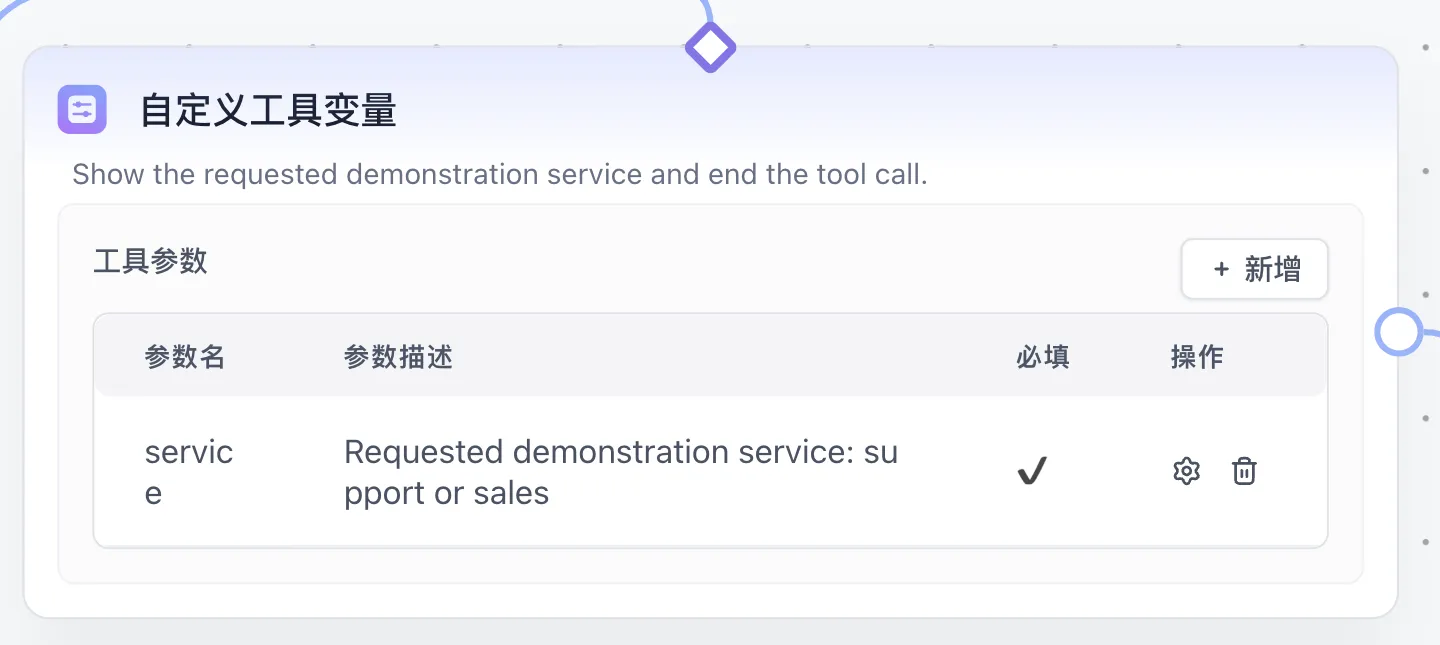
3. Custom Tool Variable (toolParams)
- Responsibility: Declares runtime parameters to be generated dynamically by the language model for a sub-workflow connected to a Tool calling node.
- Availability: Available when the canvas contains a Tool calling node or along a
selectedToolstool connection. Declared fields are merged into the tool's Function Calling schema and exposed as node outputs at runtime.
Example: Wrap and Call an Order Lookup Sub-Workflow
- Create a workflow tool named
Order Status Lookupand add a requiredorderId(String) field in Custom Inputs with the description8-digit order number. - Connect an HTTP node to query the order service and bind the returned status to a
statusTextfield in Custom Outputs, then publish the tool. - Add the
Order Status Lookupnode to your main workflow, wire the extracted order ID intoorderId, and referencestatusTextin downstream nodes.
Last updated
Tool calling & Stop Tool calling
Configure the FastGPT Workflow Tool calling and Stop Tool calling nodes so LLMs can invoke workflow tools, system plugins, and MCP tools.
Condition (IF/ELSE)
Use the FastGPT Workflow Condition (IF/ELSE) node to evaluate variable rules and route execution across matching branches.