
Local Models
Integrating bge-rerank Reranking Model
Integrating bge-rerank reranking model with FastGPT
Recommended Configuration by Model
| Model Name | RAM | VRAM | Disk Space | Start Command |
|---|---|---|---|---|
| bge-reranker-base | >=4GB | >=4GB | >=8GB | python app.py |
| bge-reranker-large | >=8GB | >=8GB | >=8GB | python app.py |
| bge-reranker-v2-m3 | >=8GB | >=8GB | >=8GB | python app.py |
Source Code Deployment
1. Environment Setup
- Python 3.9 or 3.10
- CUDA 11.7
- Network access to download models
2. Download Code
Code repositories for the 3 models:
- https://github.com/labring/FastGPT/tree/main/plugins/model/rerank-bge/bge-reranker-base
- https://github.com/labring/FastGPT/tree/main/plugins/model/rerank-bge/bge-reranker-large
- https://github.com/labring/FastGPT/tree/main/plugins/model/rerank-bge/bge-reranker-v2-m3
3. Install Dependencies
pip install -r requirements.txt4. Download Models
HuggingFace repositories for the 3 models:
- https://huggingface.co/BAAI/bge-reranker-base
- https://huggingface.co/BAAI/bge-reranker-large
- https://huggingface.co/BAAI/bge-reranker-v2-m3
Clone the model into the corresponding code directory. Directory structure:
bge-reranker-base/
app.py
Dockerfile
requirements.txt
5. Run
python app.pyOn successful startup, you should see an address like this:

http://0.0.0.0:6006is the connection address.
Docker Deployment
Image names:
- registry.cn-hangzhou.aliyuncs.com/fastgpt/bge-rerank-base:v0.1 (4 GB+)
- registry.cn-hangzhou.aliyuncs.com/fastgpt/bge-rerank-large:v0.1 (5 GB+)
- registry.cn-hangzhou.aliyuncs.com/fastgpt/bge-rerank-v2-m3:v0.1 (5 GB+)
Port
6006
Environment Variables
ACCESS_TOKEN=your_access_token (used in request header: Authorization: Bearer ${ACCESS_TOKEN})Run Command Example
# auth token set to mytoken
docker run -d --name reranker -p 6006:6006 -e ACCESS_TOKEN=mytoken --gpus all registry.cn-hangzhou.aliyuncs.com/fastgpt/bge-rerank-base:v0.1
docker-compose.yml Example
version: "3"
services:
  reranker:
    image: registry.cn-hangzhou.aliyuncs.com/fastgpt/bge-rerank-base:v0.1
    container_name: reranker
    # GPU runtime. If the host doesn't have GPU drivers installed, comment out the deploy section.
    deploy:
      resources:
        reservations:
          devices:
          - driver: nvidia
            count: all
            capabilities: [gpu]
    ports:
      - 6006:6006
    environment:
      - ACCESS_TOKEN=mytoken
Integrate with FastGPT
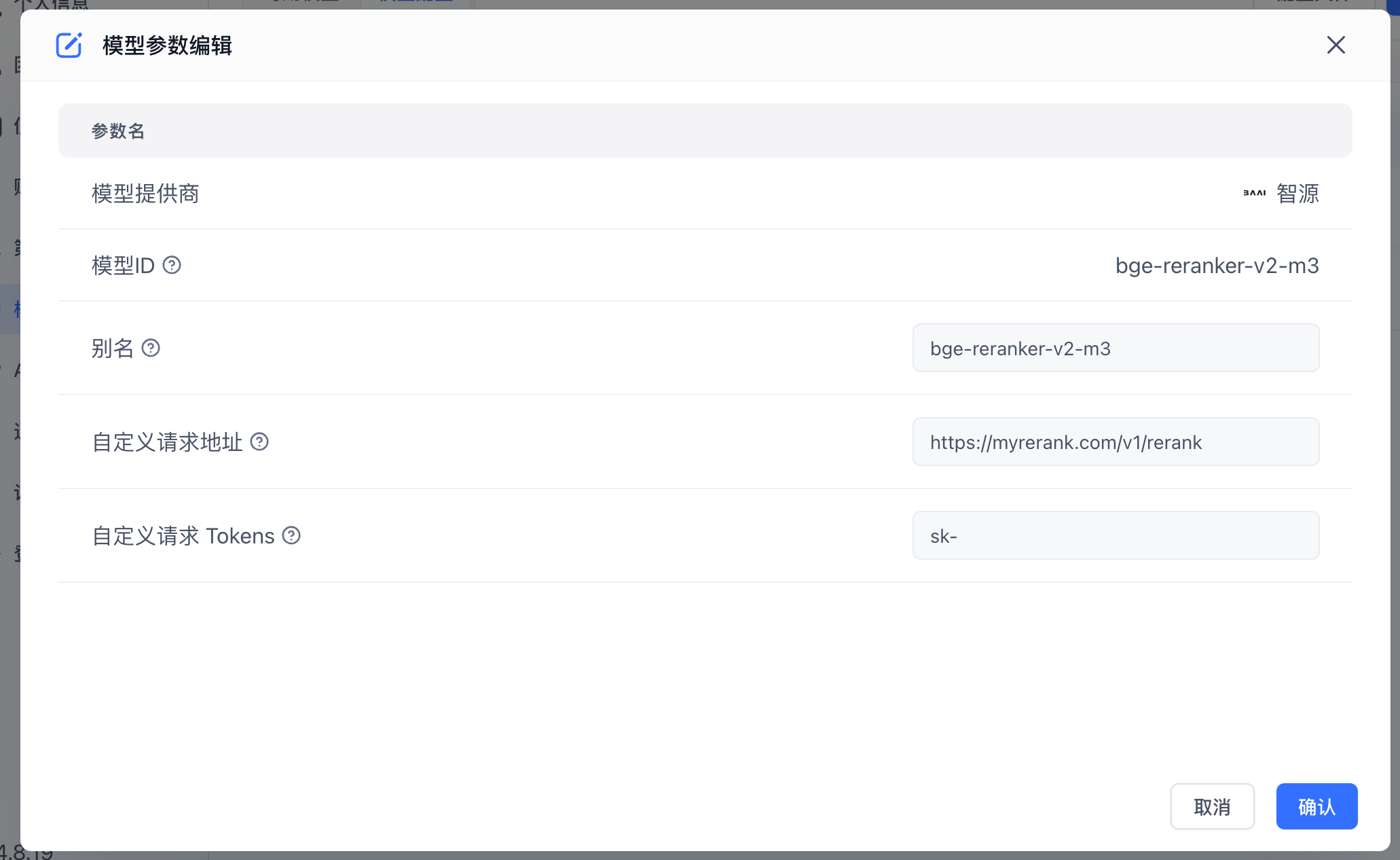
- Open the FastGPT model configuration and add a new reranking model.
- Fill in the model configuration form: set the Model ID to
bge-reranker-baseand the address to{{host}}/v1/rerank, where host is your deployed domain or IP:Port.
FAQ
403 Error
The custom request token in FastGPT does not match the ACCESS_TOKEN environment variable.
Docker reports Bus error (core dumped)
Try adding the shm_size option to your docker-compose.yml to increase the shared memory size in the container.
...
services:
  reranker:
    ...
    container_name: reranker
    shm_size: '2gb'
    ...
Edit on GitHub
File Updated