
General Troubleshooting
FastGPT Self-Hosting General Troubleshooting
(1)Frontend Page Crash
- 90% of cases are due to incorrect model configuration: ensure that at least one model is enabled for each category; check if some
objectparameters in the model are abnormal (arrays and objects). If empty, try giving an empty array or empty object. - A small part is due to browser compatibility issues. Since the project contains some high-level syntax, lower version browsers may not be compatible. You can provide specific operation steps and error information in the console to the issue.
- Turn off the browser translation function. If the browser has translation enabled, it may cause the page to crash.
(2)If deployed via sealos, are there no limitations of local deployment?
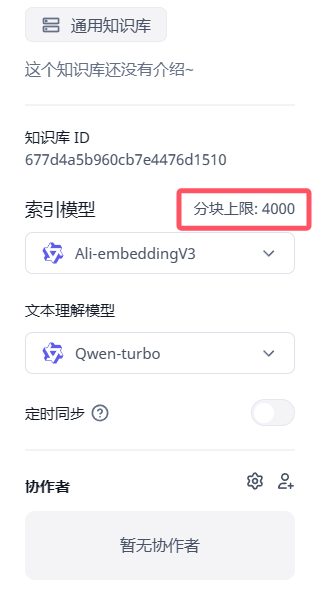 This is the length limit of the indexing model. It is the same regardless of the deployment method, but the configuration of different indexing models is different, and parameters can be modified in the background.
(3)How to mount the Mini Program configuration file
Mount the verification file to the specified location: /app/projects/app/public/xxxx.txt
Then restart. For example:
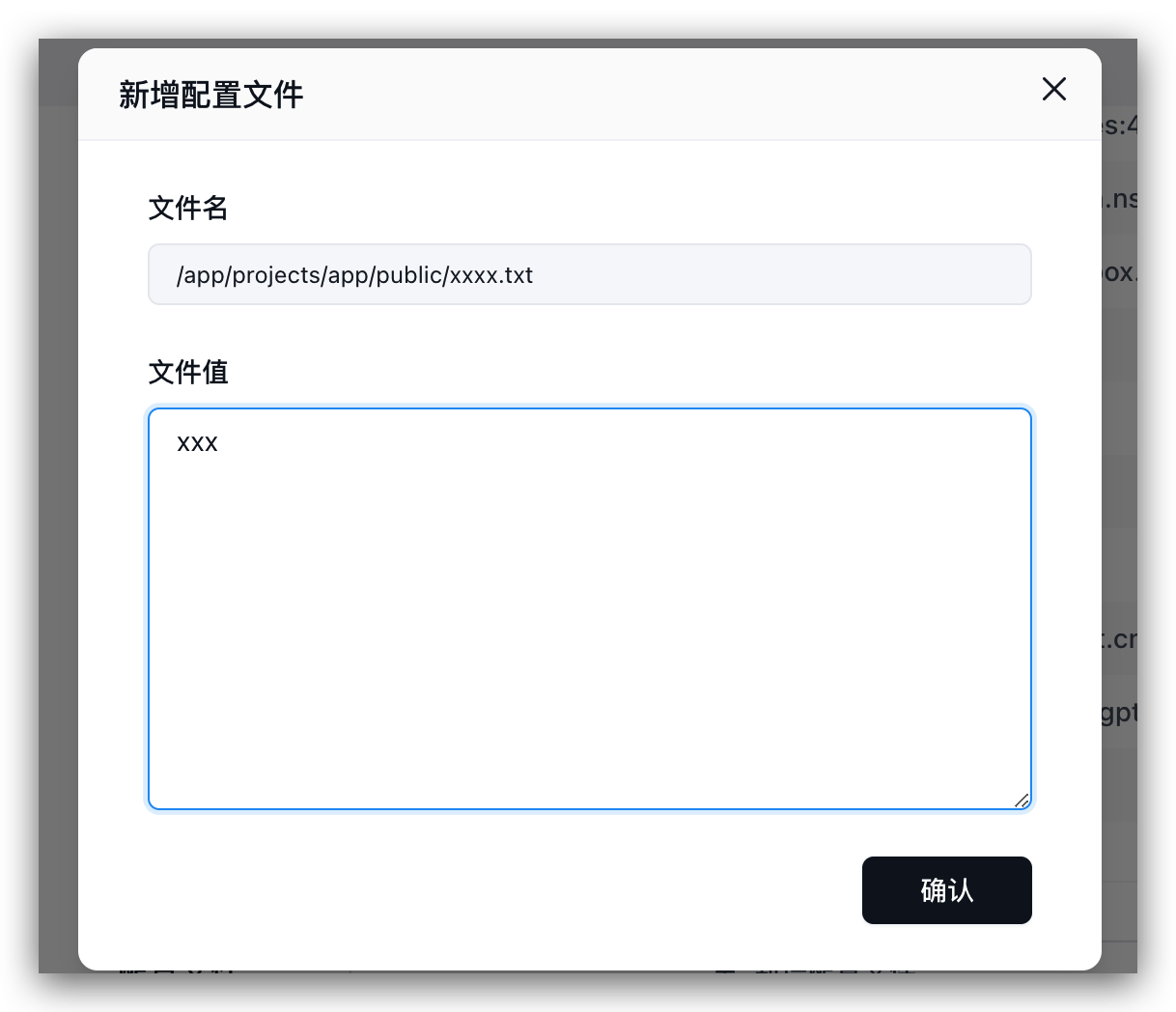
(4)Database port 3306 is occupied, service startup failed
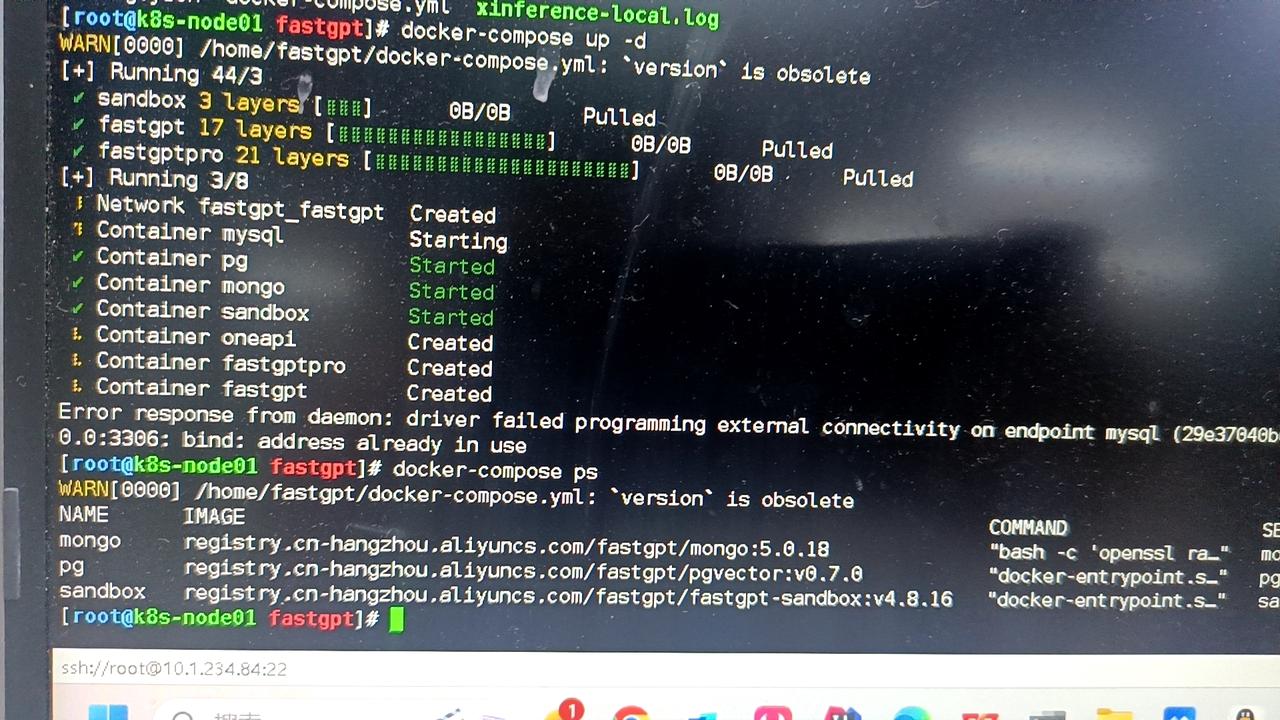
Change the port mapping to 3307 or similar, for example 3307:3306.
(5)Can it run purely locally?
Yes. You need to prepare the vector model and LLM model.
(6)Other models cannot perform question classification/content extraction
- Check the logs. If it prompts JSON invalid, not support tool, etc., it means that the model does not support tool calling or function calling. You need to set
toolChoice=falseandfunctionCall=false, and it will default to the prompt mode. Currently, the built-in prompts are only tested for commercial model APIs. Question classification is basically usable, but content extraction is not very good. - If the configuration is normal and there are no error logs, it means that the prompt may not be suitable for the model. You can customize the prompt by modifying
customCQPrompt.
(7)Page Crash
- Turn off translation.
- Check if the configuration file is loaded normally. If it is not loaded normally, system information will be missing, and it will cause a null pointer in some operations.
- 95% of cases are incorrect configuration files. It will prompt xxx undefined.
- Prompt
URI malformed, please Issue feedback specific operations and pages, this is due to special string encoding parsing errors.
- Some api incompatibility issues (rare).
(8)After enabling content completion, the response speed becomes slow
- Question completion requires a round of AI generation.
- 3~5 rounds of queries will be performed. If the database performance is insufficient, there will be a significant impact.
(9)Normal reply in the page, API error
The page uses stream=true mode, so the API also needs to set stream=true for testing. Some model interfaces (mostly domestic) are a bit garbage in non-Stream compatibility. Same as the previous question, curl test.
(10)Knowledge base indexing has no progress/indexing is very slow
First look at the log error information. There are several situations:
- Can verify, but indexing has no progress: vector model (vectorModels) is not configured.
- Cannot verify, nor index: API call failed. Maybe not connected to OneAPI or OpenAI.
- Has progress, but very slow: api key is not good, OpenAI free account, only 3 times or 60 times a minute. 200 times a day limit.
(11)Connection error
Network exception. Domestic servers cannot request OpenAI, check whether the connection with the AI model is normal.
Or FastGPT cannot request OneAPI (not in the same network).