
Batch Processing
FastGPT Batch Processing node overview and usage
Node Overview
The Batch Processing node was introduced in FastGPT V4.8.11. It allows workflows to iterate over array-type input data, processing one element at a time and automatically executing subsequent nodes until the entire array is processed.
This node is inspired by loop structures in programming languages, presented in a visual format.
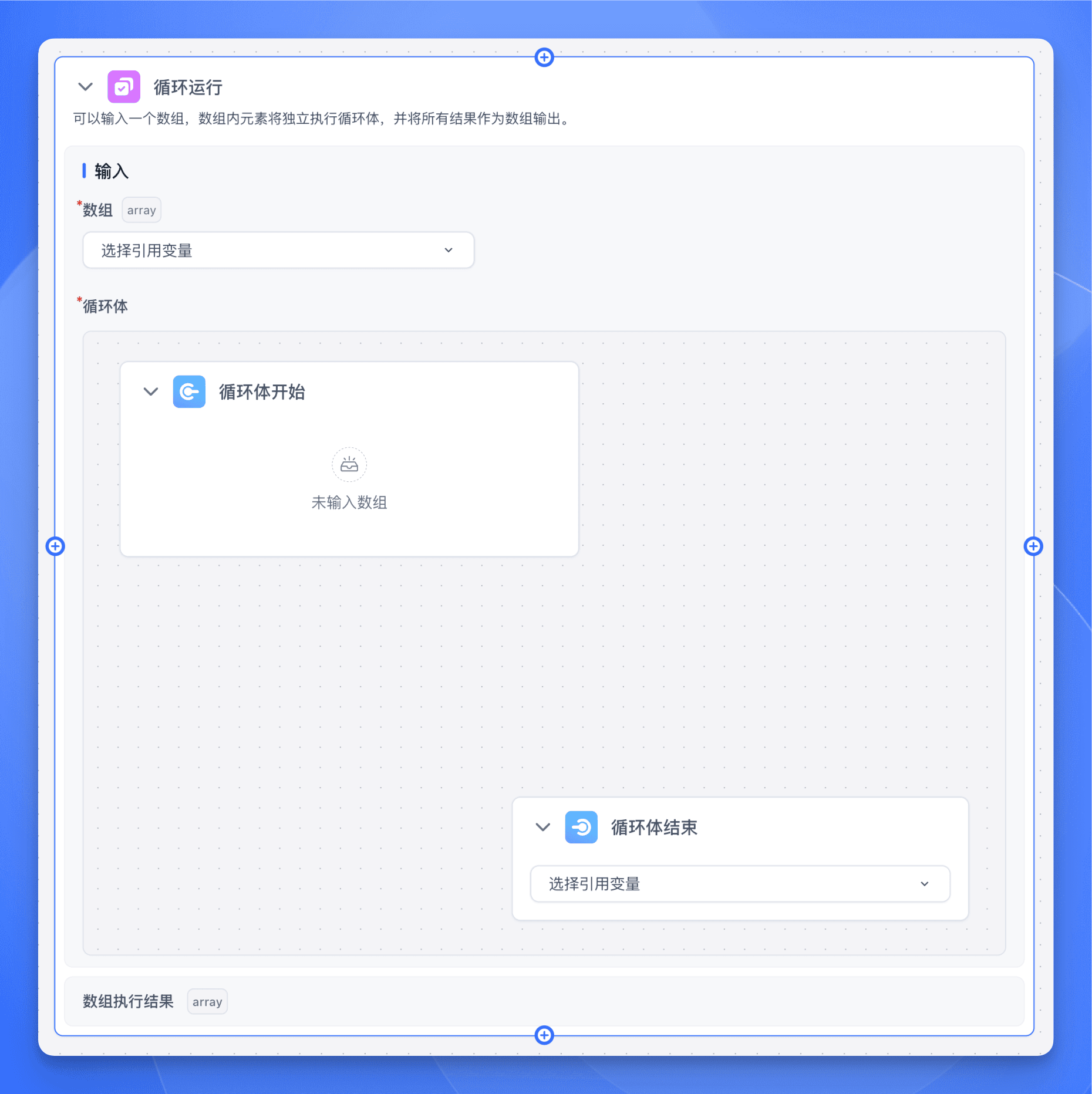
In programming terms, nodes are like functions or API endpoints -- each one is a step. By connecting multiple nodes together, you build a step-by-step process that produces the final AI output.
The Batch Processing node is essentially a function whose job is to automate repeated execution of a specific workflow.
Core Features
-
Array Batch Processing
- Accepts array-type data input
- Automatically iterates through array elements
- Maintains processing order
- Supports parallel processing for performance optimization
-
Automatic Iteration
- Automatically triggers downstream nodes
- Supports conditional termination
- Supports loop counting
- Maintains execution context
-
Works with Other Nodes
- AI Chat nodes
- HTTP Request nodes
- Content Extraction nodes
- Conditional nodes
Use Cases
The Batch Processing node extends workflow capabilities through automation, enabling FastGPT to handle batch tasks and complex data processing pipelines. It significantly improves efficiency when processing large-scale data or scenarios requiring multiple iterations.
The Batch Processing node is ideal for:
-
Batch Data Processing
- Batch text translation
- Batch document summarization
- Batch content generation
-
Data Pipeline Processing
- Analyzing search results one by one
- Processing Knowledge Base retrieval results individually
- Processing array data from HTTP responses item by item
-
Recursive or Iterative Tasks
- Long text segmented processing
- Multi-round content refinement
- Chained data processing
Usage
Input Parameters
The Batch Processing node requires two core inputs:
-
Array (Required): An array-type input, which can be:
- String array (
Array<string>) - Number array (
Array<number>) - Boolean array (
Array<boolean>) - Object array (
Array<object>)
- String array (
-
Loop Body (Required): Defines the node flow executed in each iteration:
- Loop Body Start: Marks where the loop begins
- Loop Body End: Marks where the loop ends, with an optional output variable
Loop Body Configuration
-
Inside the loop body, you can add any type of node:
- AI Chat node
- HTTP Request node
- Content Extraction node
- Text Processing node, etc.
-
Loop Body End node configuration:
- Select the output variable from the dropdown
- This variable is collected as the current iteration's result
- Results from all iterations form a new array as the final output
Examples
Batch Processing an Array
Suppose you have an array of texts that each need AI processing. This is the most basic and common use case.
Steps
-
Prepare the input array
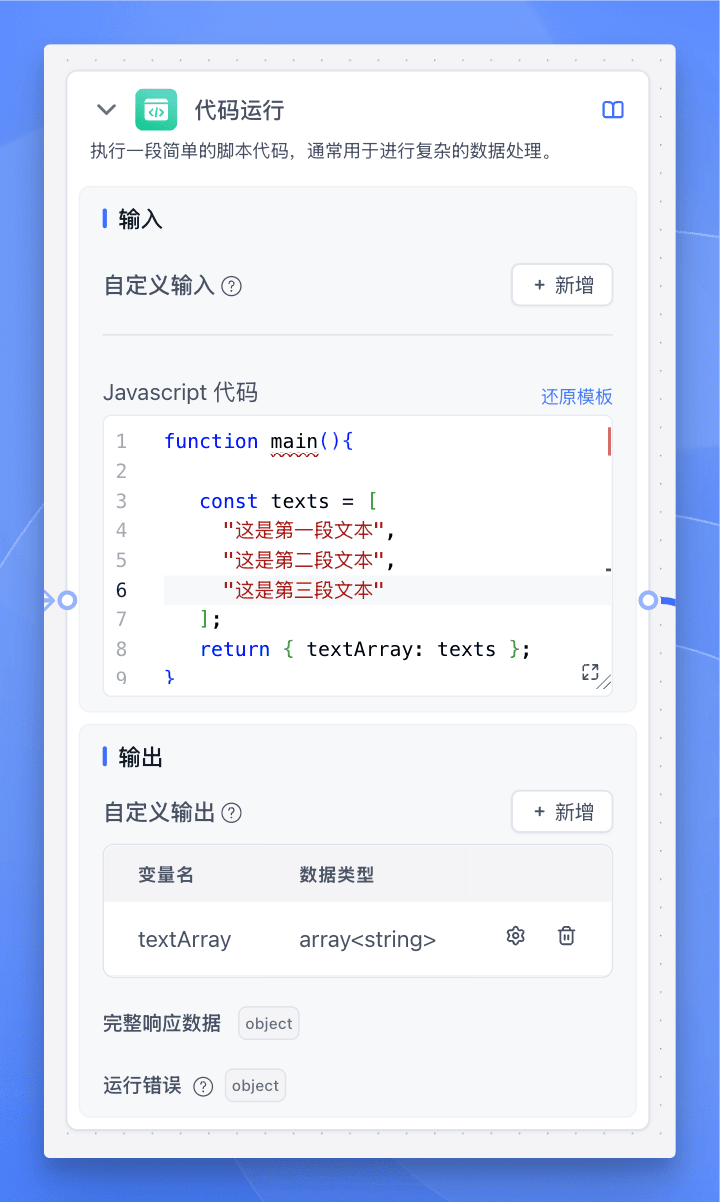
Use a Code Execution node to create a test array:
const texts = [ "这是第一段文本", "这是第二段文本", "这是第三段文本" ]; return { textArray: texts }; -
Configure the Batch Processing node
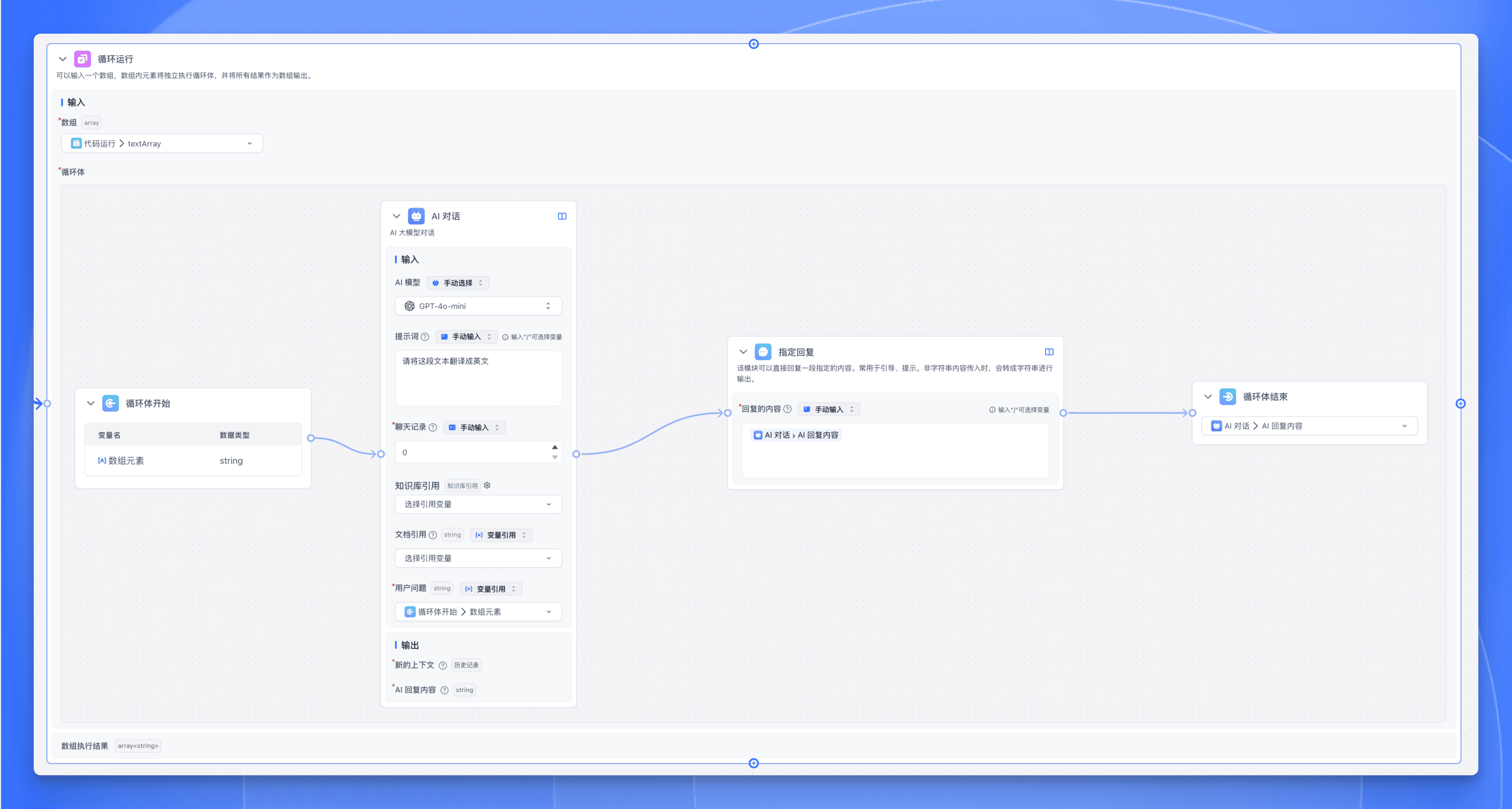
- Array input: Select the
textArrayoutput from the previous Code Execution node. - Add an AI Chat node inside the loop body to process each text. Set the prompt to:
Please translate this text to English. - Add a Specified Reply node to output the translated text.
- Set the Loop Body End node's output variable to the AI reply content.
- Array input: Select the
Execution Flow
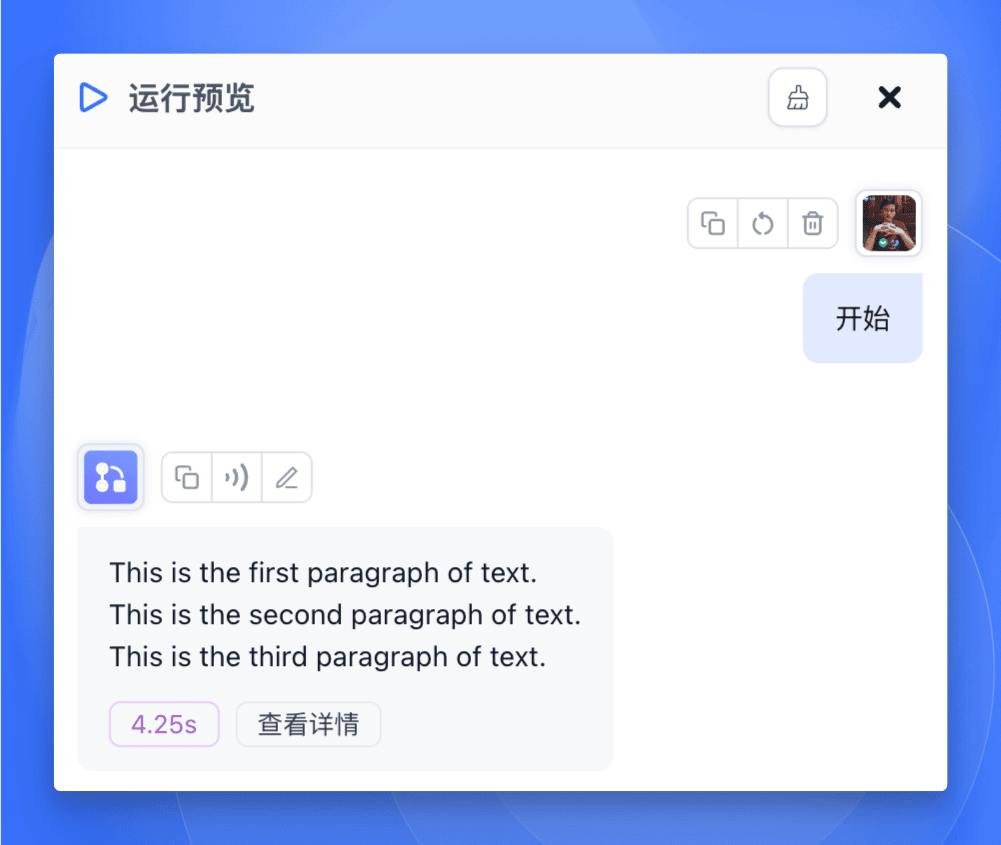
- The Code Execution node runs and generates the test array
- The Batch Processing node receives the array and begins iteration
- For each element:
- The AI Chat node processes the current element
- The Specified Reply node outputs the translated text
- The Loop Body End node collects the result
- After all elements are processed, the result array is output
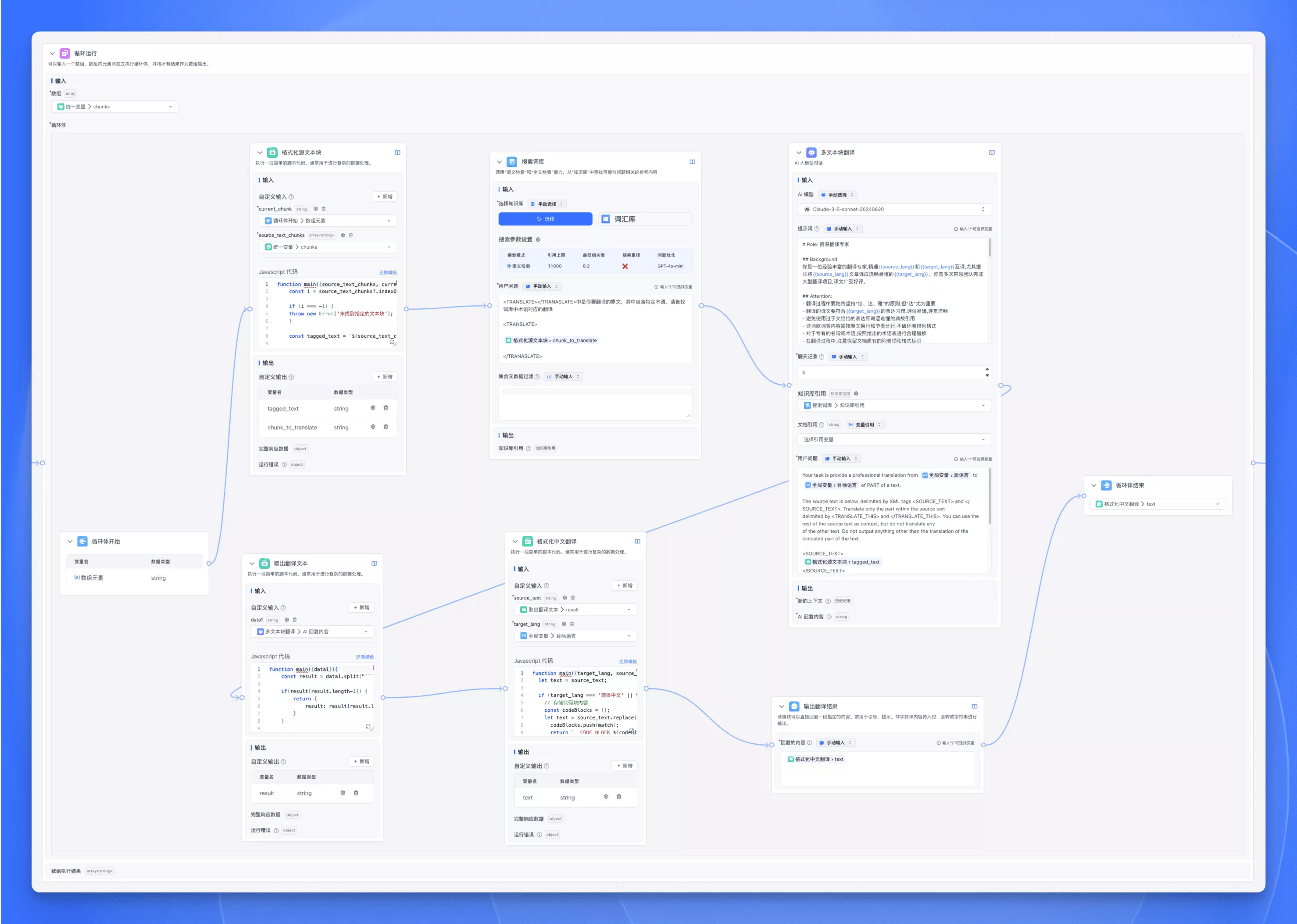
Long Text Translation
When translating long texts, you often face these challenges:
- Text length exceeds LLM token limits
- Translation style must remain consistent
- Context coherence must be maintained
- Translation quality may need multiple refinement passes
The Batch Processing node handles these well.
Steps
-
Text preprocessing and segmentation
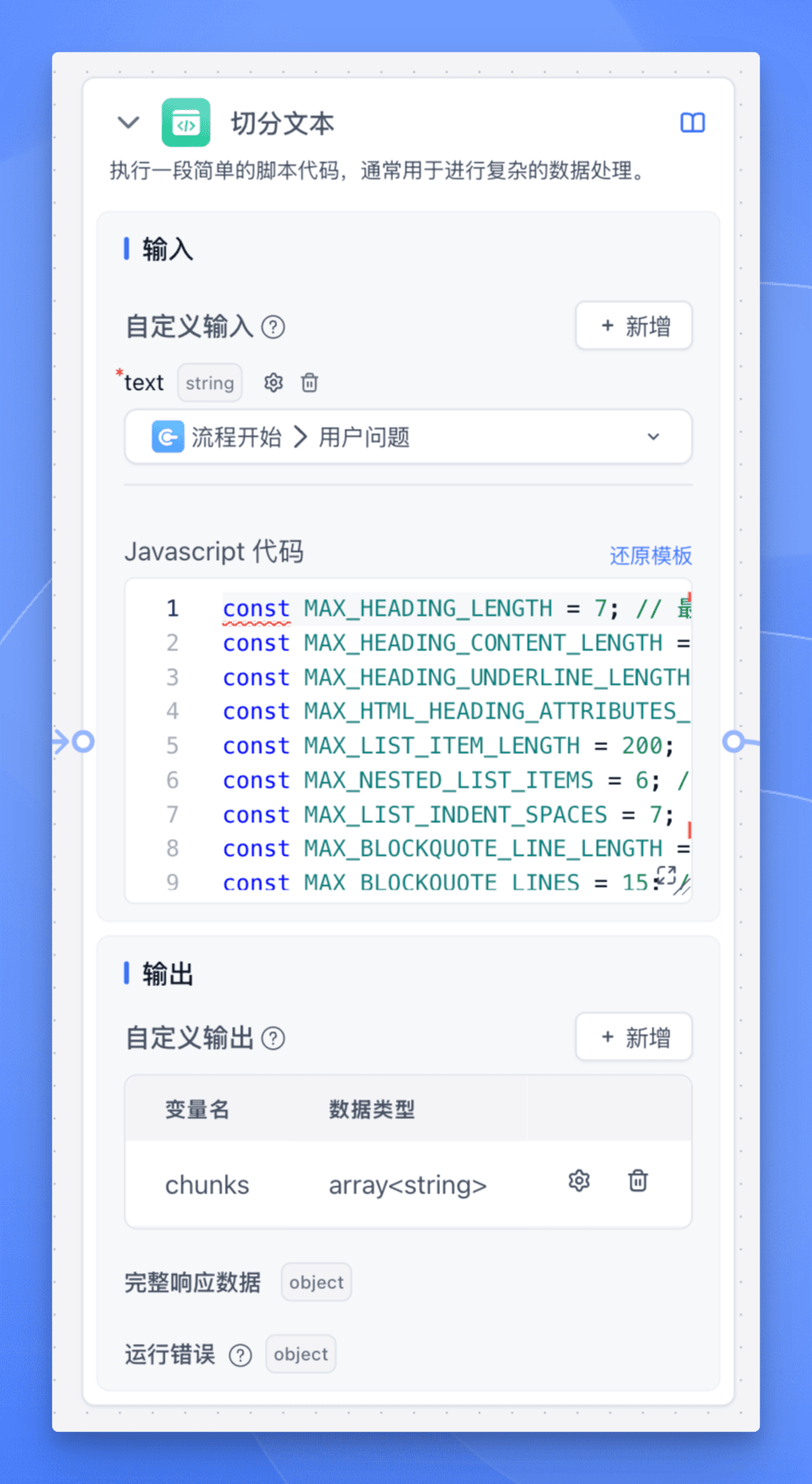
Use a Code Execution node for text segmentation:
const MAX_HEADING_LENGTH = 7; // Max heading length
const MAX_HEADING_CONTENT_LENGTH = 200; // Max heading content length
const MAX_HEADING_UNDERLINE_LENGTH = 200; // Max heading underline length
const MAX_HTML_HEADING_ATTRIBUTES_LENGTH = 100; // Max HTML heading attributes length
const MAX_LIST_ITEM_LENGTH = 200; // Max list item length
const MAX_NESTED_LIST_ITEMS = 6; // Max nested list items
const MAX_LIST_INDENT_SPACES = 7; // Max list indent spaces
const MAX_BLOCKQUOTE_LINE_LENGTH = 200; // Max blockquote line length
const MAX_BLOCKQUOTE_LINES = 15; // Max blockquote lines
const MAX_CODE_BLOCK_LENGTH = 1500; // Max code block length
const MAX_CODE_LANGUAGE_LENGTH = 20; // Max code language length
const MAX_INDENTED_CODE_LINES = 20; // Max indented code lines
const MAX_TABLE_CELL_LENGTH = 200; // Max table cell length
const MAX_TABLE_ROWS = 20; // Max table rows
const MAX_HTML_TABLE_LENGTH = 2000; // Max HTML table length
const MIN_HORIZONTAL_RULE_LENGTH = 3; // Min horizontal rule length
const MAX_SENTENCE_LENGTH = 400; // Max sentence length
const MAX_QUOTED_TEXT_LENGTH = 300; // Max quoted text length
const MAX_PARENTHETICAL_CONTENT_LENGTH = 200; // Max parenthetical content length
const MAX_NESTED_PARENTHESES = 5; // Max nested parentheses
const MAX_MATH_INLINE_LENGTH = 100; // Max inline math length
const MAX_MATH_BLOCK_LENGTH = 500; // Max math block length
const MAX_PARAGRAPH_LENGTH = 1000; // Max paragraph length
const MAX_STANDALONE_LINE_LENGTH = 800; // Max standalone line length
const MAX_HTML_TAG_ATTRIBUTES_LENGTH = 100; // Max HTML tag attributes length
const MAX_HTML_TAG_CONTENT_LENGTH = 1000; // Max HTML tag content length
const LOOKAHEAD_RANGE = 100;  // Lookahead range for sentence boundaries

const AVOID_AT_START = `[\\s\\]})>,']`; // Characters to avoid at start
const PUNCTUATION = `[.!?…]|\\.{3}|[\\u2026\\u2047-\\u2049]|[\\p{Emoji_Presentation}\\p{Extended_Pictographic}]`; // Punctuation
const QUOTE_END = `(?:'(?=\`)|''(?=\`\`))`; // Quote end
const SENTENCE_END = `(?:${PUNCTUATION}(?<!${AVOID_AT_START}(?=${PUNCTUATION}))|${QUOTE_END})(?=\\S|$)`; // Sentence end
const SENTENCE_BOUNDARY = `(?:${SENTENCE_END}|(?=[\\r\\n]|$))`; // Sentence boundary
const LOOKAHEAD_PATTERN = `(?:(?!${SENTENCE_END}).){1,${LOOKAHEAD_RANGE}}${SENTENCE_END}`; // Lookahead pattern
const NOT_PUNCTUATION_SPACE = `(?!${PUNCTUATION}\\s)`; // Non-punctuation space
const SENTENCE_PATTERN = `${NOT_PUNCTUATION_SPACE}(?:[^\\r\\n]{1,{MAX_LENGTH}}${SENTENCE_BOUNDARY}|[^\\r\\n]{1,{MAX_LENGTH}}(?=${PUNCTUATION}|$   {QUOTE_END})(?:${LOOKAHEAD_PATTERN})?)${AVOID_AT_START}*`; // Sentence pattern

const regex = new RegExp(
  "(" +
  // 1. Headings (Setext-style, Markdown, and HTML-style, with length constraints)
  `(?:^(?:[#*=-]{1,${MAX_HEADING_LENGTH}}|\\w[^\\r\\n]{0,${MAX_HEADING_CONTENT_LENGTH}}\\r?\\n[-=]{2,${MAX_HEADING_UNDERLINE_LENGTH}}|<h[1-6][^>]   {0,${MAX_HTML_HEADING_ATTRIBUTES_LENGTH}}>)[^\\r\\n]{1,${MAX_HEADING_CONTENT_LENGTH}}(?:</h[1-6]>)?(?:\\r?\\n|$))` +
  "|" +
  // New pattern for citations
  `(?:\\[[0-9]+\\][^\\r\\n]{1,${MAX_STANDALONE_LINE_LENGTH}})` +
  "|" +
  // 2. List items (bulleted, numbered, lettered, or task lists, including nested, up to three levels, with length constraints)
  `(?:(?:^|\\r?\\n)[ \\t]{0,3}(?:[-*+•]|\\d{1,3}\\.\\w\\.|\\[[ xX]\\])[ \\t]+${SENTENCE_PATTERN.replace(/{MAX_LENGTH}/g, String   (MAX_LIST_ITEM_LENGTH))}` +
  `(?:(?:\\r?\\n[ \\t]{2,5}(?:[-*+•]|\\d{1,3}\\.\\w\\.|\\[[ xX]\\])[ \\t]+${SENTENCE_PATTERN.replace(/{MAX_LENGTH}/g, String   (MAX_LIST_ITEM_LENGTH))}){0,${MAX_NESTED_LIST_ITEMS}}` +
  `(?:\\r?\\n[ \\t]{4,${MAX_LIST_INDENT_SPACES}}(?:[-*+•]|\\d{1,3}\\.\\w\\.|\\[[ xX]\\])[ \\t]+${SENTENCE_PATTERN.replace(/{MAX_LENGTH}/g, String   (MAX_LIST_ITEM_LENGTH))}){0,${MAX_NESTED_LIST_ITEMS}})?)` +
  "|" +
  // 3. Block quotes (including nested quotes and citations, up to three levels, with length constraints)
  `(?:(?:^>(?:>|\\s{2,}){0,2}${SENTENCE_PATTERN.replace(/{MAX_LENGTH}/g, String(MAX_BLOCKQUOTE_LINE_LENGTH))}\\r?\\n?){1,$   {MAX_BLOCKQUOTE_LINES}})` +
  "|" +
  // 4. Code blocks (fenced, indented, or HTML pre/code tags, with length constraints)
  `(?:(?:^|\\r?\\n)(?:\`\`\`|~~~)(?:\\w{0,${MAX_CODE_LANGUAGE_LENGTH}})?\\r?\\n[\\s\\S]{0,${MAX_CODE_BLOCK_LENGTH}}?(?:\`\`\`|~~~)\\r?\\n?` +
  `|(?:(?:^|\\r?\\n)(?: {4}|\\t)[^\\r\\n]{0,${MAX_LIST_ITEM_LENGTH}}(?:\\r?\\n(?: {4}|\\t)[^\\r\\n]{0,${MAX_LIST_ITEM_LENGTH}}){0,$   {MAX_INDENTED_CODE_LINES}}\\r?\\n?)` +
  `|(?:<pre>(?:<code>)?[\\s\\S]{0,${MAX_CODE_BLOCK_LENGTH}}?(?:</code>)?</pre>))` +
  "|" +
  // 5. Tables (Markdown, grid tables, and HTML tables, with length constraints)
  `(?:(?:^|\\r?\\n)(?:\\|[^\\r\\n]{0,${MAX_TABLE_CELL_LENGTH}}\\|(?:\\r?\\n\\|[-:]{1,${MAX_TABLE_CELL_LENGTH}}\\|){0,1}(?:\\r?\\n\\|[^\\r\\n]{0,$   {MAX_TABLE_CELL_LENGTH}}\\|){0,${MAX_TABLE_ROWS}}` +
  `|<table>[\\s\\S]{0,${MAX_HTML_TABLE_LENGTH}}?</table>))` +
  "|" +
  // 6. Horizontal rules (Markdown and HTML hr tag)
  `(?:^(?:[-*_]){${MIN_HORIZONTAL_RULE_LENGTH},}\\s*$|<hr\\s*/?>)` +
  "|" +
  // 10. Standalone lines or phrases (including single-line blocks and HTML elements, with length constraints)
  `(?!${AVOID_AT_START})(?:^(?:<[a-zA-Z][^>]{0,${MAX_HTML_TAG_ATTRIBUTES_LENGTH}}>)?${SENTENCE_PATTERN.replace(/{MAX_LENGTH}/g, String   (MAX_STANDALONE_LINE_LENGTH))}(?:</[a-zA-Z]+>)?(?:\\r?\\n|$))` +
  "|" +
  // 7. Sentences or phrases ending with punctuation (including ellipsis and Unicode punctuation)
  `(?!${AVOID_AT_START})${SENTENCE_PATTERN.replace(/{MAX_LENGTH}/g, String(MAX_SENTENCE_LENGTH))}` +
  "|" +
  // 8. Quoted text, parenthetical phrases, or bracketed content (with length constraints)
  "(?:" +
  `(?<!\\w)\"\"\"[^\"]{0,${MAX_QUOTED_TEXT_LENGTH}}\"\"\"(?!\\w)` +
  `|(?<!\\w)(?:['\"\`'"])[^\\r\\n]{0,${MAX_QUOTED_TEXT_LENGTH}}\\1(?!\\w)` +
  `|(?<!\\w)\`[^\\r\\n]{0,${MAX_QUOTED_TEXT_LENGTH}}'(?!\\w)` +
  `|(?<!\\w)\`\`[^\\r\\n]{0,${MAX_QUOTED_TEXT_LENGTH}}''(?!\\w)` +
  `|\\([^\\r\\n()]{0,${MAX_PARENTHETICAL_CONTENT_LENGTH}}(?:\\([^\\r\\n()]{0,${MAX_PARENTHETICAL_CONTENT_LENGTH}}\\)[^\\r\\n()]{0,$   {MAX_PARENTHETICAL_CONTENT_LENGTH}}){0,${MAX_NESTED_PARENTHESES}}\\)` +
  `|\\[[^\\r\\n\\[\\]]{0,${MAX_PARENTHETICAL_CONTENT_LENGTH}}(?:\\[[^\\r\\n\\[\\]]{0,${MAX_PARENTHETICAL_CONTENT_LENGTH}}\\][^\\r\\n\\[\\]]{0,$   {MAX_PARENTHETICAL_CONTENT_LENGTH}}){0,${MAX_NESTED_PARENTHESES}}\\]` +
  `|\\$[^\\r\\n$]{0,${MAX_MATH_INLINE_LENGTH}}\\$` +
  `|\`[^\`\\r\\n]{0,${MAX_MATH_INLINE_LENGTH}}\`` +
  ")" +
  "|" +
  // 9. Paragraphs (with length constraints)
  `(?!${AVOID_AT_START})(?:(?:^|\\r?\\n\\r?\\n)(?:<p>)?${SENTENCE_PATTERN.replace(/{MAX_LENGTH}/g, String(MAX_PARAGRAPH_LENGTH))}(?:</p>)?(?=\\r?   \\n\\r?\\n|$))` +
  "|" +
  // 11. HTML-like tags and their content (including self-closing tags and attributes, with length constraints)
  `(?:<[a-zA-Z][^>]{0,${MAX_HTML_TAG_ATTRIBUTES_LENGTH}}(?:>[\\s\\S]{0,${MAX_HTML_TAG_CONTENT_LENGTH}}?</[a-zA-Z]+>|\\s*/>))` +
  "|" +
  // 12. LaTeX-style math expressions (inline and block, with length constraints)
  `(?:(?:\\$\\$[\\s\\S]{0,${MAX_MATH_BLOCK_LENGTH}}?\\$\\$)|(?:\\$[^\\$\\r\\n]{0,${MAX_MATH_INLINE_LENGTH}}\\$))` +
  "|" +
  // 14. Fallback for any remaining content (with length constraints)
  `(?!${AVOID_AT_START})${SENTENCE_PATTERN.replace(/{MAX_LENGTH}/g, String(MAX_STANDALONE_LINE_LENGTH))}` +
  ")",
  "gmu"
);

function main({text}){
  const chunks = [];
  let currentChunk = '';
  const tokens = countToken(text)

  const matches = text.match(regex);
  if (matches) {
    matches.forEach((match) => {
      if (currentChunk.length + match.length <= 1000) {
        currentChunk += match;
      } else {
        if (currentChunk) {
          chunks.push(currentChunk);
        }
        currentChunk = match;
      }
    });
    if (currentChunk) {
      chunks.push(currentChunk);
    }
  }

  return {chunks, tokens};
}
This uses a powerful regex open-sourced by Jina AI that leverages all possible boundary clues and heuristics for precise text splitting.
-
Configure the Batch Processing node
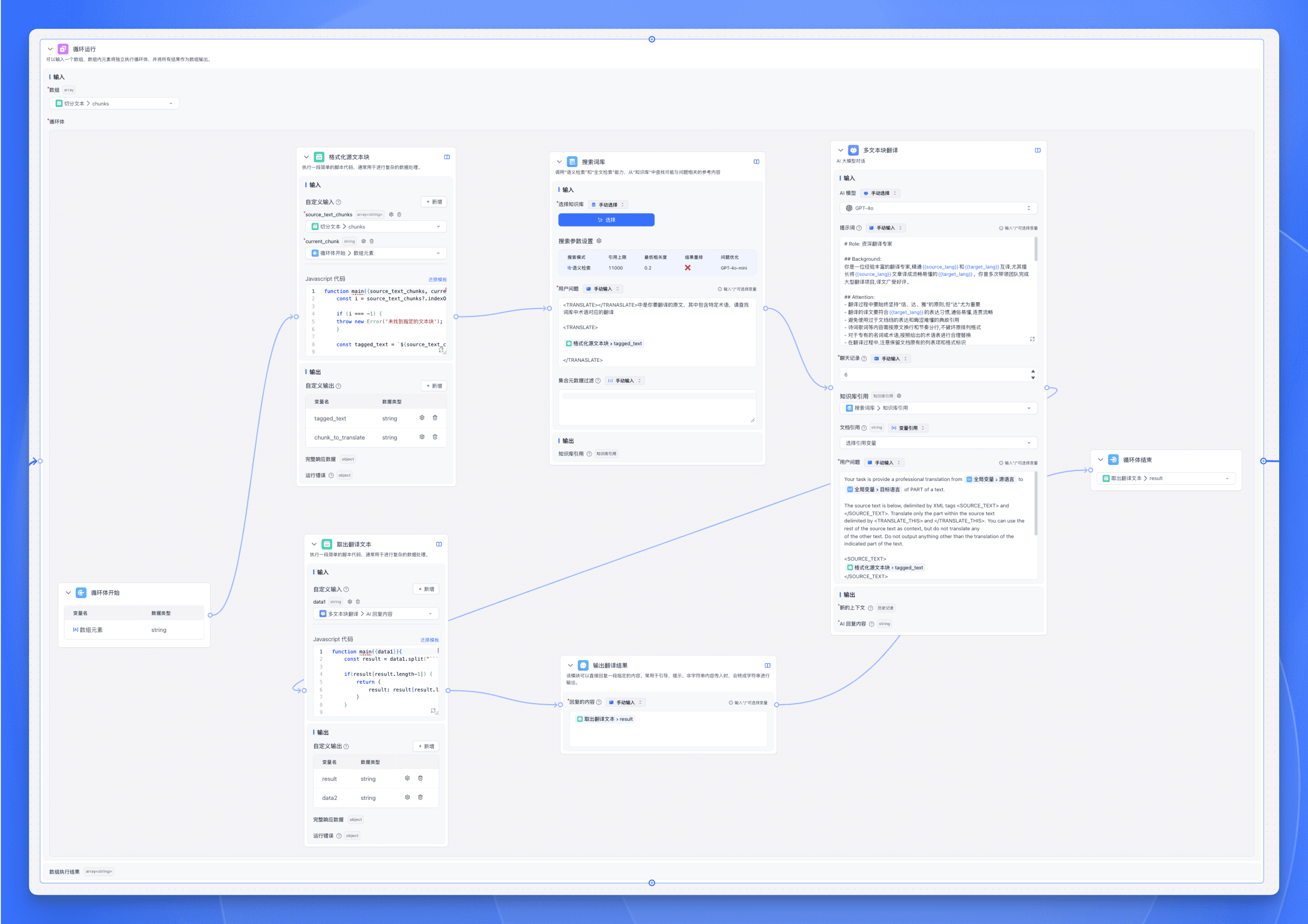
- Array input: Select the
chunksoutput from the previous Code Execution node. - Add a Code Execution node inside the loop body to format the source text.
- Add a Search Glossary node to look up proper nouns from a terminology Knowledge Base before translation.
- Add an AI Chat node using CoT (Chain of Thought) to have the LLM explicitly generate a reasoning chain showing the complete translation thought process.
- Add a Code Execution node to extract the final translation result from the AI Chat node's last round.
- Add a Specified Reply node to output the translated text.
- Set the Loop Body End node's output variable to the
resultoutput from the Extract Translation Text node.
- Array input: Select the
File Updated