
Interactive Suspension Resume and File Input API Flow
Handle workflow interactive suspension (User Selection and Form Input), checkpoint resumption, global variables, and multimodal file inputs via OpenAPI.
When a workflow includes User Selection (userSelect) or Form Input (formInput) nodes, or accepts pre-chat global variables, documents, and images, your client interacts with /api/v2/chat/completions (or /api/v1/chat/completions) using the contracts below.
1. Global Variables and Multimodal File Inputs
1. Pass Global Variables (variables)
Supply values matching your application's declared global variable keys inside the variables object:
{
  "appId": "YOUR_APP_ID",
  "chatId": "session_20261028_001",
  "stream": true,
  "detail": true,
  "variables": {
    "department": "Finance",
    "maxBudget": 5000,
    "strictMode": true
  },
  "messages": [{ "role": "user", "content": "Verify this travel reimbursement request" }]
}
2. Pass Images and Documents (Multimodal Message Array)
When vision or document parsing is enabled on the application, pass a structured array in messages[].content using file_url for documents and image_url for images reachable by the FastGPT server:
{
  "appId": "YOUR_APP_ID",
  "chatId": "session_20261028_002",
  "stream": false,
  "detail": true,
  "messages": [
    {
      "role": "user",
      "content": [
        {
          "type": "text",
          "text": "Extract the signing date and total amount from the attached contract"
        },
        {
          "type": "file_url",
          "name": "contract.pdf",
          "url": "https://example.com/files/contract.pdf"
        },
        {
          "type": "image_url",
          "image_url": { "url": "https://example.com/images/receipt.png" }
        }
      ]
    }
  ]
}
2. Interactive Suspension (Human-in-the-Loop) and Resumption
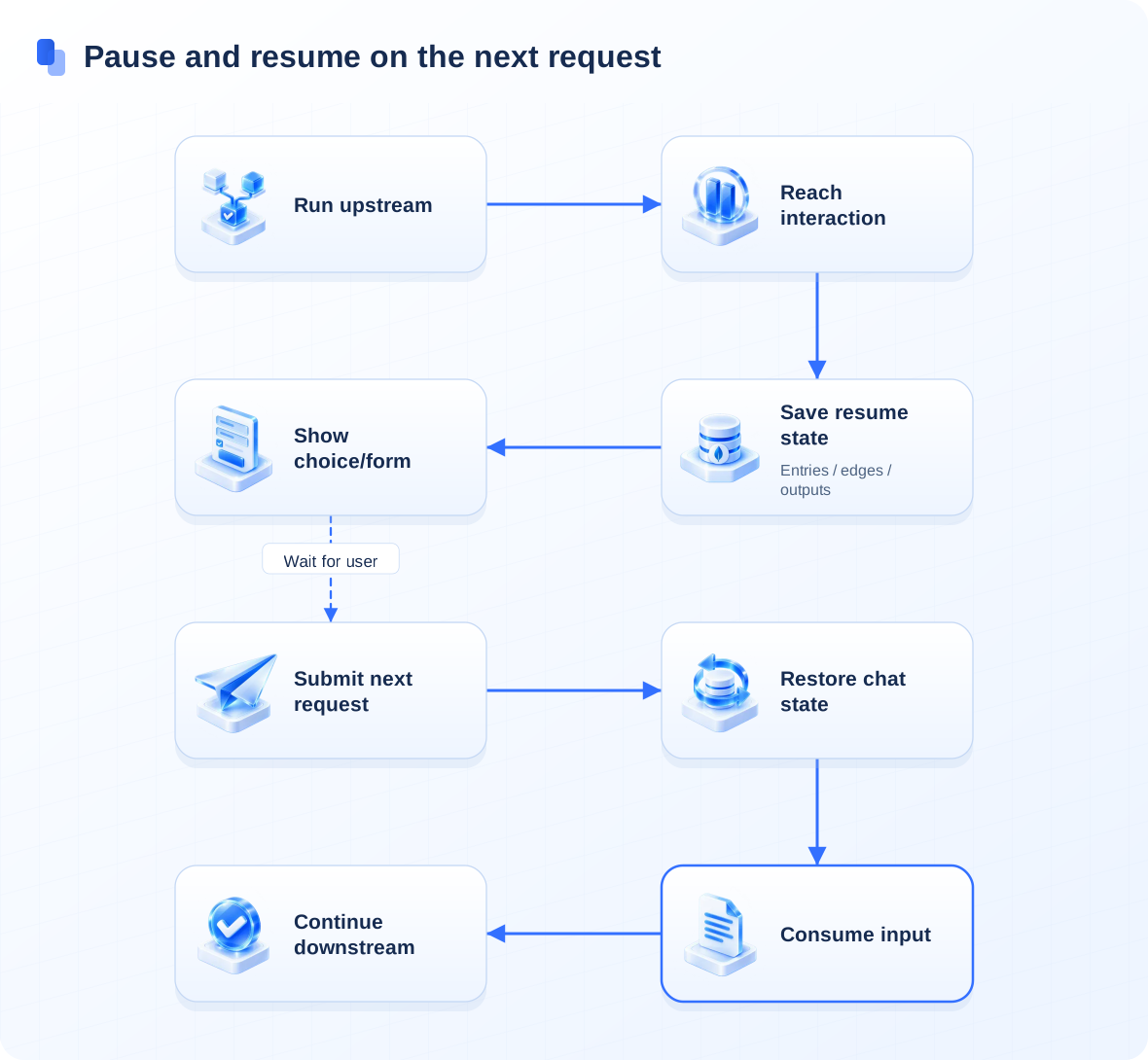
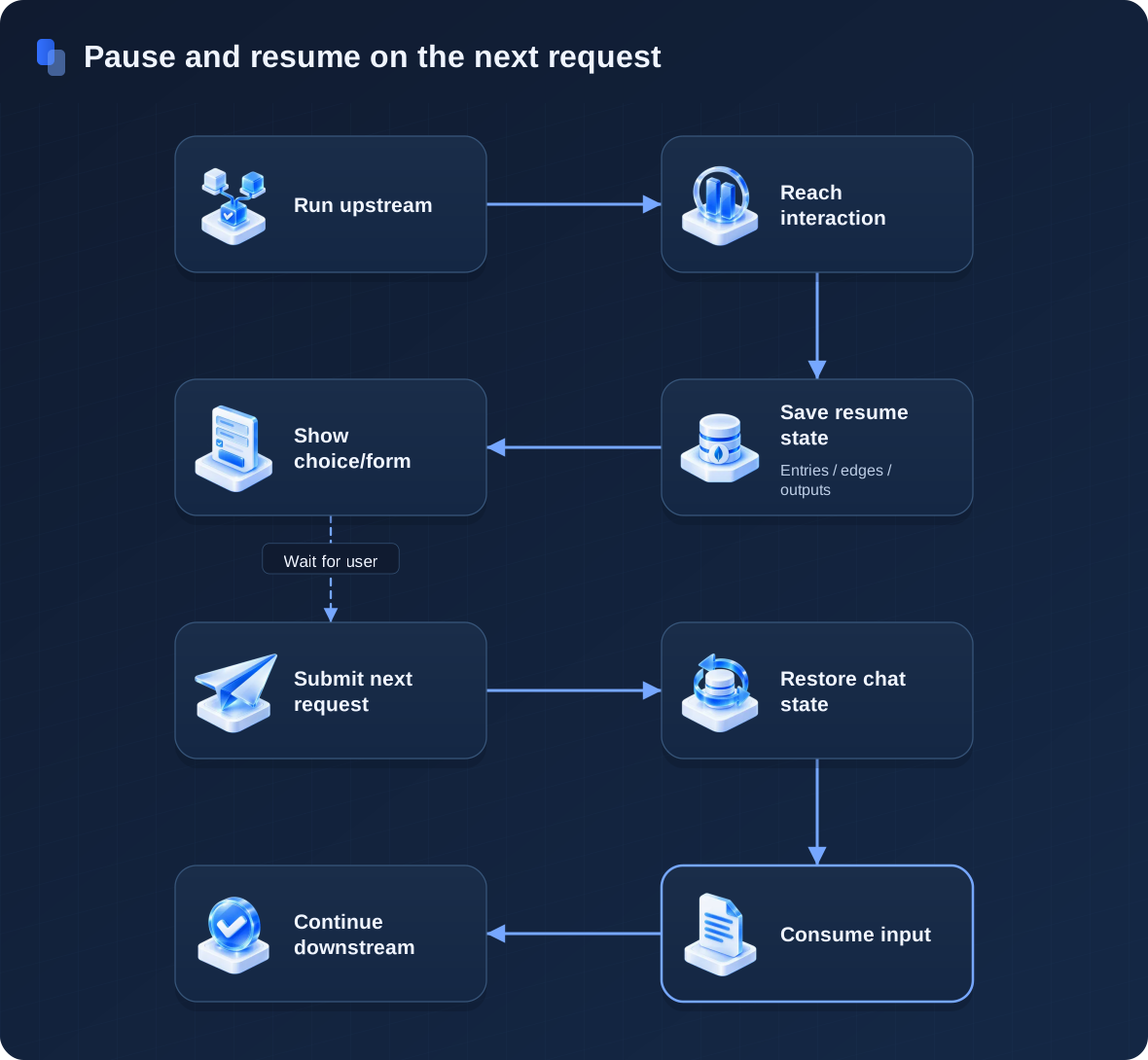
When execution reaches a userSelect or formInput node, the server saves a runtime checkpoint under the active chatId and emits an interactive payload to the client.
Step 1: Parse the Suspension Payload (detail: true Required)
- Streaming mode (
stream: true, detail: true): The server emits anevent: interactiveframe before closing the current stream withdata: [DONE]:
event: interactive
data: {"interactive":{"type":"userSelect","params":{"description":"Select an action","userSelectOptions":[{"key":"opt_1","value":"Approve rewrite"},{"key":"opt_2","value":"Cancel"}]}}}

event: answer
data: [DONE]- Form Input node (workflow node type
formInput, response discriminatorinteractive.type: "userInput"): When execution pauses at a Form Input node, the returnedinteractiveobject uses"type": "userInput", andparams.inputFormcontains the array of form field definitions (key,label,type,required, andlistoptions).
Step 2: Resume Execution with the Same chatId
Render the options or form in your client UI. Once the user submits their choice or form values, send a follow-up request to chat/completions with the exact same appId and chatId and a single role: "user" message:
- Resume a User Selection node (
userSelect): Send the selected option string ascontent:
{
  "appId": "YOUR_APP_ID",
  "chatId": "session_20261028_001",
  "stream": true,
  "detail": true,
  "messages": [{ "role": "user", "content": "Approve rewrite" }]
}- Resume a Form Input node (
formInput): Serialize the submitted key-value form object as a JSON string incontent:
{
  "appId": "YOUR_APP_ID",
  "chatId": "session_20261028_001",
  "stream": true,
  "detail": true,
  "messages": [
    {
      "role": "user",
      "content": "{\"reason\":\"Receipt explanation attached\",\"amount\":1280}"
    }
  ]
}
The server restores the saved checkpoint for chatId and continues executing downstream nodes from the suspended step.
Troubleshooting
| Symptom | Cause and Resolution |
|---|---|
| Workflow pauses at an interactive node without returning options | detail: true was omitted; enable detail: true to receive interactive events |
| Follow-up submission restarts the workflow from the start node | chatId was omitted or changed; pass the exact chatId from the suspended turn |
| Form input resumption fails or fields arrive empty | Ensure content is a JSON-serialized string whose keys match params.inputForm[].key |
Next: Consult the full Conversation and Session API Reference.
Last updated