
Debugging, packing, and publishing
Validate tool plugins locally, connect them to FastGPT, and build packages for distribution
This guide covers tool plugins created with @fastgpt-plugin/cli and @fastgpt-plugin/sdk-factory. Prepare an implemented tool or Toolkit before starting. Model presets follow their own validation workflow.
Remote debugging requires a FastGPT environment with plugin debugging enabled. Self-hosted operators can follow the remote debug suite configuration. Use a CLI version compatible with your plugin service.
1. Local mock debugging
Install dependencies in the plugin directory first:
cd packages/tools/my-tool
pnpm install
View plugin and debuggable tool information:
pnpx @fastgpt-plugin/cli debug .Run one single-tool debug invocation:
pnpx @fastgpt-plugin/cli debug . --run --input '{"query":"hello"}' --secrets '{"apiKey":"test"}'Run a child tool in a Toolkit:
pnpx @fastgpt-plugin/cli debug . --run --tool search --input '{"query":"hello"}' --secrets '{"apiKey":"test"}'Use files when input, secrets, or system variables are large:
pnpx @fastgpt-plugin/cli debug . --run --input-file input.json --secrets-file secrets.json --system-var-file system-var.jsonLocal debug boundaries:
ctx.invoke.uploadFile()uses a local mock implementation and defaults to.fastgpt-plugin-debug/uploads.- Local debug quickly validates plugin logic and schemas.
- Local debug does not simulate the production child-process pool, real Node.js IPC, network environment, server timeout, or queue scheduling.
- Before listing an official plugin, install it manually in a test environment and complete end-to-end testing.
2. FastGPT remote debugging
Remote debugging connects a locally developed plugin to a FastGPT test environment. The FastGPT page authenticates the user and generates a debug link, while the CLI uses that link to create a WSS debug channel. Debug plugins are visible only to the developer running that session.
Before using it, confirm that the test environment has deployed the FastGPT Plugin service and Connection Gateway, and that your local machine can reach the Gateway WSS endpoint returned by the test environment.
2.1 Generate a debug link
- Sign in to the FastGPT test environment.
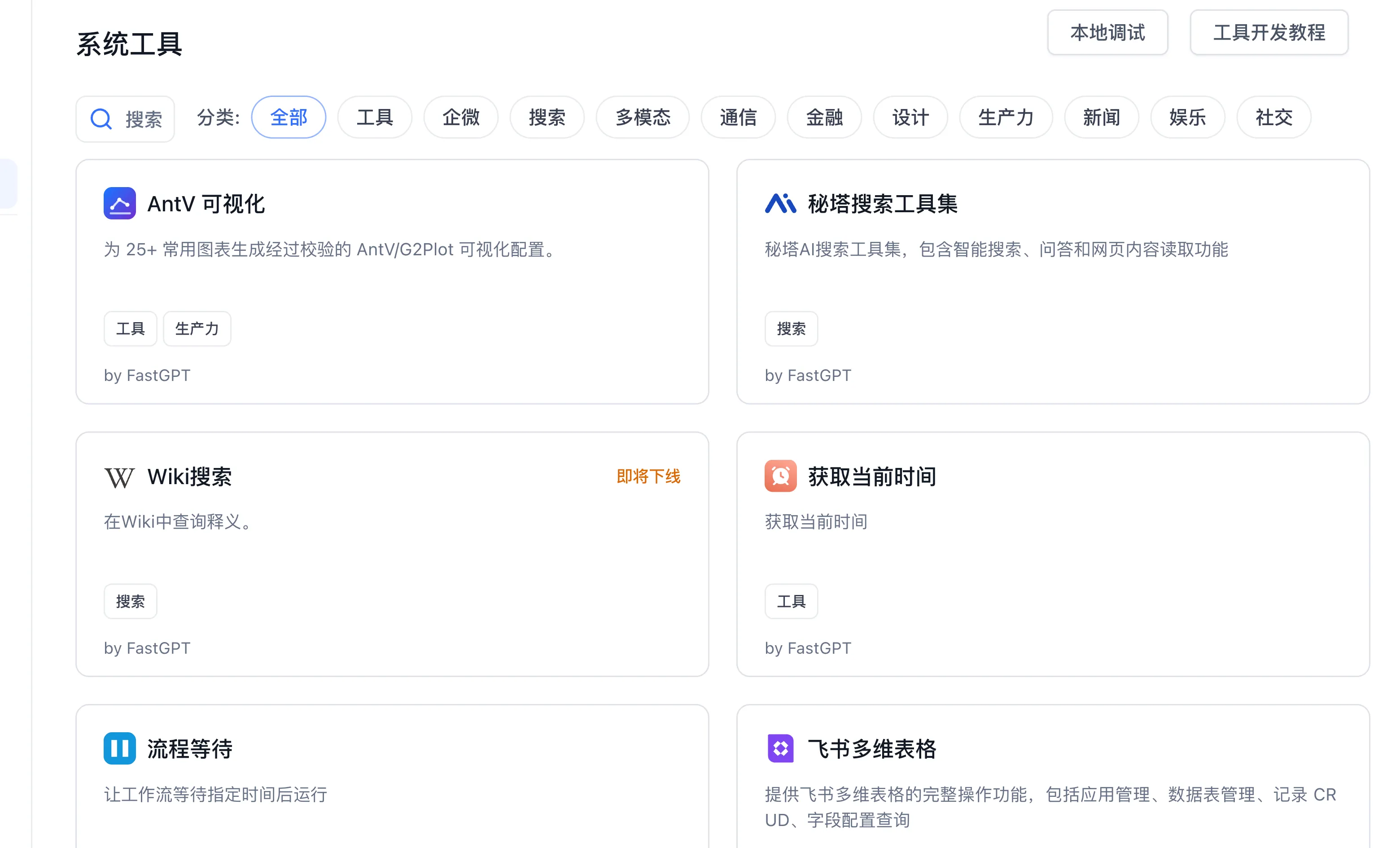
- Open Studio → System Tools and click Local Debug.
- In the modal, click Generate Link and copy the debug link.
- If a debug session already exists, click Refresh Link to generate a new connection key; the old link becomes invalid.
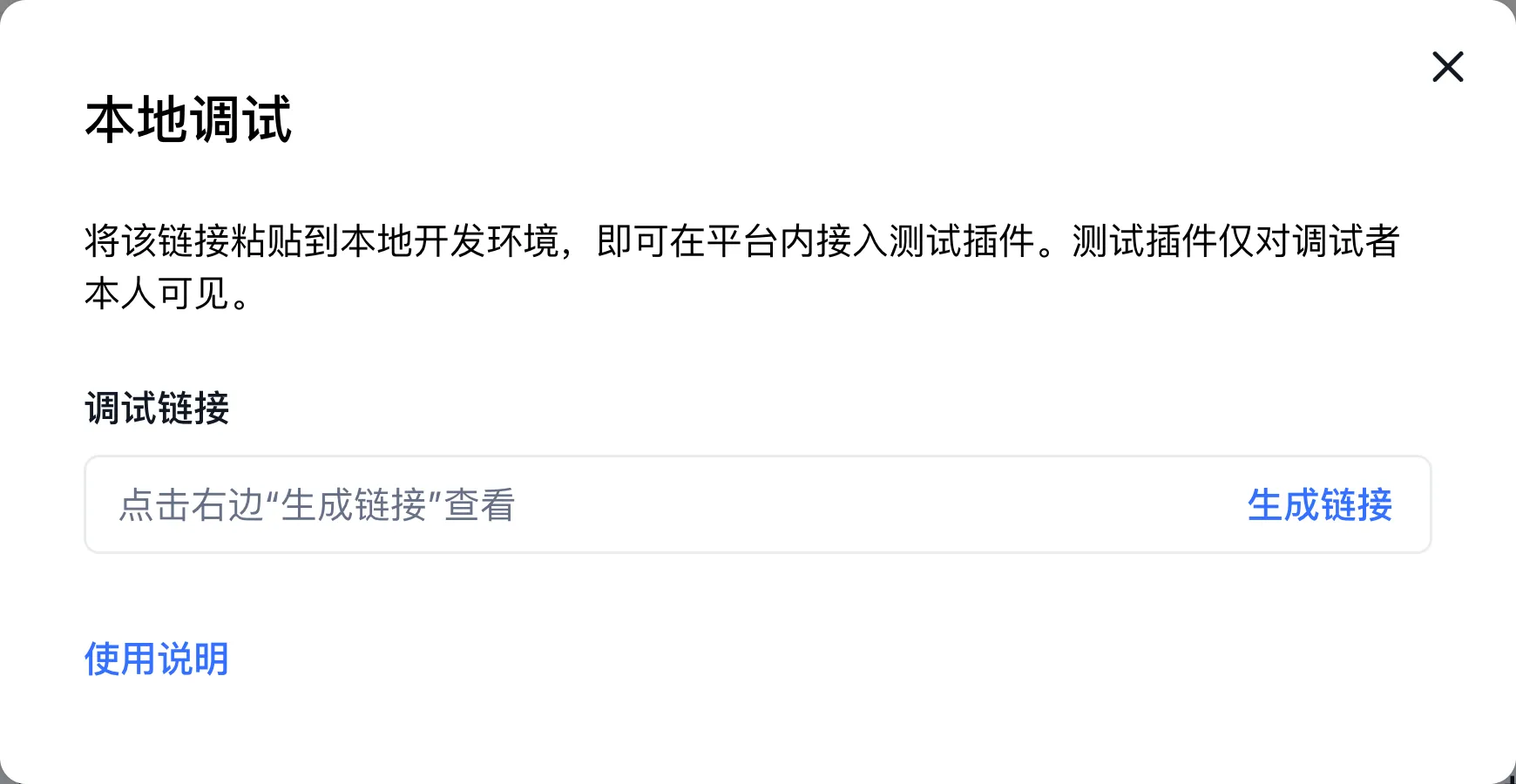
The debug link is only for connecting your local CLI to the test environment. Do not commit it to code repositories, documentation examples, or chat logs.
2.2 Start a local remote-debug session
Run this command in a plugin directory or a workspace that contains multiple plugin directories:
pnpx @fastgpt-plugin/cli devAfter startup, paste the debug link copied from FastGPT into the TUI. The CLI exchanges the connection key from the link for a short-lived WSS connect token, then mounts local plugins to the FastGPT debug channel.
Scripts and Agents can use non-interactive mode:
pnpx @fastgpt-plugin/cli dev --no-interactive \
  --connect "https://fastgpt.example.com/api/plugin/debug-channel/connection-key/exchange?connectionKey=fpg_dbg_..."
When passing only a raw connection key, tell the CLI where the exchange endpoint is:
FASTGPT_PLUGIN_DEBUG_CONNECT_URL=https://fastgpt.example.com/api/plugin/debug-channel/connection-key/exchange \
  pnpx @fastgpt-plugin/cli dev --no-interactive --connect "fpg_dbg_..."
After --connect connects successfully, it saves the connection key so later pnpx @fastgpt-plugin/cli dev runs can reuse the local config. In the TUI, press c to enter and save a new debug link or connection key.
Watch plugin directories
When no plugin directory is passed, dev auto-discovers plugins from the current directory. If the current directory contains index.ts, it is used as the plugin entry; otherwise, the CLI scans one level of child directories for index.ts.
You can also pass one or more plugin directories explicitly:
pnpx @fastgpt-plugin/cli dev ./plugins/getTime ./plugins/dbops --watch--watch reloads local plugins and recreates the remote-debug session after local file changes. The CLI reconnects by default when disconnected; use --no-reconnect to disable automatic reconnect.
2.3 Verify in FastGPT
After the CLI reports that remote debugging is ready, return to the FastGPT test environment:
- Check the debug plugin on the Studio → System Tools page.
- Select the debug tool in an app, workflow, or Agent.
- Fill in secrets and input parameters, then start a real invocation.
- Check local handler logs and errors in the CLI terminal.
The debug tool source is bound to the currently signed-in member, so other members do not see that debug plugin by default.
Troubleshooting Remote Debugging
| Symptom | Cause | Action |
|---|---|---|
| WSS connection fails or times out | Connection Key or network routing | Click Refresh Link in FastGPT, and verify connectivity and firewall rules from your dev machine to the Gateway port |
| Debug tool does not appear in FastGPT | Debug account and channel binding | A debug tool is visible only to the member who generated the debug link; verify the signed-in account matches the CLI key |
Input validation error | Zod schema constraints | Check required fields, types, minimum values, and string constraints in inputSchema, then adjust test inputs |
| Secret values are empty | ctx.secrets delivery | Confirm the secrets are filled in the tool configuration of the app, workflow, or Agent, or passed via --secrets / --secrets-file in local CLI |
2.4 End the debug session
Press Ctrl+C in the local terminal to close the current CLI debug session; press Ctrl+C again to force exit.
The End Debugging action in FastGPT revokes the current member's debug channel and removes the debug plugin entry from the page. If the debug link is exposed, the signed-in member changes, or authorization needs to be renewed, use Refresh Link to generate a new link.
3. Build, check, and pack
Generated plugin projects normally support these commands from the plugin directory:
pnpm run test
pnpm run build
pnpx @fastgpt-plugin/cli check --entry . --output ./dist
pnpm run pack
You can also pass directories explicitly:
pnpx @fastgpt-plugin/cli build --entry packages/tools/my-tool --output packages/tools/my-tool/dist --minify
pnpx @fastgpt-plugin/cli check --entry packages/tools/my-tool --output packages/tools/my-tool/dist
pnpx @fastgpt-plugin/cli pack --entry packages/tools/my-tool --dist packages/tools/my-tool/dist --output packages/tools/my-tool/out
Packaging produces a .pkg file for installation and publishing. Inspect its artifacts using the package and SDK reference.
4. Verification checklist
Before submitting, confirm:
index.tsdefault export is correct.manifest.pluginId,manifest.version, Chinese and English names, and descriptions are complete.- Toolkit
children[].idvalues are stable and unique. inputSchemacovers all user inputs and includes required type and range constraints.outputSchemamatches handler return values.secretSchemacovers all secret configuration and sensitive fields setisSecret: true.- External API success, failure, empty response, timeout, and auth failure are handled.
- Error messages help locate issues and do not leak secrets or sensitive responses.
pnpm run testpasses, or the reason it cannot be tested is documented.build,check, andpackpass.- Icons and schemas in
dist/manifest.jsonare as expected. - Remote debugging completes a real invocation in the test environment, or the reason remote debugging is not needed for this change is documented.
.pkgcan be installed in a test environment and complete a real invocation.
5. Publishing workflow
Community Plugins
Community plugins usually start by creating and pushing an independent GitHub repository from the plugin directory:
cd packages/tools/my-tool
git init
git add .
git commit -m "feat: add my-tool plugin"
gh repo create --public --source=. --remote=origin --push
Then return to the fastgpt-community-plugins repository, submit the submodule or reference update, and open a PR to labring/fastgpt-community-plugins.
Official Plugins
Official plugins require:
- Code review.
- Build, check, test, and package.
- Manual
.pkginstallation in a test environment. - Complete functional testing, including external APIs, secret configuration, error paths, and concurrent calls.
- Pre-listing security checks, focusing on SSRF, secret leakage, arbitrary file access, command execution, and dependency risk.
Business Plugins
Business plugins are released to private repositories. Manage versions, secrets, installation packages, and acceptance records according to the customer delivery process. Security boundaries for external APIs, customer private addresses, and account secrets should be recorded separately.
For private delivery, use team installation or ask a root administrator to install the system tool.
Last updated