
Chat API
FastGPT OpenAPI Chat Interface
How to Get AppId
Open the app configuration page and copy the appId query parameter from the browser address bar.
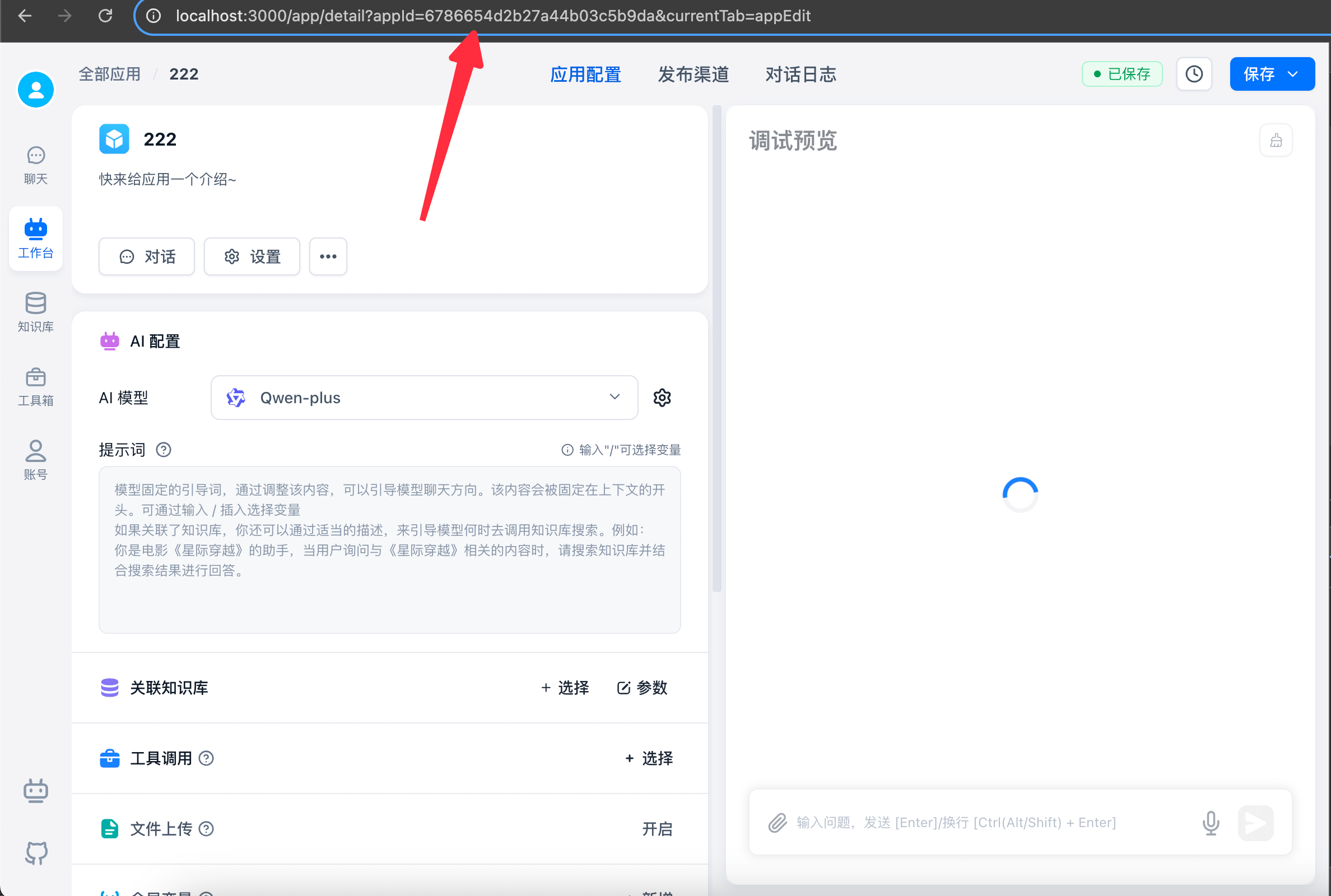
Start a Session
- Authenticate with an API key. When calling
chat/completions, passappIdin the request body. - For OpenAI SDK compatibility, you can also use
Authorization: Bearer <apiKey>-<appId>and omitbody.appId. - FastGPT resolves the app ID in this order:
body.appId, the<apiKey>-<appId>suffix, then the app ID associated with a legacy API key. - In FastGPT >= v4.15.0, the team owner can enable
authProxywhen creating or editing a key to act as a team member. That member must have permission to access the target app and chat. - Some packages require adding
v1to theBaseUrl. If you get a 404 error, try addingv1and retry.
Start Chat
The v1 chat API supports the OpenAI chat-completion format. Configure your client with the FastGPT BaseUrl and Authorization header, and follow these rules:
- Parameters like
modelandtemperatureare ignored. These values are determined by your workflow configuration. - The top-level
usagefields contain placeholder token counts. Setdetail=trueand total thetokensvalues inresponseDatato calculate actual usage.
Request
curl --location --request POST 'http://localhost:3000/api/v1/chat/completions' \
--header 'Authorization: Bearer fastgpt-xxxxxx' \
--header 'Content-Type: application/json' \
--data-raw '{
"appId": "your_app_id",
"chatId": "my_chatId",
"stream": false,
"detail": false,
"responseChatItemId": "my_responseChatItemId",
"variables": {
    "uid": "asdfadsfasfd2323",
    "name": "Zhang San"
},
"messages": [
    {
        "role": "user",
        "content": "Who is the director?"
    }
]
}'- Only
messagesdiffers slightly; other parameters are the same. - Direct file uploads are not supported. Upload files to your object storage and provide the URL.
curl --location --request POST 'http://localhost:3000/api/v1/chat/completions' \
--header 'Authorization: Bearer fastgpt-xxxxxx' \
--header 'Content-Type: application/json' \
--data-raw '{
    "appId": "your_app_id",
    "chatId": "abcd",
    "stream": false,
    "messages": [
        {
            "role": "user",
            "content": [
                {
                    "type": "text",
                    "text": "Who is the director?"
                },
                {
                    "type": "image_url",
                    "image_url": {
                        "url": "Image URL"
                    }
                },
                {
                    "type": "file_url",
                    "name": "File name",
                    "url": "Document URL; supported formats: txt md html word pdf ppt csv excel"
                }
            ]
        }
    ]
}'- headers.Authorization: Bearer [apikey]
- chatId: string | undefined.
- Empty or omitted: FastGPT context is not used, and context is built entirely from
messages. - Non-empty string: uses
chatIdfor the chat, automatically reads messages from the FastGPT session, and uses only the last item inmessagesas the user question. Other messages are ignored. Make surechatIdis unique and shorter than 250 characters. You can use the conversation ID from your own system.
- Empty or omitted: FastGPT context is not used, and context is built entirely from
- messages: Same structure as GPT chat messages .
- responseChatItemId: string | undefined. If provided, FastGPT uses it as the response message ID and stores it in the database. Make sure it is unique under the current
chatId. - detail: Whether to return intermediate values, such as node status and complete results. In
streammode, they are separated byevent; in non-stream mode, they are stored inresponseData. - variables: Node variables. This object replaces
[key]placeholders in input fields.
Response
Token counts, timings, and scores in the examples below are illustrative.
{
  "id": "adsfasf",
  "model": "",
  "usage": {
    "prompt_tokens": 1,
    "completion_tokens": 1,
    "total_tokens": 1
  },
  "choices": [
    {
      "message": {
        "role": "assistant",
        "content": "Suzume was directed by Makoto Shinkai."
      },
      "finish_reason": "stop",
      "index": 0
    }
  ]
}
data: {"id":"","object":"","created":0,"choices":[{"delta":{"content":""},"index":0,"finish_reason":null}]}
data: {"id":"","object":"","created":0,"choices":[{"delta":{"content":"The "},"index":0,"finish_reason":null}]}
data: {"id":"","object":"","created":0,"choices":[{"delta":{"content":"film "},"index":0,"finish_reason":null}]}
data: {"id":"","object":"","created":0,"choices":[{"delta":{"content":"Suzume"},"index":0,"finish_reason":null}]}{
"responseData": [
// Response values vary by node and version. Log the response to inspect the latest structure.
{
"moduleName": "Dataset Search",
"price": 1.2000000000000002,
"model": "Embedding-2",
"tokens": 6,
"similarity": 0.61,
"limit": 3
},
{
"moduleName": "AI Chat",
"price": 454.5,
"model": "FastAI-4k",
"tokens": 303,
"question": "Who is the director?",
"answer": "Suzume was directed by Makoto Shinkai.",
"maxToken": 2050,
"quoteList": [
{
"dataset_id": "646627f4f7b896cfd8910e38",
"id": "8099",
"q": "Who is the protagonist?",
"a": "The protagonist is a girl named Suzume.",
"source": "Manually edited"
},
{
"dataset_id": "646627f4f7b896cfd8910e38",
"id": "8686",
"q": "Who is the male lead in Suzume?",
"a": "The male lead in Suzume is Souta Munakata, voiced by Hokuto Matsumura.",
"source": ""
},
{
"dataset_id": "646627f4f7b896cfd8910e38",
"id": "19339",
"q": "Who directed Suzume?22",
"a": "Suzume was directed by Makoto Shinkai.",
"source": "Manually edited"
}
],
"completeMessages": [
{
"obj": "System",
"value": "Dataset content:\n1. [Who is the protagonist?\nThe protagonist is a girl named Suzume.]\n2. [Who is the male lead in Suzume?\nThe male lead in Suzume is Souta Munakata, voiced by Hokuto Matsumura.]\n3. [Who directed Suzume?22\nSuzume was directed by Makoto Shinkai.]\n"
},
{
"obj": "System",
"value": "1. Remember that you are Baidu's next-generation knowledge-enhanced language model. Answer using only the supplied Dataset content.\n\n2. Disregard knowledge unrelated to the film Suzume."
},
{
"obj": "System",
"value": "Answer only questions about Suzume. For any other question, reply: I do not know."
},
{
"obj": "Human",
"value": "Who is the director?"
},
{
"obj": "AI",
"value": "Suzume was directed by Makoto Shinkai."
}
]
}
],
"id": "",
"model": "",
"usage": {
"prompt_tokens": 1,
"completion_tokens": 1,
"total_tokens": 1
},
"choices": [
{
"message": {
"role": "assistant",
"content": "Suzume was directed by Makoto Shinkai."
},
"finish_reason": "stop",
"index": 0
}
]
}event: flowNodeStatus
data: {"status":"running","name":"Dataset search"}
event: flowNodeStatus
data: {"status":"running","name":"AI Chat"}
event: answer
data: {"id":"","object":"","created":0,"model":"","choices":[{"delta":{"content":"Suzume"},"index":0,"finish_reason":null}]}
event: answer
data: {"id":"","object":"","created":0,"model":"","choices":[{"delta":{"content":" was "},"index":0,"finish_reason":null}]}
event: answer
data: {"id":"","object":"","created":0,"model":"","choices":[{"delta":{"content":"directed "},"index":0,"finish_reason":null}]}
event: answer
data: {"id":"","object":"","created":0,"model":"","choices":[{"delta":{"content":"by Makoto "},"index":0,"finish_reason":null}]}
event: answer
data: {"id":"","object":"","created":0,"model":"","choices":[{"delta":{"content":"Shinkai."},"index":0,"finish_reason":null}]}
event: answer
data: {"id":"","object":"","created":0,"model":"","choices":[{"delta":{},"index":0,"finish_reason":"stop"}]}
event: answer
data: [DONE]
event: flowResponses
data: [{"moduleName":"Dataset search","moduleType":"datasetSearchNode","runningTime":1.78},{"question":"Who is the director?","quoteList":[{"id":"654f2e49b64caef1d9431e8b","q":"Who directed Suzume?","a":"Suzume was directed by Makoto Shinkai!","indexes":[{"type":"qa","dataId":"3515487","text":"Who directed Suzume?","_id":"654f2e49b64caef1d9431e8c","defaultIndex":true}],"datasetId":"646627f4f7b896cfd8910e38","collectionId":"653279b16cd42ab509e766e8","sourceName":"data (81).csv","sourceId":"64fd3b6423aa1307b65896f6","score":0.8935586214065552},{"id":"6552e14c50f4a2a8e632af11","q":"Who is the director?","a":"Suzume was directed by Makoto Shinkai.","indexes":[{"defaultIndex":true,"type":"qa","dataId":"3644565","text":"Who is the director?\nSuzume was directed by Makoto Shinkai.","_id":"6552e14dde5cc7ba3954e417"}],"datasetId":"646627f4f7b896cfd8910e38","collectionId":"653279b16cd42ab509e766e8","sourceName":"data (81).csv","sourceId":"64fd3b6423aa1307b65896f6","score":0.8890955448150635},{"id":"654f34a0b64caef1d946337e","q":"Who is the protagonist?","a":"The protagonist is a girl named Suzume.","indexes":[{"type":"qa","dataId":"3515541","text":"Who is the protagonist?","_id":"654f34a0b64caef1d946337f","defaultIndex":true}],"datasetId":"646627f4f7b896cfd8910e38","collectionId":"653279b16cd42ab509e766e8","sourceName":"data (81).csv","sourceId":"64fd3b6423aa1307b65896f6","score":0.8738770484924316},{"id":"654f3002b64caef1d944207a","q":"Who is the male lead in Suzume?","a":"The male lead in Suzume is Souta Munakata, voiced by Hokuto Matsumura.","indexes":[{"type":"qa","dataId":"3515538","text":"Who is the male lead in Suzume?","_id":"654f3002b64caef1d944207b","defaultIndex":true}],"datasetId":"646627f4f7b896cfd8910e38","collectionId":"653279b16cd42ab509e766e8","sourceName":"data (81).csv","sourceId":"64fd3b6423aa1307b65896f6","score":0.8607980012893677},{"id":"654f2fc8b64caef1d943fd46","q":"Who wrote Suzume?","a":"Makoto Shinkai wrote the screenplay.","indexes":[{"defaultIndex":true,"type":"qa","dataId":"3515550","text":"Who wrote Suzume?22","_id":"654f2fc8b64caef1d943fd47"}],"datasetId":"646627f4f7b896cfd8910e38","collectionId":"653279b16cd42ab509e766e8","sourceName":"data (81).csv","sourceId":"64fd3b6423aa1307b65896f6","score":0.8468944430351257}],"moduleName":"AI Chat","moduleType":"chatNode","runningTime":1.86}]Event values:
- answer: Text returned to the client (counts as the final answer)
- chatTitle: Chat title generated from the current user question
- fastAnswer: Preset reply text returned to the client (counts as the final answer)
- toolCall: Tool execution
- toolParams: Tool parameters
- toolResponse: Tool response
- flowNodeStatus: Current workflow step status
- flowResponses: Complete workflow step responses
- updateVariables: Updated variables
- interactive: Interactive config
- error: Error
Response
Interactive node responses
If your workflow contains interactive nodes, still call this API with detail=true:
stream=true: read the interactive config fromevent=interactiveindata.interactive.stream=false: read the element that contains theinteractivefield fromchoices[].message.content.
The interactive payload returned to external callers is display config only. It contains only type and params; internal runtime fields such as entryNodeIds, memoryEdges, nodeOutputs, and nodeResponseId are not returned. If the workflow internally hits a children / loop / tool wrapper interaction, the API returns the deepest user-facing interaction.
When calling a workflow with interactive steps, if an interaction is encountered, it returns immediately. The examples below show the element inside choices[].message.content[] when stream=false; when stream=true, event=interactive returns { "interactive": ... } as its data:
{
  "interactive": {
    "type": "userSelect",
    "params": {
      "description": "Test",
      "userSelectOptions": [
        {
          "value": "Confirm",
          "key": "option1"
        },
        {
          "value": "Cancel",
          "key": "option2"
        }
      ]
    }
  }
}
{
"interactive": {
"type": "userInput",
"params": {
"description": "Test",
"inputForm": [
{
"type": "input",
"key": "测试 1",
"label": "Test 1",
"description": "",
"value": "",
"defaultValue": "",
"valueType": "string",
"required": false,
"list": [
{
"label": "",
"value": ""
}
]
},
{
"type": "numberInput",
"key": "测试 2",
"label": "Test 2",
"description": "",
"value": "",
"defaultValue": "",
"valueType": "number",
"required": false,
"list": [
{
"label": "",
"value": ""
}
]
}
]
}
}
}Continue Interaction
After receiving interactive info, render your UI to guide user input or selection. Then call this API again to continue the workflow. Use this format:
For user selection, simply pass the selected value to messages.
curl --location --request POST 'http://localhost:3000/api/v1/chat/completions' \
--header 'Authorization: Bearer fastgpt-xxx' \
--header 'Content-Type: application/json' \
--data-raw '{
    "appId": "your_app_id",
    "stream": true,
    "detail": true,
    "chatId":"22222231",
    "messages": [
        {
            "role": "user",
            "content": "Confirm"
        }
    ]
}'
For form input, serialize an object as a JSON string in messages[].content. Use the exact form keys from the interaction response and the values entered by the user. Keep the same chatId when continuing the workflow.
curl --location --request POST 'http://localhost:3000/api/v1/chat/completions' \
--header 'Authorization: Bearer fastgpt-xxxx' \
--header 'Content-Type: application/json' \
--data-raw '{
    "appId": "your_app_id",
    "stream": true,
    "detail": true,
    "chatId":"22231",
    "messages": [
        {
            "role": "user",
            "content": "{\"测试 1\":\"Text entered in the input field\",\"测试 2\":666}"
        }
    ]
}'
Request Plugin
The request example below has one plugin input parameter, query.
Plugin API is identical to chat API, with slight parameter differences:
- When calling a Plugin-type App, the endpoint uses
detailmode by default. - No need to pass
chatIdsince plugins run only once. - No need to pass
messages. - Pass
variablesto represent plugin inputs. - Get plugin outputs from
pluginData.
Request
curl --location --request POST 'http://localhost:3000/api/v1/chat/completions' \
--header 'Authorization: Bearer test-xxxxx' \
--header 'Content-Type: application/json' \
--data-raw '{
    "appId": "your_app_id",
    "stream": false,
    "chatId": "test",
    "variables": {
        "query":"Hello"
    }
}'
Response
- Find plugin output by locating
moduleType=pluginOutputinresponseData. ItspluginOutputcontains the output. - Stream output is still available via
choices.
{
  "responseData": [
    {
      "nodeId": "fdDgXQ6SYn8v",
      "moduleName": "AI Chat",
      "moduleType": "chatNode",
      "totalPoints": 0.685,
      "model": "FastAI-3.5",
      "tokens": 685,
      "query": "Hello",
      "maxToken": 2000,
      "historyPreview": [
        {
          "obj": "Human",
          "value": "Hello"
        },
        {
          "obj": "AI",
          "value": "Hello! How can I help you? Ask me a question."
        }
      ],
      "contextTotalLen": 14,
      "runningTime": 1.73
    },
    {
      "nodeId": "pluginOutput",
      "moduleName": "Plugin output",
      "moduleType": "pluginOutput",
      "totalPoints": 0,
      "pluginOutput": {
        "result": "Hello! How can I help you? Ask me a question."
      },
      "runningTime": 0
    }
  ],
  "newVariables": {
    "query": "Hello"
  },
  "id": "safsafsa",
  "model": "",
  "usage": {
    "prompt_tokens": 1,
    "completion_tokens": 1,
    "total_tokens": 1
  },
  "choices": [
    {
      "message": {
        "role": "assistant",
        "content": "Hello! How can I help you? Ask me a question."
      },
      "finish_reason": "stop",
      "index": 0
    }
  ]
}- Get plugin output by deserializing the
event=flowResponsesstring into an array. FindmoduleType=pluginOutputelement; itspluginOutputcontains the output. - Stream output works the same as chat API.
event: flowNodeStatus
data: {"status":"running","name":"AI Chat"}

event: answer
data: {"id":"","object":"","created":0,"model":"","choices":[{"delta":{"role":"assistant","content":""},"index":0,"finish_reason":null}]}

event: answer
data: {"id":"","object":"","created":0,"model":"","choices":[{"delta":{"role":"assistant","content":"Hel"},"index":0,"finish_reason":null}]}

event: answer
data: {"id":"","object":"","created":0,"model":"","choices":[{"delta":{"role":"assistant","content":"lo"},"index":0,"finish_reason":null}]}

event: answer
data: {"id":"","object":"","created":0,"model":"","choices":[{"delta":{"role":"assistant","content":"!"},"index":0,"finish_reason":null}]}

event: answer
data: {"id":"","object":"","created":0,"model":"","choices":[{"delta":{"role":"assistant","content":" "},"index":0,"finish_reason":null}]}

event: answer
data: {"id":"","object":"","created":0,"model":"","choices":[{"delta":{"role":"assistant","content":"How"},"index":0,"finish_reason":null}]}

event: answer
data: {"id":"","object":"","created":0,"model":"","choices":[{"delta":{"role":"assistant","content":" "},"index":0,"finish_reason":null}]}

event: answer
data: {"id":"","object":"","created":0,"model":"","choices":[{"delta":{"role":"assistant","content":"can"},"index":0,"finish_reason":null}]}

event: answer
data: {"id":"","object":"","created":0,"model":"","choices":[{"delta":{"role":"assistant","content":" "},"index":0,"finish_reason":null}]}

event: answer
data: {"id":"","object":"","created":0,"model":"","choices":[{"delta":{"role":"assistant","content":"I"},"index":0,"finish_reason":null}]}

event: answer
data: {"id":"","object":"","created":0,"model":"","choices":[{"delta":{"role":"assistant","content":" "},"index":0,"finish_reason":null}]}

event: answer
data: {"id":"","object":"","created":0,"model":"","choices":[{"delta":{"role":"assistant","content":"help"},"index":0,"finish_reason":null}]}

event: answer
data: {"id":"","object":"","created":0,"model":"","choices":[{"delta":{"role":"assistant","content":" you"},"index":0,"finish_reason":null}]}

event: answer
data: {"id":"","object":"","created":0,"model":"","choices":[{"delta":{"role":"assistant","content":"?"},"index":0,"finish_reason":null}]}

event: answer
data: {"id":"","object":"","created":0,"model":"","choices":[{"delta":{"role":"assistant","content":""},"index":0,"finish_reason":null}]}

event: answer
data: {"id":"","object":"","created":0,"model":"","choices":[{"delta":{},"index":0,"finish_reason":"stop"}]}

event: answer
data: [DONE]

event: flowResponses
data: [{"nodeId":"fdDgXQ6SYn8v","moduleName":"AI Chat","moduleType":"chatNode","totalPoints":0.033,"model":"FastAI-3.5","tokens":33,"query":"Hello","maxToken":2000,"historyPreview":[{"obj":"Human","value":"Hello"},{"obj":"AI","value":"Hello! How can I help you?"}],"contextTotalLen":2,"runningTime":1.42},{"nodeId":"pluginOutput","moduleName":"Plugin output","moduleType":"pluginOutput","totalPoints":0,"pluginOutput":{"result":"Hello! How can I help you?"},"runningTime":0}]
Event values:
- answer: Text returned to the client and counted as the final answer
- fastAnswer: Specified Reply text returned to the client and counted as the final answer
- toolCall: Run a tool
- toolParams: Tool parameters
- toolResponse: Tool response
- flowNodeStatus: Status of the current node
- flowResponses: Complete node responses
- updateVariables: Updated variables
- error: Error
Chat CRUD
Important Fields
-
appId - The app ID
-
chatId - The ID of a session under an app
-
dataId - The ID of a message under a session
Session Management
Get Session List
curl --location --request POST 'http://localhost:3000/api/core/chat/history/getHistories' \
--header 'Authorization: Bearer [apikey]' \
--header 'Content-Type: application/json' \
--data-raw '{
    "appId": "appId",
    "offset": 0,
    "pageSize": 20,
    "source": "api"
}'- appId - App ID
- offset - Offset (starting position)
- pageSize - Number of items
- source - Chat source.
source=apimeans get API-created sessions only (excludes web UI sessions)
{
  "code": 200,
  "statusText": "",
  "message": "",
  "data": {
    "list": [
      {
        "chatId": "usdAP1GbzSGu",
        "updateTime": "2024-10-13T03:29:05.779Z",
        "appId": "66e29b870b24ce35330c0f08",
        "customTitle": "",
        "title": "Hello",
        "top": false
      },
      {
        "chatId": "lC0uTAsyNBlZ",
        "updateTime": "2024-10-13T03:22:19.950Z",
        "appId": "66e29b870b24ce35330c0f08",
        "customTitle": "",
        "title": "Test",
        "top": false
      }
    ],
    "total": 2
  }
}
Update Session Title
curl --location --request PUT 'http://localhost:3000/api/core/chat/history/updateHistory' \
--header 'Authorization: Bearer [apikey]' \
--header 'Content-Type: application/json' \
--data-raw '{
    "appId": "appId",
    "chatId": "chatId",
    "customTitle": "Custom title"
}'- appId - App ID
- chatId - Session ID
- customTitle - Custom session title
{
  "code": 200,
  "statusText": "",
  "message": "",
  "data": null
}
Update Session Pin Status
curl --location --request PUT 'http://localhost:3000/api/core/chat/history/updateHistory' \
--header 'Authorization: Bearer [apikey]' \
--header 'Content-Type: application/json' \
--data-raw '{
    "appId": "appId",
    "chatId": "chatId",
    "top": true
}'- appId - App ID
- chatId - Session ID
- top - Whether to pin. true = pin, false = unpin
{
  "code": 200,
  "statusText": "",
  "message": "",
  "data": null
}
Delete a Session
curl --location --request DELETE 'http://localhost:3000/api/core/chat/history/delHistory?chatId=[chatId]&appId=[appId]' \
--header 'Authorization: Bearer [apikey]'- appId - App ID
- chatId - Session ID
{
  "code": 200,
  "statusText": "",
  "message": "",
  "data": null
}
Clear App Sessions
This endpoint clears sessions created through an API key. Sessions from the web UI, shared links, and other sources are preserved.
curl --location --request DELETE 'http://localhost:3000/api/core/chat/history/clearHistories?appId=[appId]' \
--header 'Authorization: Bearer [apikey]'- appId - App ID
{
  "code": 200,
  "statusText": "",
  "message": "",
  "data": null
}
Message Management
Operations on messages under a specific session.
Get Session Basic Info
curl --location --request GET 'http://localhost:3000/api/core/chat/init?appId=[appId]&chatId=[chatId]' \
--header 'Authorization: Bearer [apikey]'- appId - App ID
- chatId - Session ID
{
  "code": 200,
  "statusText": "",
  "message": "",
  "data": {
    "chatId": "sPVOuEohjo3w",
    "appId": "66e29b870b24ce35330c0f08",
    "variables": {},
    "app": {
      "chatConfig": {
        "questionGuide": true,
        "ttsConfig": {
          "type": "web"
        },
        "whisperConfig": {
          "open": false,
          "autoSend": false,
          "autoTTSResponse": false
        },
        "chatInputGuide": {
          "open": false,
          "textList": [],
          "customUrl": ""
        },
        "instruction": "",
        "variables": [],
        "fileSelectConfig": {
          "canSelectFile": true,
          "canSelectImg": true,
          "maxFiles": 10
        },
        "_id": "66f1139aaab9ddaf1b5c596d",
        "welcomeText": ""
      },
      "chatModels": ["GPT-4o-mini"],
      "name": "Test",
      "avatar": "/imgs/app/avatar/workflow.svg",
      "intro": "",
      "type": "advanced",
      "pluginInputs": []
    }
  }
}
Get Message List
curl --location --request POST 'http://localhost:3000/api/core/chat/record/getPaginationRecords' \
--header 'Authorization: Bearer [apikey]' \
--header 'Content-Type: application/json' \
--data-raw '{
    "appId": "appId",
    "chatId": "chatId",
    "offset": 0,
    "pageSize": 10,
    "loadCustomFeedbacks": true
}'- appId - App ID
- chatId - Session ID
- offset - Offset
- pageSize - Number of items
- loadCustomFeedbacks - Whether to load custom feedbacks (optional)
{
  "code": 200,
  "statusText": "",
  "message": "",
  "data": {
    "list": [
      {
        "_id": "670b84e6796057dda04b0fd2",
        "dataId": "jzqdV4Ap1u004rhd2WW8yGLn",
        "obj": "Human",
        "value": [
          {
            "text": {
              "content": "Hello"
            }
          }
        ],
        "customFeedbacks": []
      },
      {
        "_id": "670b84e6796057dda04b0fd3",
        "dataId": "x9KQWcK9MApGdDQH7z7bocw1",
        "obj": "AI",
        "value": [
          {
            "text": {
              "content": "Hello! How can I help you?"
            }
          }
        ],
        "customFeedbacks": [],
        "totalQuoteList": [],
        "totalRunningTime": 2.42,
        "useAgentSandbox": false
      }
    ],
    "total": 2
  }
}
Get Message Run Details
curl --location --request GET 'http://localhost:3000/api/core/chat/record/getResData?appId=[appId]&chatId=[chatId]&dataId=[dataId]' \
--header 'Authorization: Bearer [apikey]'- appId - App ID
- chatId - Session ID
- dataId - Message ID
{
  "code": 200,
  "statusText": "",
  "message": "",
  "data": [
    {
      "id": "mVlxkz8NfyfU",
      "nodeId": "448745",
      "moduleName": "common:core.module.template.work_start",
      "moduleType": "workflowStart",
      "runningTime": 0
    },
    {
      "id": "b3FndAdHSobY",
      "nodeId": "z04w8JXSYjl3",
      "moduleName": "AI Chat",
      "moduleType": "chatNode",
      "runningTime": 1.22,
      "totalPoints": 0.02475,
      "model": "GPT-4o-mini",
      "tokens": 75,
      "query": "Test",
      "maxToken": 2000,
      "historyPreview": [
        {
          "obj": "Human",
          "value": "Hello"
        },
        {
          "obj": "AI",
          "value": "Hello! How can I help you?"
        },
        {
          "obj": "Human",
          "value": "Test"
        },
        {
          "obj": "AI",
          "value": "The test passed! What question or topic would you like to discuss?"
        }
      ],
      "contextTotalLen": 4
    }
  ]
}
Delete Message
curl --location --request DELETE 'http://localhost:3000/api/core/chat/record/delete?contentId=[contentId]&chatId=[chatId]&appId=[appId]' \
--header 'Authorization: Bearer [apikey]'- appId - App ID
- chatId - Session ID
- contentId - Message ID
{
  "code": 200,
  "statusText": "",
  "message": "",
  "data": null
}
Update Feedback (Like / Dislike)
Like / unlike:
curl --location --request POST 'http://localhost:3000/api/core/chat/feedback/updateUserFeedback' \
--header 'Authorization: Bearer [apikey]' \
--header 'Content-Type: application/json' \
--data-raw '{
    "appId": "appId",
    "chatId": "chatId",
    "dataId": "dataId",
    "userGoodFeedback": "yes"
}'
Dislike / remove dislike:
curl --location --request POST 'http://localhost:3000/api/core/chat/feedback/updateUserFeedback' \
--header 'Authorization: Bearer [apikey]' \
--header 'Content-Type: application/json' \
--data-raw '{
    "appId": "appId",
    "chatId": "chatId",
    "dataId": "dataId",
    "userBadFeedback": "yes"
}'- appId - App ID
- chatId - Session ID
- dataId - Message ID
- userGoodFeedback - User feedback when liking (optional). Omit to unlike.
- userBadFeedback - User feedback when disliking (optional). Omit to remove dislike.
{
  "code": 200,
  "statusText": "",
  "message": "",
  "data": null
}
Question Suggestions
New API for releases after 4.8.16
The suggested questions feature requires both appId and chatId. It automatically fetches the last 6 message turns from the session as context.
curl --location --request POST 'http://localhost:3000/api/core/ai/agent/v2/createQuestionGuide' \
--header 'Authorization: Bearer [apikey]' \
--header 'Content-Type: application/json' \
--data-raw '{
    "appId": "appId",
    "chatId": "chatId",
    "questionGuide": {
        "open": true,
        "model": "GPT-4o-mini",
        "customPrompt": "You are an intelligent assistant. Generate suggested follow-up questions based on the question from the user."
    }
}'| Parameter | Type | Required | Description |
|---|---|---|---|
| appId | string | ✅ | App ID |
| chatId | string | ✅ | Session ID |
| questionGuide | object | Custom configuration. If omitted, uses the latest published configuration for the App ID. |
type CreateQuestionGuideParams = OutLinkChatAuthProps & {
  appId: string;
  chatId: string;
  questionGuide?: {
    open: boolean;
    model?: string;
    customPrompt?: string;
  };
};
{
"code": 200,
"statusText": "",
"message": "",
"data": ["What do you think about AI?", "Would you like to learn about AI applications?", "What would you like AI to do?"]
}Last updated