
Integrate apps into your business system
Connect a FastGPT app to your product with an app key, your own user identities, and chat history APIs.
Online API Reference: Always refer to the latest online API documentation for complete request/response schemas and endpoint availability:
- Mainland China Cloud: System OpenAPI
- International Cloud: System OpenAPI
- Self-Hosted Instance:
<instance>/apidoc/systemopenapi
Version compatibility: FastGPT v4.18.0 or later. Earlier versions do not support the app keys (bound to an appId) or the customUid parameter used in this guide.
This guide walks through adding an AI assistant to your product: calling an app, identifying your users, and managing chat history.
The examples use an app key bound to one app, so appId is optional. For personal keys, see API documentation introduction. Use /apidoc/systemopenapi on your deployment for the exact API contract.
FastGPT's chat completions endpoint supports the OpenAI SDK. Point the SDK's base_url at your FastGPT instance and pass chatId and customUid through extra_body to call your app and continue sessions. See the Python SDK example below.
Integration flow


Keep your existing login system. Your backend identifies the signed-in user, calls FastGPT, and returns the result to the frontend. Store the app key only in your backend configuration.
1. Create an app key
Publish the app, then go to App → Publishing channels → API access → App key and create a key for your backend. Viewing, creating, and managing app keys requires app administrator permissions.
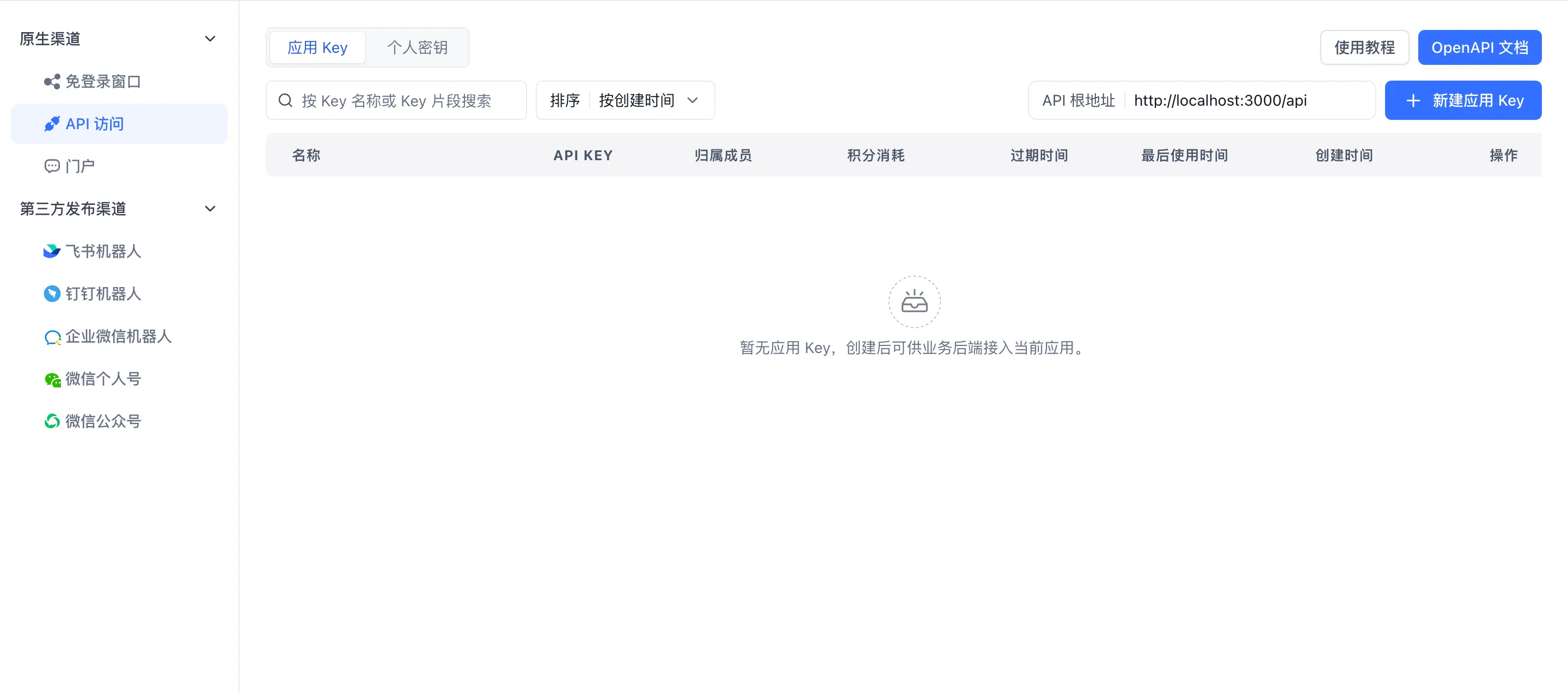
Screenshots use the Chinese interface. Under API access, select App key, then click Create app key.
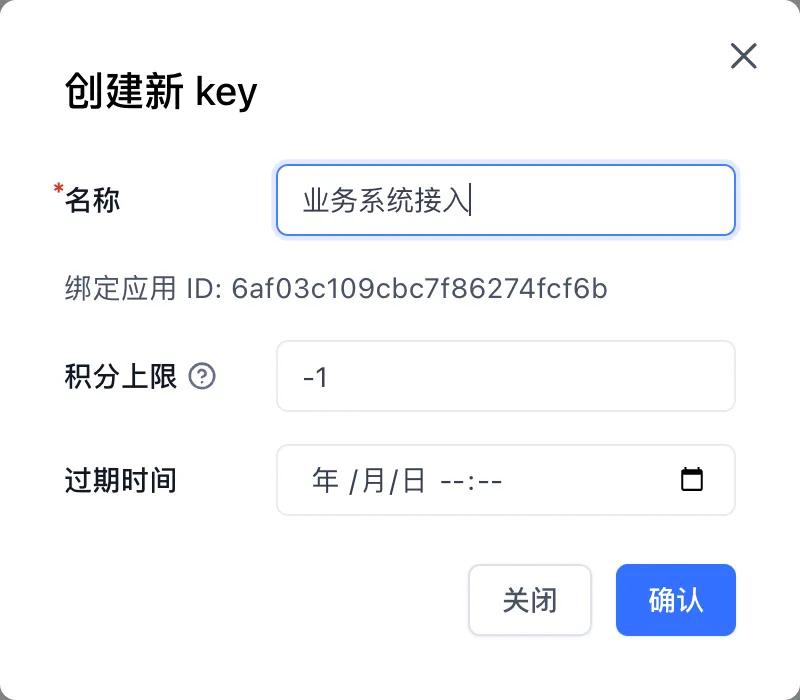
The key is bound to the current app. Set a name for your backend integration and configure a points limit and expiration time as needed.
export FASTGPT_BASE_URL='http://localhost:3000/api'
export FASTGPT_APP_KEY='YOUR_APP_API_KEY'
FASTGPT_BASE_URL includes /api. Append /v1/chat/completions for chat requests and /core/chat/... for chat history requests. Do not add /v1 to every endpoint.
2. Map your users
Pass a stable user identifier from your platform as customUid. You do not need to create a FastGPT team member for every user.
| Field | Purpose | Example |
|---|---|---|
| App key | Authorizes calls to the bound FastGPT app | Key stored on your backend |
customUid | Identifies the user of your product | tenant-01:user-42 |
chatId | Identifies one session; reuse it across chat turns | UUID generated by your backend |
- Derive
customUidfrom the authenticated user on your backend. Do not trust a user ID submitted directly by the frontend. - Use a different
chatIdfor each new session. Keep bothchatIdandcustomUidunchanged when continuing a session. - For multi-tenant products, include a tenant prefix to distinguish users with the same local ID.
customUidaccepts up to 1024 characters. For a new session, omitting it or passing an empty string uses the default identity. Once the first turn establishes the identity, continuing a session cannot change, omit, or clear its boundcustomUid. It is mutually exclusive withauthProxy; app keys do not supportauthProxy.
customUid identifies a user; it does not authenticate them. An app key authorizes access to its bound app. Your backend must still check which sessions each user owns.
Store a mapping in your database for the user's session list and subsequent ownership checks:
{
  "tenantId": "tenant-01",
  "userId": "user-42",
  "fastgptAppId": "YOUR_FASTGPT_APP_ID",
  "customUid": "tenant-01:user-42",
  "chatId": "de305d54-75b4-431b-adb2-eb6b9e546014"
}
fastgptAppId records the binding in your product. Requests made with the app key can still omit appId.
3. Start and continue a chat
For a new session, generate a chatId, record its owner, and send the first request from your backend:
curl "$FASTGPT_BASE_URL/v1/chat/completions" \
  --header "Authorization: Bearer $FASTGPT_APP_KEY" \
  --header 'Content-Type: application/json' \
  --data '{
    "chatId": "de305d54-75b4-431b-adb2-eb6b9e546014",
    "customUid": "tenant-01:user-42",
    "stream": false,
    "messages": [{ "role": "user", "content": "Hello, what can you help me with?" }]
  }'
Before continuing, verify that the current user owns the chatId. Reuse the same chatId and customUid, and replace messages with the new question. FastGPT loads the saved history for that session; a normal continuation does not require resending the full history.
For streaming text, set stream to true and handle or forward the SSE stream on your backend. Finish the current turn before starting the next one. See your deployment's API documentation for event details.
Using the OpenAI SDK
To use the OpenAI Python SDK, install the package:
python -m pip install openaiReuse FASTGPT_BASE_URL and FASTGPT_APP_KEY from above. Append /v2 to the /api base URL so the SDK calls /api/v2/chat/completions:
import os
from uuid import uuid4

from openai import OpenAI

client = OpenAI(
    api_key=os.environ["FASTGPT_APP_KEY"],
    base_url=f"{os.environ['FASTGPT_BASE_URL'].rstrip('/')}/v2",
)

chat_id = str(uuid4())
custom_uid = "tenant-01:user-42"  # Derive this from the authenticated user on your backend.

response = client.chat.completions.create(
    model="fastgpt",
    messages=[{"role": "user", "content": "Hello, what can you help me with?"}],
    stream=False,
    extra_body={"chatId": chat_id, "customUid": custom_uid},
)

print(response.choices[0].message.content)
The SDK requires model as a placeholder; the FastGPT app configuration selects the actual model. Pass FastGPT's chatId and customUid fields through extra_body. Generate and save chat_id when starting a session. For subsequent turns, reuse the same chat_id and custom_uid, replacing only the current messages.
4. Display and manage chat history
Session list
Call getHistories from your backend with the current user's customUid, derived from their authenticated identity. An app key lists API-source sessions for its bound app; customUid further limits the list to that user:
curl "$FASTGPT_BASE_URL/core/chat/history/getHistories" \
  --header "Authorization: Bearer $FASTGPT_APP_KEY" \
  --header 'Content-Type: application/json' \
  --data '{ "customUid": "tenant-01:user-42", "offset": 0, "pageSize": 20 }'
Omitting customUid lists API sessions across users of the app, which is useful for backend administration. Do not return that unfiltered list to an end user. Your own session mappings remain useful for ownership checks and product-specific features. For message counts, feedback, or date-based reporting, use POST /core/app/logs/list with outLinkUids: ["tenant-01:user-42"].
Read data.list and data.total from the response. Entries include chatId, title, customTitle, and updateTime. Increase offset for the next page, or use pageNum starting at 1. If both are provided, offset takes precedence.
Open a session
Check ownership on your backend before loading its messages:
curl "$FASTGPT_BASE_URL/core/chat/record/getPaginationRecords" \
  --header "Authorization: Bearer $FASTGPT_APP_KEY" \
  --header 'Content-Type: application/json' \
  --data '{
    "chatId": "de305d54-75b4-431b-adb2-eb6b9e546014",
    "customUid": "tenant-01:user-42",
    "offset": 0,
    "pageSize": 20
  }'
Read messages from data.list and use data.total to determine whether more are available. The obj field distinguishes Human and AI messages. The value field contains text, files, and other content blocks; render each block according to its type.
Other common operations
These endpoints also accept an app key without appId. Check session ownership on your backend and pass the current user's customUid with each operation. In Query parameters, customUid is a plain string; encode it with a tool such as URLSearchParams.
| Operation | Method and path (relative to /api) | Main parameters |
|---|---|---|
| Rename or pin a session | PUT /core/chat/history/updateHistory | chatId and customTitle or top in the body |
| Delete one session | DELETE /core/chat/history/delHistory | chatId in the query |
| Read session running statuses in bulk | POST /core/chat/history/getHistoryStatus | chatIds in the body |
With customUid, clearHistories clears only that user's API-source sessions. Without it, the request clears API-source sessions across the app. Batch physical deletion is a log management endpoint that does not process user identity parameters; do not use it for an end user's “clear my sessions” action.
Troubleshoot in FastGPT
Open the app's Chat logs and search for the session ID:
- User: Shows
customUid, which maps back to a user of your product. - Authorizer: Identifies the team member used for authorization. This column is hidden by default; enable it in the column settings.
- Call channel / Channel name: Identifies the API call and its key channel.
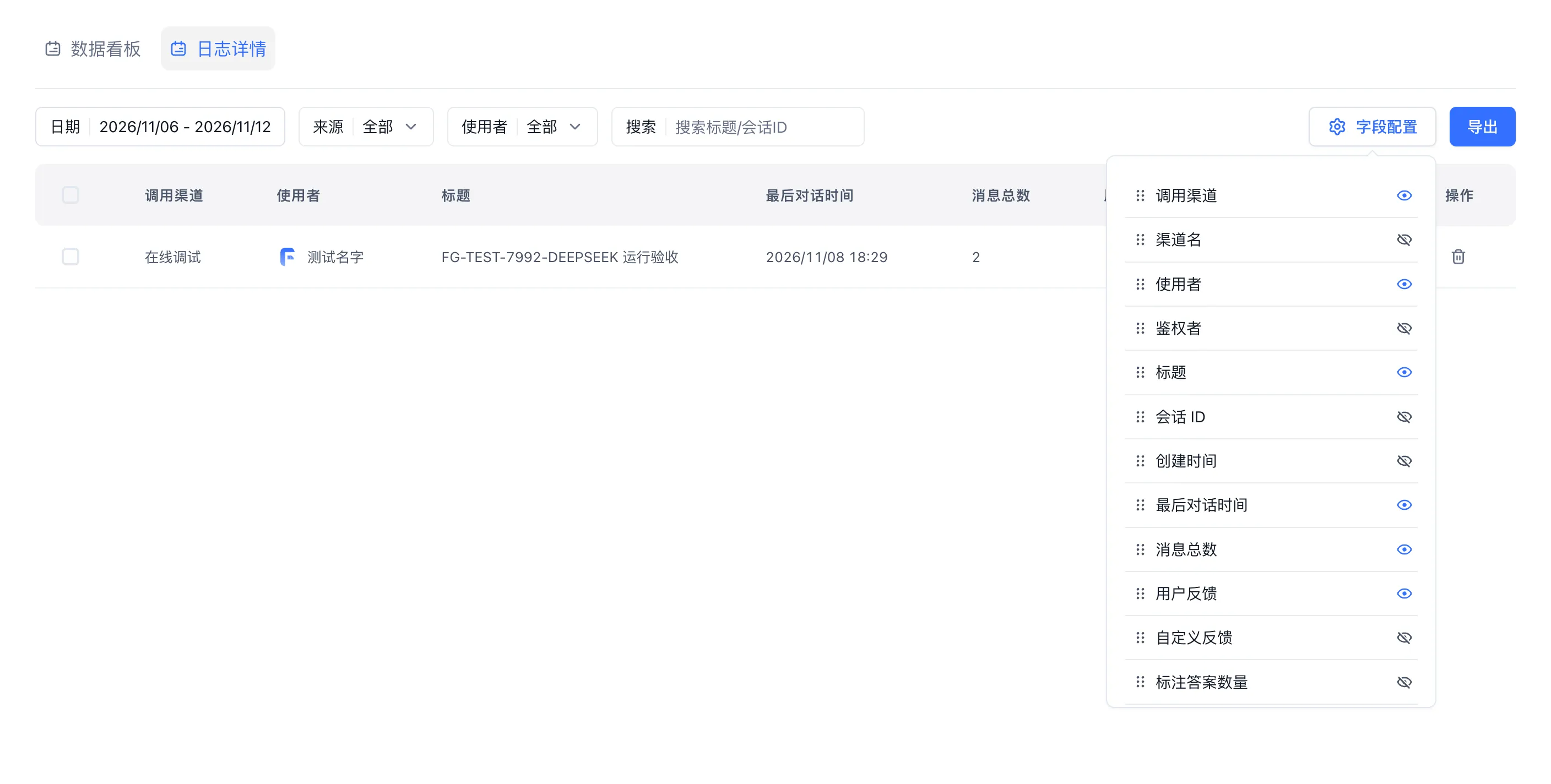
The screenshot uses test records. In Field Configuration, show Authorizer and Channel name when needed.
Start with creating a session, continuing it, reading messages, and deleting it. Then add file uploads, feedback, and streaming. Use your deployment's System OpenAPI documentation for field and response details.
Last updated
Interactive Suspension Resume and File Input API Flow
Handle workflow interactive suspension (User Selection and Form Input), checkpoint resumption, global variables, and multimodal file inputs via OpenAPI.
Integrate knowledge ingestion and retrieval
Use generated API contracts for import, processing checks, retrieval testing, and application association.