
Chat Agent V2 Dedicated Configuration
Master authoring system prompts, attaching toolsets, configuring virtual machine sandboxes, and mounting skills in Chat Agent V2.
Chat Agent V2 is an autonomous agent application equipped with dynamic planning and tool execution capabilities. Through the dedicated settings panel, builders define the agent's persona boundaries, tool availability, isolated runtime environments, and skill bundles.
1. Structured System Prompts
System prompts provide the operational blueprint guiding the agent's goal decomposition and decision loops:
- Role and Boundaries: Define the agent's domain expertise, tone, and service scope explicitly.
- Decision Workflow: Instruct the model to execute tasks following the ReAct sequence: "Reason → Select Tool → Observe Output → Conclude".
- Formatting Standards: Establish structured presentation criteria (such as enumerated bullet points, preserved quantitative data, and markdown tables).
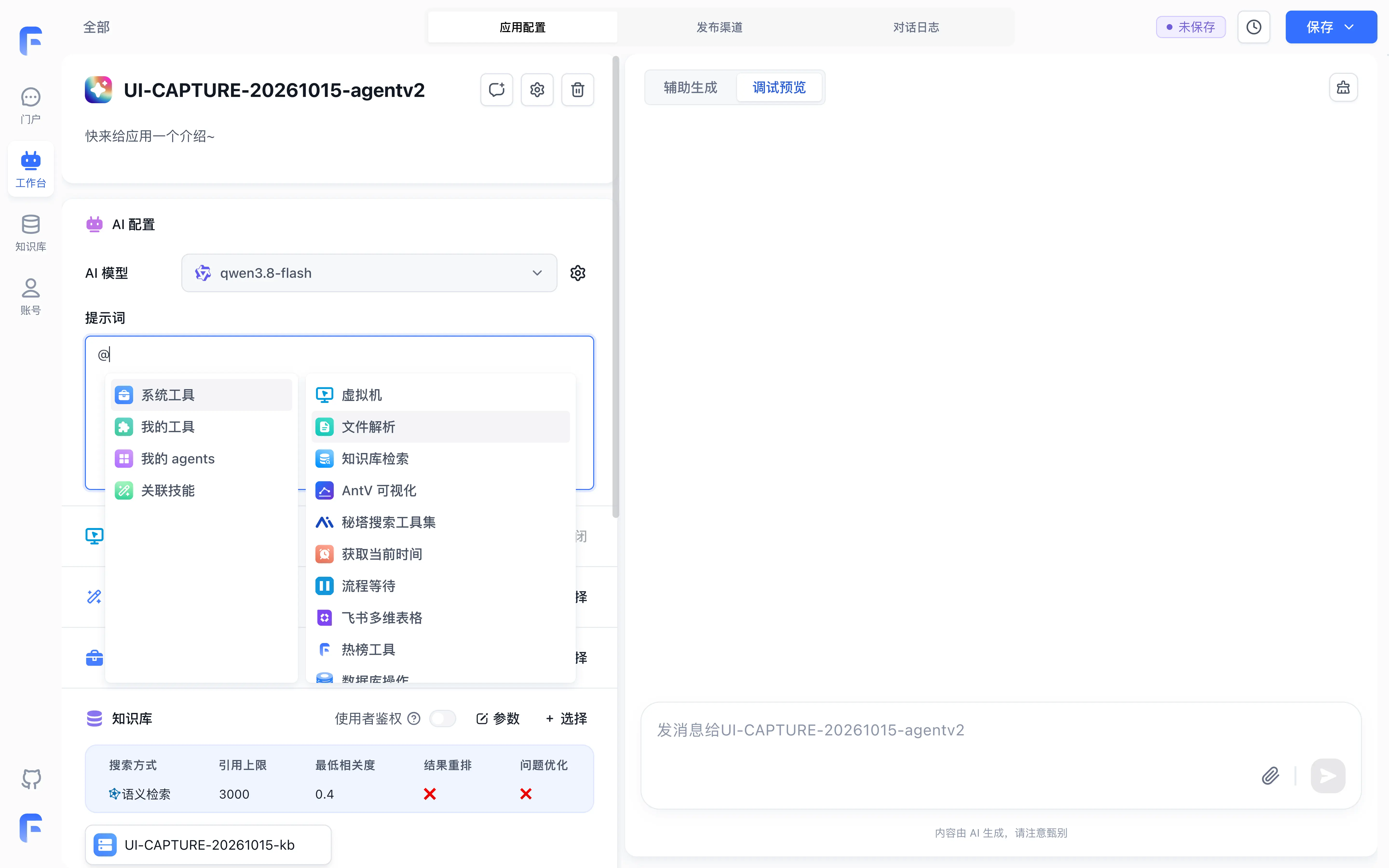
- In-Prompt Resource Citations: Type
@within the prompt input to open the resource menu, grouped into System Tools (including Sandbox, FileParsing, DatasetSearch, and other system tools), Tools, My Agents, and Skills.
Click the settings button next to the model selector to open the model configuration dialog, which provides Model selection and Reasoning settings in Chat Agent V2. For general model parameter descriptions, refer to AI Settings.
2. Tools and Datasets Configuration
In the left configuration panel, Tools and Datasets are configured in dedicated sections:
- Attaching Tools: In the Tools section, click + Choose, then click Add on tools in the System Tools, Tools (Workflow Tools, HTTP Tools, and MCP Tools), and Agent tabs of the modal.
- Associating Datasets: In the separate Dataset section below, click + Choose to link team Datasets and click Parameters to configure search mode, citation limits, and relevance thresholds.
3. Virtual Machine Execution Sandbox
Enabling the Virtual Machine (VM) grants the agent programmatic code execution, persistent file I/O, and container isolation:
- Prerequisites: A connected backend sandbox service (such as OpenSandbox or Sealos Devbox) and active virtual machine quotas in your workspace.
- Execution Characteristics: The platform allocates a dedicated session directory
sessions/<chatId>per conversation. Files uploaded by users mount directly into the sandbox for Python/Node analysis. - For detailed lifecycle and startup script setup, review the Virtual Machine Sandbox Guide.
4. Skill Extension Packages
Skills are versioned bundles combining expert instructions, reference templates, and executable scripts:
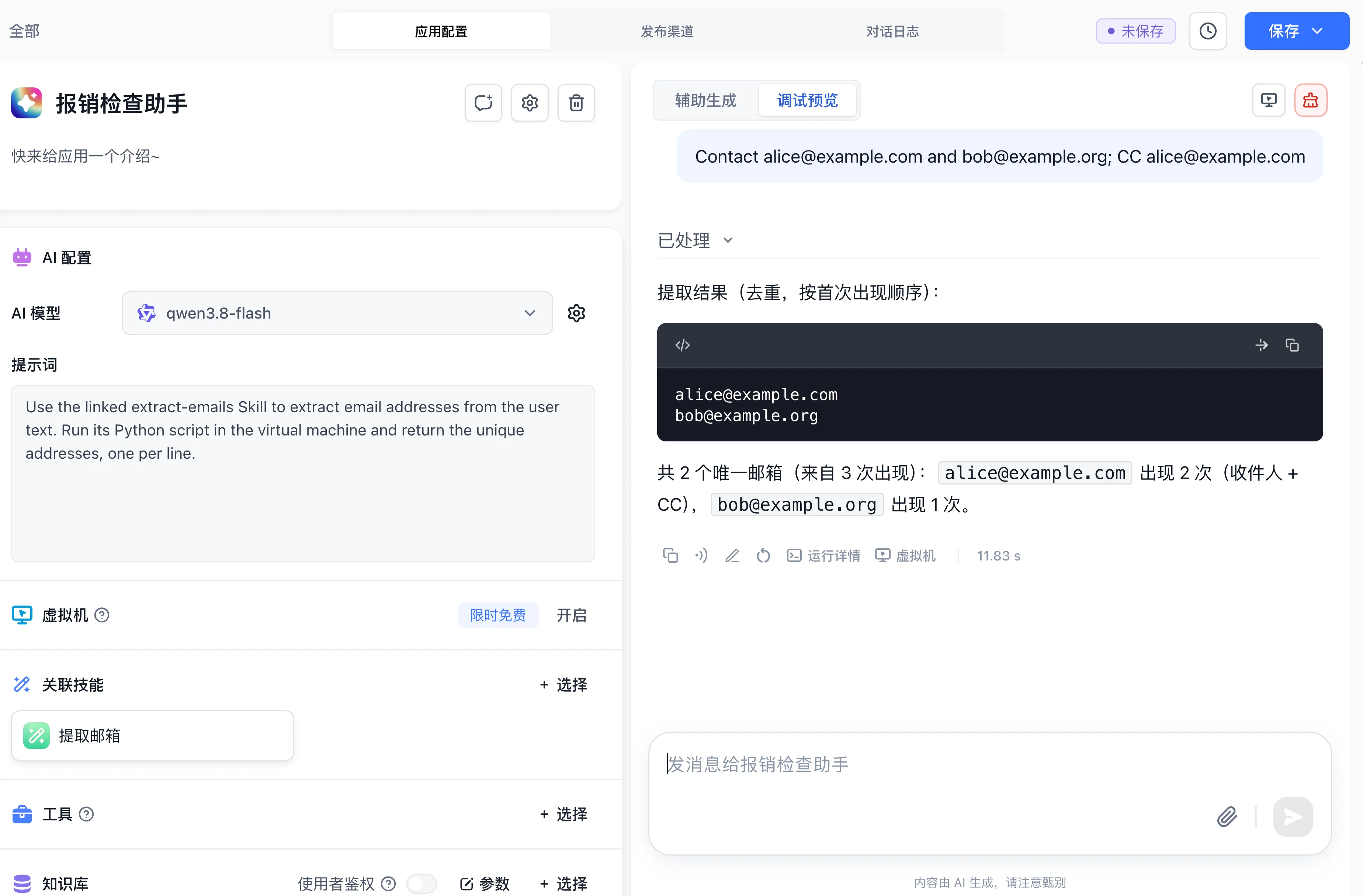
- Attaching Published Skills: In the Skills section, click + Choose, then click Add next to a published skill in your team.
- Environment Automation: Attaching a skill activates the virtual machine sandbox automatically and injects the corresponding skill package.
- To author, debug, and publish custom skills, consult Skill Development and Debugging.
Next Steps
- Debugging and tracing: Explore Agent Debugging and Trace Inspection.
- Sandbox architecture: Study Virtual Machine Lifecycle.
- Workflow orchestration: Review Workflow Agent Node.
Last updated