
Chat API
FastGPT OpenAPI Chat Interface
How to Get AppId
You can find the AppId in your application details URL.
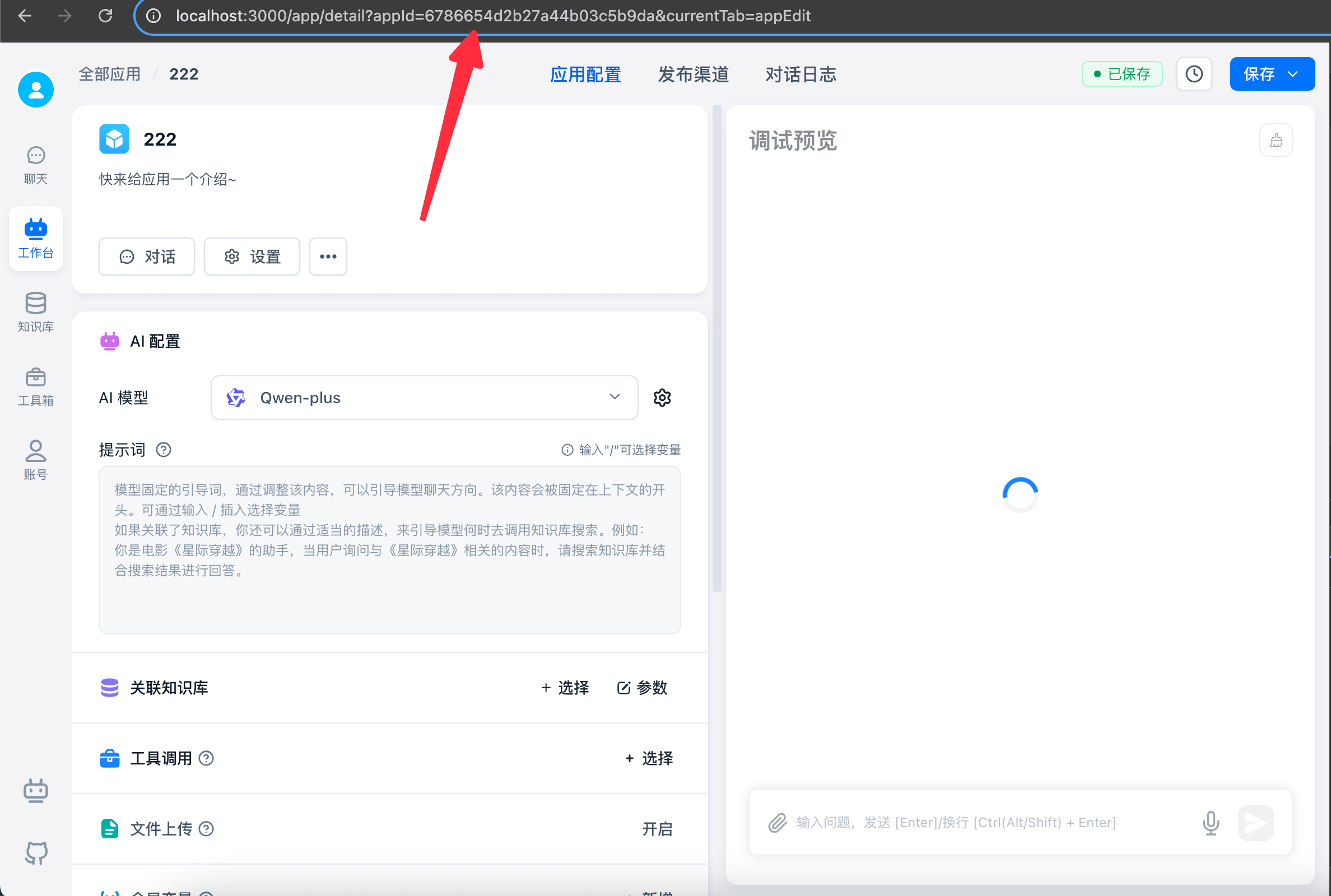
Start a Conversation
- This API requires an application-specific API key, or it will return an error.
- Some packages require adding
v1to theBaseUrl. If you get a 404 error, try addingv1and retry.
Request Chat Agent and Workflow
The v1 chat API is compatible with the GPT interface! If you're using the standard GPT official API, you can access FastGPT by simply changing the BaseUrl and Authorization. However, note these rules:
- Parameters like
modelandtemperatureare ignored. These values are determined by your workflow configuration. - Won't return actual
Tokenconsumed. If needed, setdetail=trueand manually calculatetokensfromresponseData.
Request
curl --location --request POST 'http://localhost:3000/api/v1/chat/completions' \
--header 'Authorization: Bearer fastgpt-xxxxxx' \
--header 'Content-Type: application/json' \
--data-raw '{
"chatId": "my_chatId",
"stream": false,
"detail": false,
"responseChatItemId": "my_responseChatItemId",
"variables": {
    "uid": "asdfadsfasfd2323",
    "name": "张三"
},
"messages": [
    {
        "role": "user",
        "content": "导演是谁"
    }
]
}'- Only
messagesdiffers slightly; other parameters are the same. - Direct file uploads are not supported. Upload files to your object storage and provide the URL.
curl --location --request POST 'http://localhost:3000/api/v1/chat/completions' \
--header 'Authorization: Bearer fastgpt-xxxxxx' \
--header 'Content-Type: application/json' \
--data-raw '{
    "chatId": "abcd",
    "stream": false,
    "messages": [
        {
            "role": "user",
            "content": [
                {
                    "type": "text",
                    "text": "导演是谁"
                },
                {
                    "type": "image_url",
                    "image_url": {
                        "url": "图片链接"
                    }
                },
                {
                    "type": "file_url",
                    "name": "文件名",
                    "url": "文档链接,支持 txt md html word pdf ppt csv excel"
                }
            ]
        }
    ]
}'- headers.Authorization: Bearer [apikey]
- chatId: string | undefined 。
- 为时(不传入),不使用 FastGpt 提供的上下文功能,完全通过传入的 messages 构建上下文。
- 为
非空字符串时,意味着使用 chatId 进行对话,自动从 FastGpt 数据库取历史记录,并使用 messages数组最后一个内容作为用户问题,其余 message 会被忽略。请自行确保 chatId唯一,长度小于250,通常可以是自己系统的对话框ID。
- messages: 结构与GPT接口 chat模式一致。
- responseChatItemId: string | undefined 。如果传入,则会将该值作为本次对话的响应消息的 ID,FastGPT会自动将该 ID 存入数据库。请确保,在当前
chatId下,responseChatItemId是唯一的。 - detail:是否返回中间值(模块状态,响应的完整结果等),
stream模式下会通过event进行区分,非stream模式结果保存在responseData中。 - variables: 模块变量,一个对象,会替换模块中,输入框内容里的
[key]
Response
{
  "id": "adsfasf",
  "model": "",
  "usage": {
    "prompt_tokens": 1,
    "completion_tokens": 1,
    "total_tokens": 1
  },
  "choices": [
    {
      "message": {
        "role": "assistant",
        "content": "电影《铃芽之旅》的导演是新海诚。"
      },
      "finish_reason": "stop",
      "index": 0
    }
  ]
}
data: {"id":"","object":"","created":0,"choices":[{"delta":{"content":""},"index":0,"finish_reason":null}]}
data: {"id":"","object":"","created":0,"choices":[{"delta":{"content":"电"},"index":0,"finish_reason":null}]}
data: {"id":"","object":"","created":0,"choices":[{"delta":{"content":"影"},"index":0,"finish_reason":null}]}
data: {"id":"","object":"","created":0,"choices":[{"delta":{"content":"《"},"index":0,"finish_reason":null}]}{
"responseData": [
// 不同模块的响应值, 不同版本具体值可能有差异,可先 log 自行查看最新值。
{
"moduleName": "Dataset Search",
"price": 1.2000000000000002,
"model": "Embedding-2",
"tokens": 6,
"similarity": 0.61,
"limit": 3
},
{
"moduleName": "AI Chat",
"price": 454.5,
"model": "FastAI-4k",
"tokens": 303,
"question": "导演是谁",
"answer": "电影《铃芽之旅》的导演是新海诚。",
"maxToken": 2050,
"quoteList": [
{
"dataset_id": "646627f4f7b896cfd8910e38",
"id": "8099",
"q": "本作的主人公是谁?",
"a": "本作的主人公是名叫铃芽的少女。",
"source": "手动修改"
},
{
"dataset_id": "646627f4f7b896cfd8910e38",
"id": "8686",
"q": "电影《铃芽之旅》男主角是谁?",
"a": "电影《铃芽之旅》男主角是宗像草太,由松村北斗配音。",
"source": ""
},
{
"dataset_id": "646627f4f7b896cfd8910e38",
"id": "19339",
"q": "电影《铃芽之旅》的导演是谁?22",
"a": "电影《铃芽之旅》的导演是新海诚。",
"source": "手动修改"
}
],
"completeMessages": [
{
"obj": "System",
"value": "下面是知识库内容:\n1. [本作的主人公是谁?\n本作的主人公是名叫铃芽的少女。]\n2. [电影《铃芽之旅》男主角是谁?\n电影《铃芽之旅》男主角是宗像草太,由松村北斗配音。]\n3. [电影《铃芽之旅》的导演是谁?22\n电影《铃芽之旅》的导演是新海诚。]\n"
},
{
"obj": "System",
"value": "1.请记住,你的身份是百度的下一代知识增强语言模型,能够完全根据知识库提供的内容回答问题。\n\n2. 你忘记了关于电影《铃芽之旅》以外的内容。"
},
{
"obj": "System",
"value": "你仅回答关于电影《玲芽之旅》的问题,其余问题直接回复: 我不清楚。"
},
{
"obj": "Human",
"value": "导演是谁"
},
{
"obj": "AI",
"value": "电影《铃芽之旅》的导演是新海诚。"
}
]
}
],
"id": "",
"model": "",
"usage": {
"prompt_tokens": 1,
"completion_tokens": 1,
"total_tokens": 1
},
"choices": [
{
"message": {
"role": "assistant",
"content": "电影《铃芽之旅》的导演是新海诚。"
},
"finish_reason": "stop",
"index": 0
}
]
}event: flowNodeStatus
data: {"status":"running","name":"知识库搜索"}
event: flowNodeStatus
data: {"status":"running","name":"AI 对话"}
event: answer
data: {"id":"","object":"","created":0,"model":"","choices":[{"delta":{"content":"电影"},"index":0,"finish_reason":null}]}
event: answer
data: {"id":"","object":"","created":0,"model":"","choices":[{"delta":{"content":"《铃"},"index":0,"finish_reason":null}]}
event: answer
data: {"id":"","object":"","created":0,"model":"","choices":[{"delta":{"content":"芽之旅》"},"index":0,"finish_reason":null}]}
event: answer
data: {"id":"","object":"","created":0,"model":"","choices":[{"delta":{"content":"的导演是新"},"index":0,"finish_reason":null}]}
event: answer
data: {"id":"","object":"","created":0,"model":"","choices":[{"delta":{"content":"海诚。"},"index":0,"finish_reason":null}]}
event: answer
data: {"id":"","object":"","created":0,"model":"","choices":[{"delta":{},"index":0,"finish_reason":"stop"}]}
event: answer
data: [DONE]
event: flowResponses
data: [{"moduleName":"知识库搜索","moduleType":"datasetSearchNode","runningTime":1.78},{"question":"导演是谁","quoteList":[{"id":"654f2e49b64caef1d9431e8b","q":"电影《铃芽之旅》的导演是谁?","a":"电影《铃芽之旅》的导演是新海诚!","indexes":[{"type":"qa","dataId":"3515487","text":"电影《铃芽之旅》的导演是谁?","_id":"654f2e49b64caef1d9431e8c","defaultIndex":true}],"datasetId":"646627f4f7b896cfd8910e38","collectionId":"653279b16cd42ab509e766e8","sourceName":"data (81).csv","sourceId":"64fd3b6423aa1307b65896f6","score":0.8935586214065552},{"id":"6552e14c50f4a2a8e632af11","q":"导演是谁?","a":"电影《铃芽之旅》的导演是新海诚。","indexes":[{"defaultIndex":true,"type":"qa","dataId":"3644565","text":"导演是谁?\n电影《铃芽之旅》的导演是新海诚。","_id":"6552e14dde5cc7ba3954e417"}],"datasetId":"646627f4f7b896cfd8910e38","collectionId":"653279b16cd42ab509e766e8","sourceName":"data (81).csv","sourceId":"64fd3b6423aa1307b65896f6","score":0.8890955448150635},{"id":"654f34a0b64caef1d946337e","q":"本作的主人公是谁?","a":"本作的主人公是名叫铃芽的少女。","indexes":[{"type":"qa","dataId":"3515541","text":"本作的主人公是谁?","_id":"654f34a0b64caef1d946337f","defaultIndex":true}],"datasetId":"646627f4f7b896cfd8910e38","collectionId":"653279b16cd42ab509e766e8","sourceName":"data (81).csv","sourceId":"64fd3b6423aa1307b65896f6","score":0.8738770484924316},{"id":"654f3002b64caef1d944207a","q":"电影《铃芽之旅》男主角是谁?","a":"电影《铃芽之旅》男主角是宗像草太,由松村北斗配音。","indexes":[{"type":"qa","dataId":"3515538","text":"电影《铃芽之旅》男主角是谁?","_id":"654f3002b64caef1d944207b","defaultIndex":true}],"datasetId":"646627f4f7b896cfd8910e38","collectionId":"653279b16cd42ab509e766e8","sourceName":"data (81).csv","sourceId":"64fd3b6423aa1307b65896f6","score":0.8607980012893677},{"id":"654f2fc8b64caef1d943fd46","q":"电影《铃芽之旅》的编剧是谁?","a":"新海诚是本片的编剧。","indexes":[{"defaultIndex":true,"type":"qa","dataId":"3515550","text":"电影《铃芽之旅》的编剧是谁?22","_id":"654f2fc8b64caef1d943fd47"}],"datasetId":"646627f4f7b896cfd8910e38","collectionId":"653279b16cd42ab509e766e8","sourceName":"data (81).csv","sourceId":"64fd3b6423aa1307b65896f6","score":0.8468944430351257}],"moduleName":"AI 对话","moduleType":"chatNode","runningTime":1.86}]event取值:
- answer: 返回给客户端的文本(最终会算作回答)
- fastAnswer: 指定回复返回给客户端的文本(最终会算作回答)
- toolCall: 执行工具
- toolParams: 工具参数
- toolResponse: 工具返回
- flowNodeStatus: 运行到的节点状态
- flowResponses: 节点完整响应
- updateVariables: 更新变量
- error: 报错
Response
If your workflow contains interactive nodes, still call this API with detail=true. Get interactive node config from event=interactive data. For stream=false, find type=interactive elements in choices.
When calling a workflow with interactive nodes, if an interactive node is encountered, it returns immediately with this info:
{
  "interactive": {
    "type": "userSelect",
    "params": {
      "description": "测试",
      "userSelectOptions": [
        {
          "value": "Confirm",
          "key": "option1"
        },
        {
          "value": "Cancel",
          "key": "option2"
        }
      ]
    }
  }
}
{
"interactive": {
"type": "userInput",
"params": {
"description": "测试",
"inputForm": [
{
"type": "input",
"key": "测试 1",
"label": "测试 1",
"description": "",
"value": "",
"defaultValue": "",
"valueType": "string",
"required": false,
"list": [
{
"label": "",
"value": ""
}
]
},
{
"type": "numberInput",
"key": "测试 2",
"label": "测试 2",
"description": "",
"value": "",
"defaultValue": "",
"valueType": "number",
"required": false,
"list": [
{
"label": "",
"value": ""
}
]
}
]
}
}
}Continue Interactive Node
After receiving interactive node info, render your UI to guide user input or selection. Then call this API again to continue the workflow. Use this format:
For user selection, simply pass the selected value to messages.
curl --location --request POST 'http://localhost:3000/api/v1/chat/completions' \
--header 'Authorization: Bearer fastgpt-xxx' \
--header 'Content-Type: application/json' \
--data-raw '{
    "stream": true,
    "detail": true,
    "chatId":"22222231",
    "messages": [
        {
            "role": "user",
            "content": "Confirm"
        }
    ]
}'
Form input is slightly more complex. Serialize the input as a JSON string for messages. Object keys match form keys, values are user inputs. Ensure chatId is consistent.
curl --location --request POST 'http://localhost:3000/api/v1/chat/completions' \
--header 'Authorization: Bearer fastgpt-xxxx' \
--header 'Content-Type: application/json' \
--data-raw '{
    "stream": true,
    "detail": true,
    "chatId":"22231",
    "messages": [
        {
            "role": "user",
            "content": "{\"测试 1\":\"这是输入框的内容\",\"测试 2\":666}"
        }
    ]
}'
Request Plugin
Plugin API is identical to chat API, with slight parameter differences:
- 调用插件Type的应用时,接口默认为
detail模式。 - No need to pass
chatIdsince plugins run only once. - No need to pass
messages. - Pass
variablesto represent plugin inputs. - Get plugin outputs from
pluginData.
Request
curl --location --request POST 'http://localhost:3000/api/v1/chat/completions' \
--header 'Authorization: Bearer test-xxxxx' \
--header 'Content-Type: application/json' \
--data-raw '{
    "stream": false,
    "chatId": "test",
    "variables": {
        "query":"你好" # 我的插件输入有一个参数,变量名叫 query
    }
}'
Response
- Find plugin output by locating
moduleType=pluginOutputinresponseData. ItspluginOutputcontains the output. - Stream output is still available via
choices.
{
  "responseData": [
    {
      "nodeId": "fdDgXQ6SYn8v",
      "moduleName": "AI 对话",
      "moduleType": "chatNode",
      "totalPoints": 0.685,
      "model": "FastAI-3.5",
      "tokens": 685,
      "query": "你好",
      "maxToken": 2000,
      "historyPreview": [
        {
          "obj": "Human",
          "value": "你好"
        },
        {
          "obj": "AI",
          "value": "你好!有什么可以帮助你的吗?欢迎向我提问。"
        }
      ],
      "contextTotalLen": 14,
      "runningTime": 1.73
    },
    {
      "nodeId": "pluginOutput",
      "moduleName": "插件输出",
      "moduleType": "pluginOutput",
      "totalPoints": 0,
      "pluginOutput": {
        "result": "你好!有什么可以帮助你的吗?欢迎向我提问。"
      },
      "runningTime": 0
    }
  ],
  "newVariables": {
    "query": "你好"
  },
  "id": "safsafsa",
  "model": "",
  "usage": {
    "prompt_tokens": 1,
    "completion_tokens": 1,
    "total_tokens": 1
  },
  "choices": [
    {
      "message": {
        "role": "assistant",
        "content": "你好!有什么可以帮助你的吗?欢迎向我提问。"
      },
      "finish_reason": "stop",
      "index": 0
    }
  ]
}- Get plugin output by deserializing the
event=flowResponsesstring into an array. FindmoduleType=pluginOutputelement; itspluginOutputcontains the output. - Stream output works the same as chat API.
event: flowNodeStatus
data: {"status":"running","name":"AI 对话"}

event: answer
data: {"id":"","object":"","created":0,"model":"","choices":[{"delta":{"role":"assistant","content":""},"index":0,"finish_reason":null}]}

event: answer
data: {"id":"","object":"","created":0,"model":"","choices":[{"delta":{"role":"assistant","content":"你"},"index":0,"finish_reason":null}]}

event: answer
data: {"id":"","object":"","created":0,"model":"","choices":[{"delta":{"role":"assistant","content":"好"},"index":0,"finish_reason":null}]}

event: answer
data: {"id":"","object":"","created":0,"model":"","choices":[{"delta":{"role":"assistant","content":"!"},"index":0,"finish_reason":null}]}

event: answer
data: {"id":"","object":"","created":0,"model":"","choices":[{"delta":{"role":"assistant","content":"有"},"index":0,"finish_reason":null}]}

event: answer
data: {"id":"","object":"","created":0,"model":"","choices":[{"delta":{"role":"assistant","content":"什"},"index":0,"finish_reason":null}]}

event: answer
data: {"id":"","object":"","created":0,"model":"","choices":[{"delta":{"role":"assistant","content":"么"},"index":0,"finish_reason":null}]}

event: answer
data: {"id":"","object":"","created":0,"model":"","choices":[{"delta":{"role":"assistant","content":"可以"},"index":0,"finish_reason":null}]}

event: answer
data: {"id":"","object":"","created":0,"model":"","choices":[{"delta":{"role":"assistant","content":"帮"},"index":0,"finish_reason":null}]}

event: answer
data: {"id":"","object":"","created":0,"model":"","choices":[{"delta":{"role":"assistant","content":"助"},"index":0,"finish_reason":null}]}

event: answer
data: {"id":"","object":"","created":0,"model":"","choices":[{"delta":{"role":"assistant","content":"你"},"index":0,"finish_reason":null}]}

event: answer
data: {"id":"","object":"","created":0,"model":"","choices":[{"delta":{"role":"assistant","content":"的"},"index":0,"finish_reason":null}]}

event: answer
data: {"id":"","object":"","created":0,"model":"","choices":[{"delta":{"role":"assistant","content":"吗"},"index":0,"finish_reason":null}]}

event: answer
data: {"id":"","object":"","created":0,"model":"","choices":[{"delta":{"role":"assistant","content":"?"},"index":0,"finish_reason":null}]}

event: answer
data: {"id":"","object":"","created":0,"model":"","choices":[{"delta":{"role":"assistant","content":""},"index":0,"finish_reason":null}]}

event: answer
data: {"id":"","object":"","created":0,"model":"","choices":[{"delta":{},"index":0,"finish_reason":"stop"}]}

event: answer
data: [DONE]

event: flowResponses
data: [{"nodeId":"fdDgXQ6SYn8v","moduleName":"AI 对话","moduleType":"chatNode","totalPoints":0.033,"model":"FastAI-3.5","tokens":33,"query":"你好","maxToken":2000,"historyPreview":[{"obj":"Human","value":"你好"},{"obj":"AI","value":"你好!有什么可以帮助你的吗?"}],"contextTotalLen":2,"runningTime":1.42},{"nodeId":"pluginOutput","moduleName":"插件输出","moduleType":"pluginOutput","totalPoints":0,"pluginOutput":{"result":"你好!有什么可以帮助你的吗?"},"runningTime":0}]
event取值:
- answer: 返回给客户端的文本(最终会算作回答)
- fastAnswer: 指定回复返回给客户端的文本(最终会算作回答)
- toolCall: 执行工具
- toolParams: 工具参数
- toolResponse: 工具返回
- flowNodeStatus: 运行到的节点状态
- flowResponses: 节点完整响应
- updateVariables: 更新变量
- error: 报错
Chat CRUD
- The following APIs can be called with any
API Key. - 4.8.12 and above
Important Fields
- chatId - The ID of a conversation window under an application
- dataId - The ID of a chat record under a conversation window
History
History
curl --location --request POST 'http://localhost:3000/api/core/chat/history/getHistories' \
--header 'Authorization: Bearer [apikey]' \
--header 'Content-Type: application/json' \
--data-raw '{
    "appId": "appId",
    "offset": 0,
    "pageSize": 20,
    "source": "api"
}'- appId - Application ID
- offset - Offset (starting position)
- pageSize - Number of records
- source - Chat source. source=api means get API-created chats only (excludes web UI chats)
{
  "code": 200,
  "statusText": "",
  "message": "",
  "data": {
    "list": [
      {
        "chatId": "usdAP1GbzSGu",
        "updateTime": "2024-10-13T03:29:05.779Z",
        "appId": "66e29b870b24ce35330c0f08",
        "customTitle": "",
        "title": "你好",
        "top": false
      },
      {
        "chatId": "lC0uTAsyNBlZ",
        "updateTime": "2024-10-13T03:22:19.950Z",
        "appId": "66e29b870b24ce35330c0f08",
        "customTitle": "",
        "title": "测试",
        "top": false
      }
    ],
    "total": 2
  }
}
Update Chat Title
curl --location --request POST 'http://localhost:3000/api/core/chat/history/updateHistory' \
--header 'Authorization: Bearer [apikey]' \
--header 'Content-Type: application/json' \
--data-raw '{
    "appId": "appId",
    "chatId": "chatId",
    "customTitle": "自定义标题"
}'- appId - Application ID
- chatId - History ID
- customTitle - Custom chat title
{
  "code": 200,
  "statusText": "",
  "message": "",
  "data": null
}
Pin / Unpin
curl --location --request POST 'http://localhost:3000/api/core/chat/history/updateHistory' \
--header 'Authorization: Bearer [apikey]' \
--header 'Content-Type: application/json' \
--data-raw '{
    "appId": "appId",
    "chatId": "chatId",
    "top": true
}'- appId - Application ID
- chatId - History ID
- top - Whether to pin. true = pin, false = unpin
{
  "code": 200,
  "statusText": "",
  "message": "",
  "data": null
}
History
curl --location --request DELETE 'http://localhost:3000/api/core/chat/history/delHistory?chatId=[chatId]&appId=[appId]' \
--header 'Authorization: Bearer [apikey]'- appId - Application ID
- chatId - History ID
{
  "code": 200,
  "statusText": "",
  "message": "",
  "data": null
}
History
Only clears chat history created via API Key. Does not clear history from web UI, share links, or other sources.
curl --location --request DELETE 'http://localhost:3000/api/core/chat/history/clearHistories?appId=[appId]' \
--header 'Authorization: Bearer [apikey]'- appId - Application ID
{
  "code": 200,
  "statusText": "",
  "message": "",
  "data": null
}
Chat Records
Operations on chat records under a specific chatId.
Get Chat Initialization Info
curl --location --request GET 'http://localhost:3000/api/core/chat/init?appId=[appId]&chatId=[chatId]' \
--header 'Authorization: Bearer [apikey]'- appId - Application ID
- chatId - History ID
{
  "code": 200,
  "statusText": "",
  "message": "",
  "data": {
    "chatId": "sPVOuEohjo3w",
    "appId": "66e29b870b24ce35330c0f08",
    "variables": {},
    "app": {
      "chatConfig": {
        "questionGuide": true,
        "ttsConfig": {
          "type": "web"
        },
        "whisperConfig": {
          "open": false,
          "autoSend": false,
          "autoTTSResponse": false
        },
        "chatInputGuide": {
          "open": false,
          "textList": [],
          "customUrl": ""
        },
        "instruction": "",
        "variables": [],
        "fileSelectConfig": {
          "canSelectFile": true,
          "canSelectImg": true,
          "maxFiles": 10
        },
        "_id": "66f1139aaab9ddaf1b5c596d",
        "welcomeText": ""
      },
      "chatModels": ["GPT-4o-mini"],
      "name": "测试",
      "avatar": "/imgs/app/avatar/workflow.svg",
      "intro": "",
      "type": "advanced",
      "pluginInputs": []
    }
  }
}
Chat Records
curl --location --request POST 'http://localhost:3000/api/core/chat/getPaginationRecords' \
--header 'Authorization: Bearer [apikey]' \
--header 'Content-Type: application/json' \
--data-raw '{
    "appId": "appId",
    "chatId": "chatId",
    "offset": 0,
    "pageSize": 10,
    "loadCustomFeedbacks": true
}'- appId - Application ID
- chatId - History ID
- offset - Offset
- pageSize - Number of records
- loadCustomFeedbacks - Whether to load custom feedbacks (optional)
{
  "code": 200,
  "statusText": "",
  "message": "",
  "data": {
    "list": [
      {
        "_id": "670b84e6796057dda04b0fd2",
        "dataId": "jzqdV4Ap1u004rhd2WW8yGLn",
        "obj": "Human",
        "value": [
          {
            "text": {
              "content": "你好"
            }
          }
        ],
        "customFeedbacks": []
      },
      {
        "_id": "670b84e6796057dda04b0fd3",
        "dataId": "x9KQWcK9MApGdDQH7z7bocw1",
        "obj": "AI",
        "value": [
          {
            "text": {
              "content": "你好!有什么我可以帮助你的吗?"
            }
          }
        ],
        "customFeedbacks": [],
        "totalQuoteList": [],
        "totalRunningTime": 2.42,
        "useAgentSandbox": false
      }
    ],
    "total": 2
  }
}
Chat Records
curl --location --request GET 'http://localhost:3000/api/core/chat/getResData?appId=[appId]&chatId=[chatId]&dataId=[dataId]' \
--header 'Authorization: Bearer [apikey]'- appId - Application ID
- chatId - Chat ID
- dataId - Chat Record ID
{
  "code": 200,
  "statusText": "",
  "message": "",
  "data": [
    {
      "id": "mVlxkz8NfyfU",
      "nodeId": "448745",
      "moduleName": "common:core.module.template.work_start",
      "moduleType": "workflowStart",
      "runningTime": 0
    },
    {
      "id": "b3FndAdHSobY",
      "nodeId": "z04w8JXSYjl3",
      "moduleName": "AI 对话",
      "moduleType": "chatNode",
      "runningTime": 1.22,
      "totalPoints": 0.02475,
      "model": "GPT-4o-mini",
      "tokens": 75,
      "query": "测试",
      "maxToken": 2000,
      "historyPreview": [
        {
          "obj": "Human",
          "value": "你好"
        },
        {
          "obj": "AI",
          "value": "你好!有什么我可以帮助你的吗?"
        },
        {
          "obj": "Human",
          "value": "测试"
        },
        {
          "obj": "AI",
          "value": "测试成功!请问你有什么具体的问题或者需要讨论的话题吗?"
        }
      ],
      "contextTotalLen": 4
    }
  ]
}
Chat Records
curl --location --request DELETE 'http://localhost:3000/api/core/chat/item/delete?contentId=[contentId]&chatId=[chatId]&appId=[appId]' \
--header 'Authorization: Bearer [apikey]'- appId - Application ID
- chatId - History ID
- contentId - Chat Record ID
{
  "code": 200,
  "statusText": "",
  "message": "",
  "data": null
}
Like / Unlike
curl --location --request POST 'http://localhost:3000/api/core/chat/feedback/updateUserFeedback' \
--header 'Authorization: Bearer [apikey]' \
--header 'Content-Type: application/json' \
--data-raw '{
    "appId": "appId",
    "chatId": "chatId",
    "dataId": "dataId",
    "userGoodFeedback": "yes"
}'- appId - Application ID
- chatId - History ID
- dataId - Chat Record ID
- userGoodFeedback - User feedback when liking (optional). Omit to unlike.
{
  "code": 200,
  "statusText": "",
  "message": "",
  "data": null
}
Dislike / Remove Dislike
curl --location --request POST 'http://localhost:3000/api/core/chat/feedback/updateUserFeedback' \
--header 'Authorization: Bearer [apikey]' \
--header 'Content-Type: application/json' \
--data-raw '{
    "appId": "appId",
    "chatId": "chatId",
    "dataId": "dataId",
    "userBadFeedback": "yes"
}'- appId - Application ID
- chatId - History ID
- dataId - Chat Record ID
- userBadFeedback - User feedback when disliking (optional). Omit to remove dislike.
{
  "code": 200,
  "statusText": "",
  "message": "",
  "data": null
}
Question Suggestions
4.8.16 New API (version
The new question suggestion feature requires both appId and chatId parameters. It automatically fetches the last 6 conversation turns from chatId as context.
curl --location --request POST 'http://localhost:3000/api/core/ai/agent/v2/createQuestionGuide' \
--header 'Authorization: Bearer [apikey]' \
--header 'Content-Type: application/json' \
--data-raw '{
    "appId": "appId",
    "chatId": "chatId",
    "questionGuide": {
        "open": true,
        "model": "GPT-4o-mini",
        "customPrompt": "你是一个智能助手,请根据用户的问题生成猜你想问。"
    }
}'| 参数名 | 类型 | 必填 | 说明 |
|---|---|---|---|
| appId | string | ✅ | 应用 Id |
| chatId | string | ✅ | 对话 Id |
| questionGuide | object | 自定义配置,不传的话,则会根据 appId,取最新发布版本的配置 |
type CreateQuestionGuideParams = OutLinkChatAuthProps & {
  appId: string;
  chatId: string;
  questionGuide?: {
    open: boolean;
    model?: string;
    customPrompt?: string;
  };
};
{
"code": 200,
"statusText": "",
"message": "",
"data": ["你对AI有什么看法?", "想了解AI的应用吗?", "你希望AI能做什么?"]
}File Updated