
S3 Issues Troubleshooting
Diagnose object storage connection and upload errors in self-hosted FastGPT
1. Log shows ERR level "Failed to ensure (external) public/private bucket exists"
1.1 Symptom
Startup logs report Failed to ensure public/private bucket exists (internal endpoint STORAGE_S3_ENDPOINT) or Failed to ensure external public/private bucket exists (external endpoint STORAGE_EXTERNAL_ENDPOINT), accompanied by Error: getaddrinfo ENOTFOUND or Deserialization error:
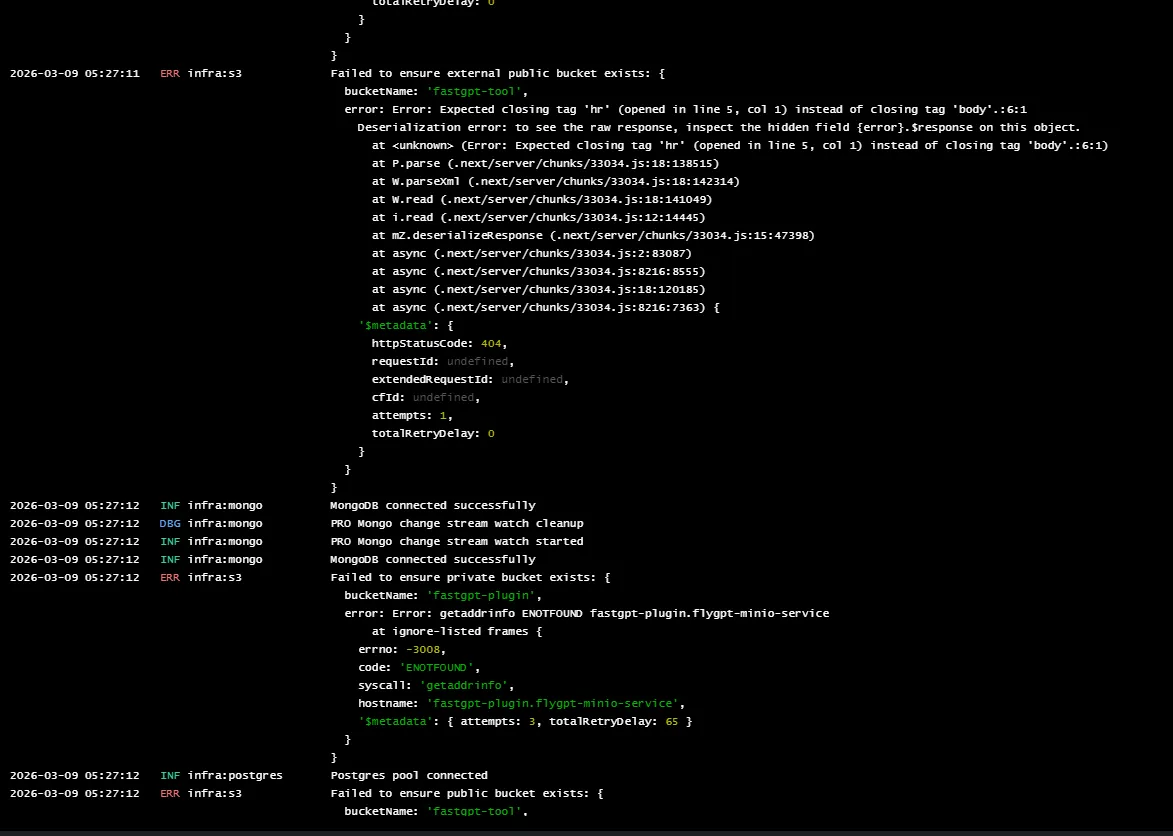
1.2 Cause
- The hostname in
STORAGE_S3_ENDPOINTorSTORAGE_EXTERNAL_ENDPOINTcannot be resolved from the container, or the client uses virtual-hosted bucket addressing (<bucket>.<endpoint>) that the storage service does not support. - The external endpoint points to a reverse proxy or gateway that returns a non-S3 response (such as an HTML 404 page), causing XML deserialization to fail.
1.3 Resolution
- Check DNS resolution and network reachability for both
STORAGE_S3_ENDPOINTandSTORAGE_EXTERNAL_ENDPOINTfrom thefastgpt-appcontainer. - For services that use path-style addressing (such as RustFS, MinIO, or IP-based endpoints), set
STORAGE_S3_FORCE_PATH_STYLEtotrueso the client avoids prepending the bucket name as a subdomain.
2. Upload conversation file / Dataset file error
2.1 Symptom (SignatureDoesNotMatch)
File uploads fail with SignatureDoesNotMatch. FastGPT's backend proxies file uploads to object storage, so the Nginx in front of FastGPT does not participate in S3 signing. Inspect the reverse proxy sitting between FastGPT and the object storage service.
2.2 Cause
- The reverse proxy in front of the object storage (such as Nginx) does not preserve the original
Hostheader (including port), so the host received by object storage differs from theSTORAGE_S3_ENDPOINThost FastGPT used for signing.
2.3 Resolution
- Set
proxy_set_header Host $http_host;in the Nginx in front of the object storage to preserve the original host and port used to sign the request (Nginx's$hostvariable strips the port).
Edit on GitHub
Last updated