
Enhanced PDF Parsing Configuration
Configure enhanced PDF parsing in FastGPT v4.18.0+ using SoMark, Doc2X, TextIn, or a self-hosted parsing service
This guide applies to FastGPT v4.18.0 and later. Starting in v4.18.0, enhanced PDF parsing is configured directly in the Admin console and takes effect immediately upon saving without editing environment variables. For v4.17.x and earlier, see Environment Variables (Legacy).
1. Capabilities and Scope
FastGPT's built-in PDF parser extracts text streams directly, which works well for plain-text PDFs. For scanned documents, multi-column layouts, complex tables, mathematical formulas, and embedded figures, plain text extraction often produces broken lines or missing content.
With Enhanced PDF Parsing enabled, FastGPT routes PDF files to an external vision/OCR parsing service, converts them into structured Markdown, and automatically uploads extracted images to your object storage for higher retrieval and Q&A accuracy.
Once configured, enhanced parsing takes effect wherever you opt in:
- Dataset import and reprocessing: When uploading local PDF files to a Dataset (or reprocessing an existing Collection), check Enhanced PDF Parsing under Parameter Settings → File Parsing Settings.
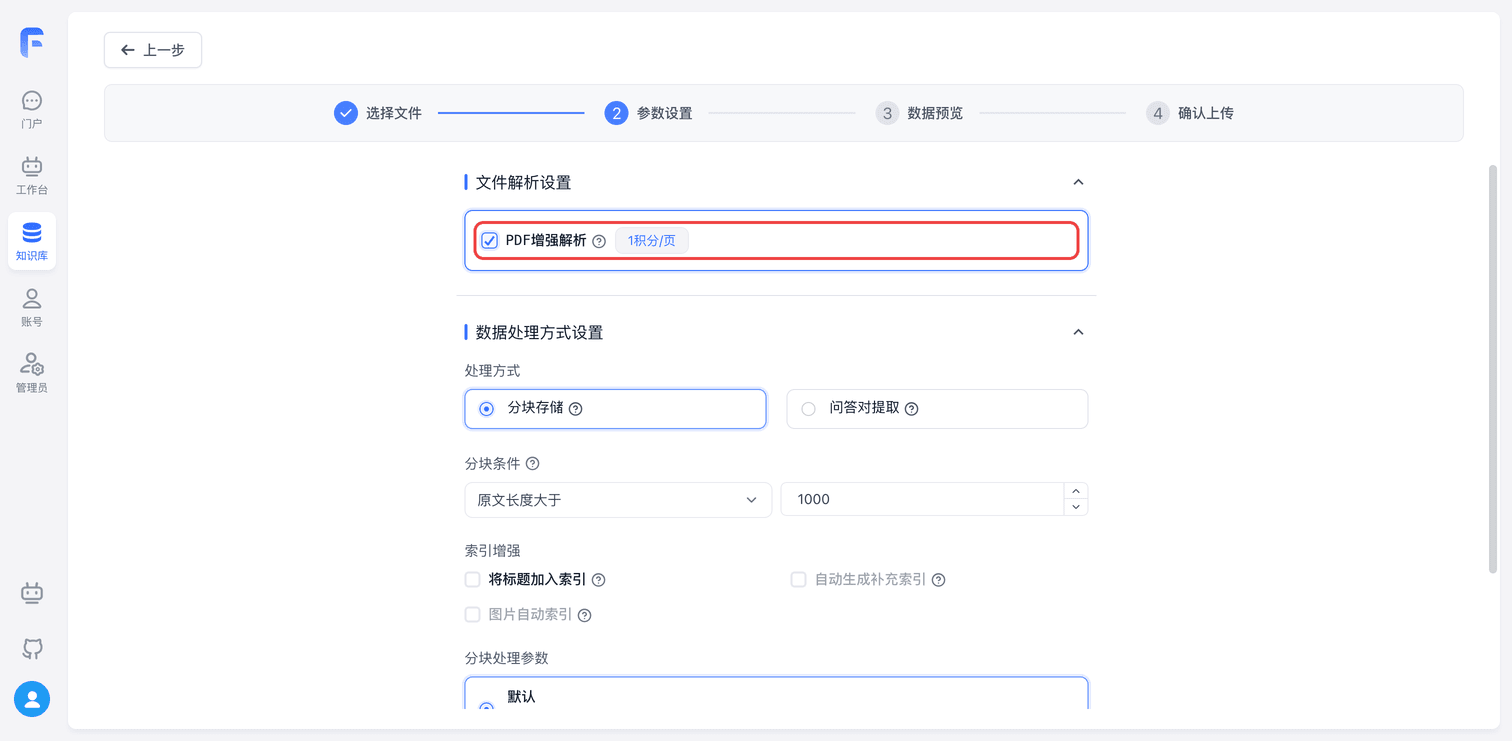
- App, Agent, and Workflow chat: Open System Config → File Upload in your App settings, enable document uploads, and check Enhanced PDF Parsing so PDFs uploaded during chat use the configured parser.
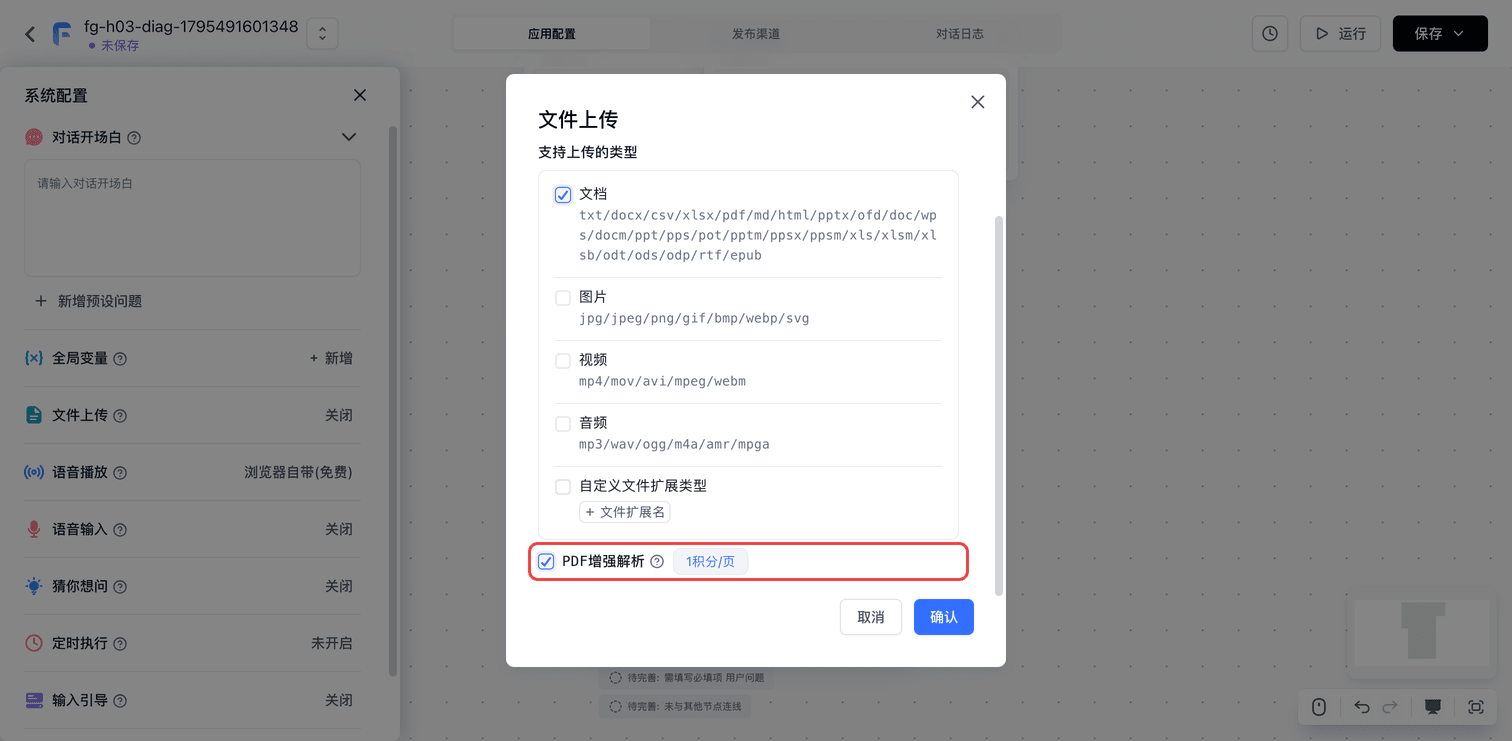
With the four PDF parsing providers covered in this guide, PDF files uploaded without the option enabled—as well as non-PDF formats—continue to use the built-in system parser. (If the optional Sangfor parser is enabled, files matching its configured extensions are routed directly to Sangfor.)
2. How to Configure (v4.18.0+)
- Sign in as the
rootadministrator and open Admin → System Settings → Core Settings (/admin/settings/core). - Scroll to the Enhanced Document Parsing section and choose a service from the Parsing Provider dropdown.
- Enter the required endpoint or credentials for your chosen provider. You can click Test in the bottom-right corner of the card to send a built-in single-page sample PDF and verify connectivity, credentials, and response format, then click Save in the top-right corner to hot-reload without restarting containers.
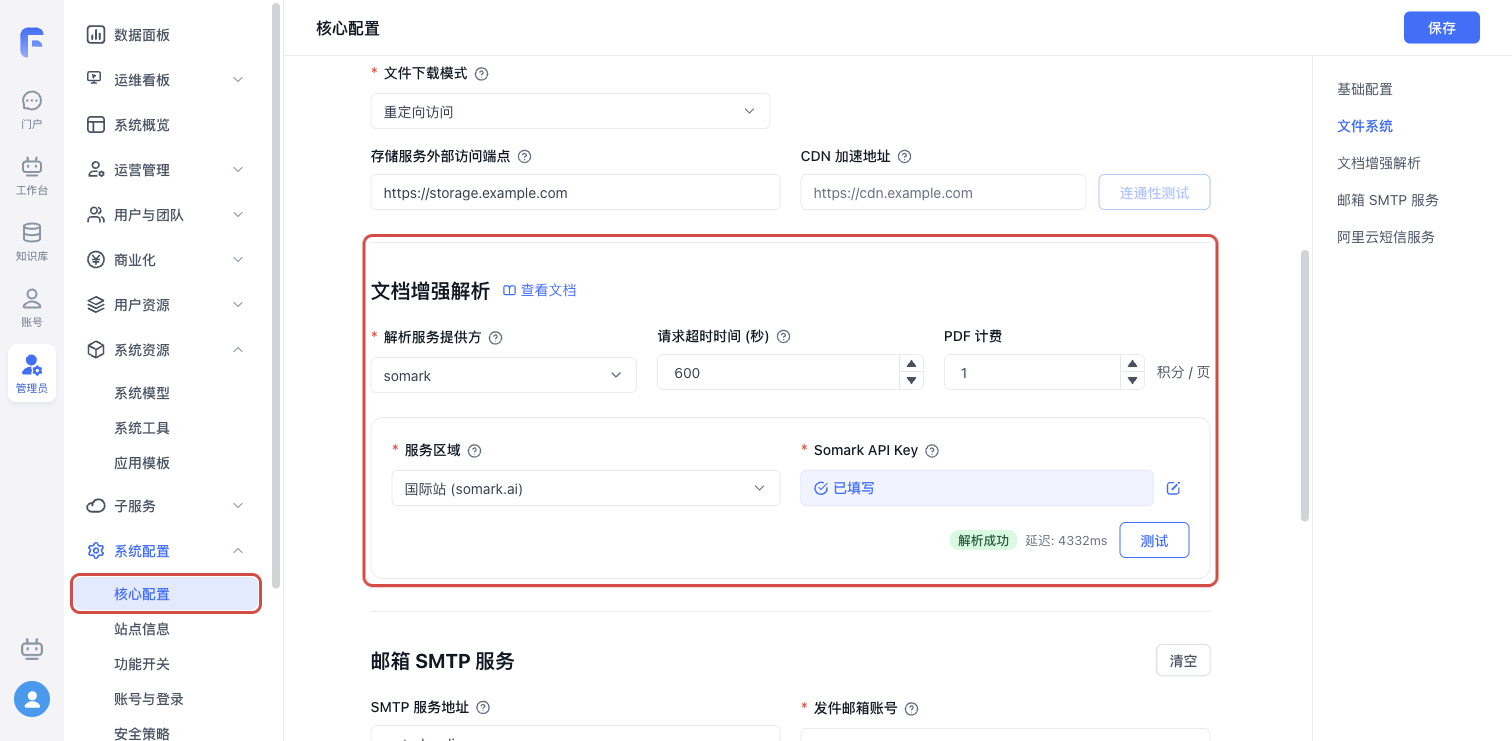
Additional settings:
- PDF Billing (Commercial Edition): When standard subscription Plans are configured, a PDF Billing (Points / page) field appears next to the provider selector. All enabled PDF parsing providers are billed uniformly based on the returned page count.
- Request Timeout (Seconds): Enhanced PDF parsing has its own timeout setting right inside the Enhanced Document Parsing section (
60–7200seconds, defaults to600seconds), independent of the built-in file parsing timeout.
3. Supported Providers
| Provider | Website / API Keys | Required Fields | Highlights & Best Fit |
|---|---|---|---|
| SoMark (Recommended) | International: somark.ai China Mainland: somark.cn | Service Region, Somark API Key | Synchronous parsing with high fidelity for text, tables, formulas, and images; supports up to 200 MB and 300 pages per file. |
| Doc2X | open.noedgeai.com/apiKeys | Doc2X Key | Asynchronous upload and polling; strong at academic formulas, multi-column layouts, and complex tables. |
| TextIn (IntSig) | www.textin.com | TextIn AppId, TextIn Secret Code | Enterprise OCR and layout reconstruction with automatic watermark removal and Markdown table conversion. |
| Custom (Self-hosted) | Local deployment guides: OXR / MinerU | Custom PDF Parser Service URL, Custom Parser Auth Key (optional) | Keeps all document data inside your private network with built-in Test end-to-end verification; ideal for self-hosted GPU environments. |
SoMark Regions
SoMark International and China Mainland accounts use separate API keys that are not interchangeable. Select the region matching where you created your key:
- International (
somark.ai): Default fallback region usinghttps://somark.ai/api/v1. - China Mainland (
somark.cn): For China Mainland accounts, usinghttps://somark.cn/api/v1. - Custom: For self-hosted deployments or internal reverse proxies implementing the SoMark
/parse/syncendpoint. Enter the base URL without/parse/sync(for example,https://somark.example.com/api/v1or an internal address such ashttp://10.0.0.10:8080/api/v1); FastGPT appends/parse/syncautomatically. Because this endpoint is administrator-configured, it is not blocked by end-user internal-IP SSRF checks. If you deploy FastGPT's official OXR Docker image (which exposes/v2/parse/file), use the Custom (Self-hosted) provider instead.
Recommended Self-Hosted Options
If you run your own GPU servers and want fully offline PDF parsing, use one of FastGPT's ready-to-deploy Docker guides:
- OXR (Recommended): Powered by SoMark OXR-1.0 with pre-bundled weights, public image access, and multi-GPU support. See Integrate OXR PDF Parsing.
- MinerU: Vision and OCR pipeline for complex PDFs. See Integrate MinerU PDF Parsing.
4. Custom Service API Specification
To build your own parser wrapper or integrate another third-party service, implement the HTTP contract below and enter the full endpoint URL in Custom PDF Parser Service URL.
Request Format
- Method:
POST - URL: FastGPT sends requests directly to the configured Custom PDF Parser Service URL as-is without appending extra paths (for example,
https://pdf-parser.example.com/v2/parse/file). - Headers:
Content-Type: multipart/form-dataAuthorization: Bearer <Custom Parser Auth Key>(included only when an auth key is configured)
- Body (FormData):
| Field | Type | Required | Description |
|---|---|---|---|
file | File (Binary) | Yes | PDF binary stream with the original filename |
Response Format
Return an application/json payload:
{
  "pages": 10,
  "markdown": "# Document Title\n\nBody text, tables, formulas, and images..."
}| Field | Type | Required | Description |
|---|---|---|---|
pages | number | Yes | Total number of pages in the PDF, used for usage tracking and per-page billing |
markdown | string | Yes | Parsed Markdown content. Embedded Base64 images (data:image/...) and accessible HTTP image URLs are automatically transferred to object storage by FastGPT |
error | string | object | No | Return a non-empty value on failure. Any non-empty error field or non-2xx HTTP status causes FastGPT to fail the parsing job |
Quick Verification with cURL
Verify your endpoint before saving it in the Admin console:
curl --fail-with-body \
  -X POST "https://pdf-parser.example.com/v2/parse/file" \
  -H "Authorization: Bearer your-service-key" \
  -F "file=@./sample.pdf"
If the response returns valid JSON containing pages and markdown, enter the URL in Core Settings and click Test to verify end-to-end parsing from the FastGPT container.
Last updated