
API File Library
Connect an external REST file service to FastGPT as an API Dataset for custom document retrieval.
Background
FastGPT supports local file imports, but in many cases users already have an existing document library. Re-importing files would create duplicate storage and complicate management. To address this, FastGPT offers an API File Library that connects to your existing document library through simple API endpoints, with flexible import options.
The API File Library lets you integrate your existing document library seamlessly. Implement a few endpoints that conform to FastGPT's API File Library specification, provide the service's baseURL and token when creating a Dataset, and you can browse and selectively import files directly from the UI.
How to Use the API File Library
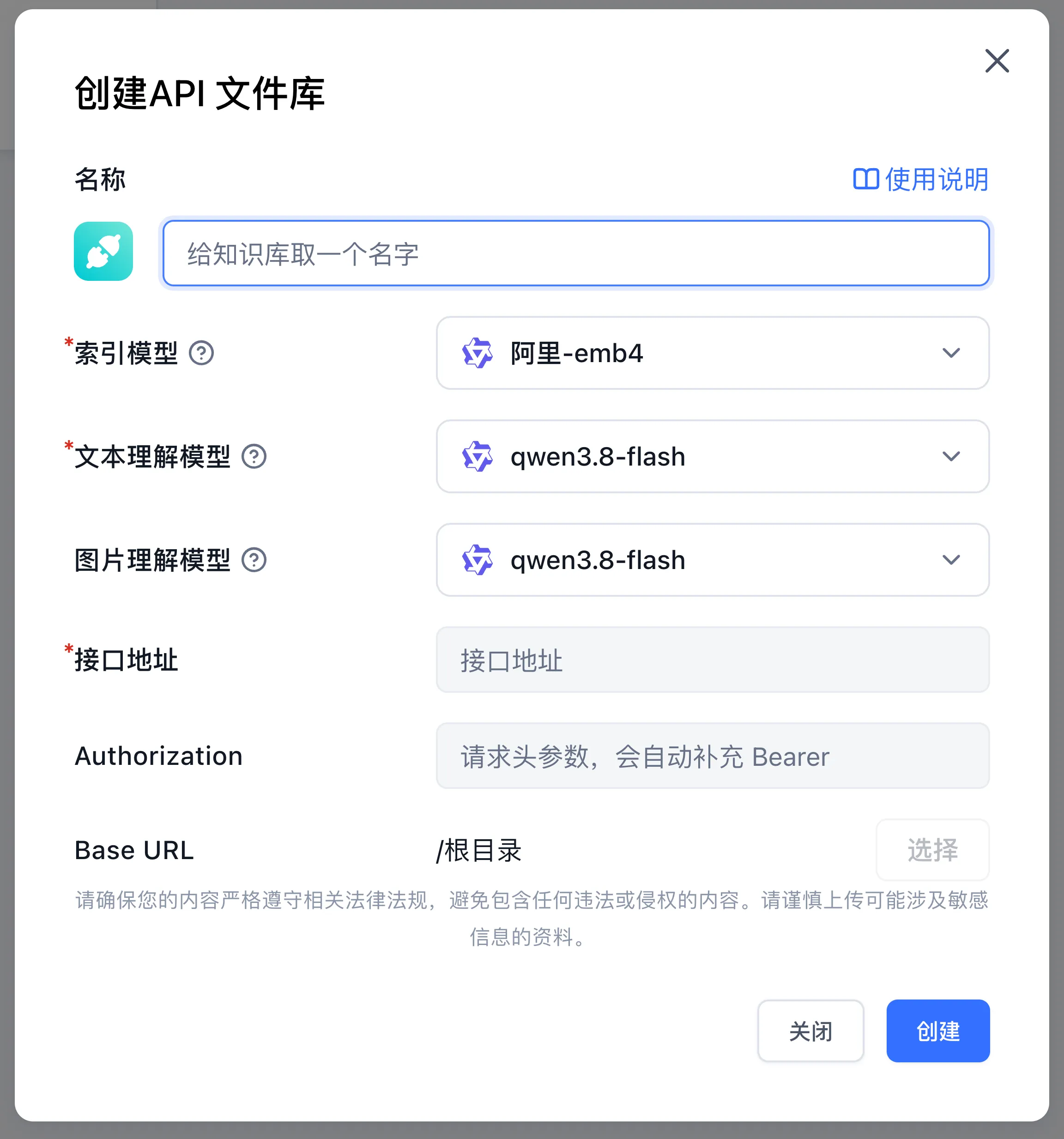
Go to Knowledge Bases → New → Third-Party Dataset → API File Library and configure the service connection parameters. Once your endpoints implement the specification below, FastGPT fetches and displays the file tree for selective import.
The creation modal fields map to the configuration parameters as follows:
| UI Field | Config Parameter | Description |
|---|---|---|
| API URL | baseURL | Root URL of your external file service (e.g., https://files.example.com/api) |
| Authorization | authorization | Authentication token; FastGPT automatically prepends Bearer (Authorization: Bearer <token>) |
| Base URL | basePath | Optional root directory (parentId) for the file tree; click Select after filling in the URL and token |
API Specification
Response format:
type ResponseType = {
  success: boolean;
  message: string;
  data: any;
};
Data types:
// Single file item in the file list
type FileListItem = {
  id: string;
  parentId: string | null;
  name: string;
  type: 'file' | 'folder';
  updateTime: Date;
  createTime: Date;
  hasChild?: boolean; // Optional, whether it has child nodes, defaults to true for folder type
};
1. Get File Tree
parentId: Optional parent ID. When omitted ornull, the configuredbasePathis used as the root directory.searchKey: Optional search keyword.
curl --location --request POST '{{baseURL}}/v1/file/list' \
--header 'Authorization: Bearer {{authorization}}' \
--header 'Content-Type: application/json' \
--data-raw '{
    "parentId": null,
    "searchKey": ""
}'
{
"success": true,
"message": "",
"data": [
{
"id": "xxxx",
"parentId": "xxxx",
"type": "file",
"name": "test.json",
"updateTime": "2024-11-26T03:05:24.759Z",
"createTime": "2024-11-26T03:05:24.759Z",
"hasChild": false
}
]
}2. Get Single File Content (Text Content or Access Link)
curl --location --request GET '{{baseURL}}/v1/file/content?id=xx' \
--header 'Authorization: Bearer {{authorization}}'
{
"success": true,
"message": "",
"data": {
"title": "Document Title",
"content": "FastGPT is an LLM-based Dataset Q&A system with out-of-the-box data processing and model calling capabilities. It also supports visual Workflow orchestration for complex Q&A scenarios!\n"
}
}- title - File title, optional. Used to display the file name. If not provided, the system falls back in order: downloaded response filename →
namereturned by/v1/file/detail→ filename parsed from thepreviewUrlpath → random ID. - content - The text content of the file, optional. Returns the complete text content of the file directly, which the system will use for indexing and retrieval.
- previewUrl - The access link to the file, optional. Provides an accessible file URL, and the system will automatically request this address to download the file and extract its content. Supports various file formats (such as PDF, Word, Markdown, etc.).
Important Notes:
- Either
contentorpreviewUrlmust be returned, at least one is required, otherwise an error will occur. - If both
contentandpreviewUrlare returned,contenttakes priority and the system will use thecontentdirectly. - When
previewUrlis returned, the system will access the link to read and parse the document content, and will cache the parsing results to improve performance.
3. Get File Read Link (for Viewing the Original)
id is the file's ID.
curl --location --request GET '{{baseURL}}/v1/file/read?id=xx' \
--header 'Authorization: Bearer {{authorization}}'
{
"success": true,
"message": "",
"data": {
"url": "xxxx"
}
}- url - File access link; opens automatically once retrieved.
4. Get File Details
id is the file's ID.
curl --location --request GET '{{baseURL}}/v1/file/detail?id=xx' \
--header 'Authorization: Bearer {{authorization}}'
{
"success": true,
"message": "",
"data": {
"id": "xxxx",
"name": "test.json",
"parentId": "xxxx",
"type": "file",
"updateTime": "2024-11-26T03:05:24.759Z",
"createTime": "2024-11-26T03:05:24.759Z"
}
}id: File ID.name: File name.parentId: Parent ID;nullindicates the root directory.type:fileorfolder.updateTime: Last update time.createTime: Creation time.
Last updated