
Text Editor
Assemble dynamic prompts and string templates by referencing workflow variables in the FastGPT Text Editor node.
Features
- Can be added multiple times
- Has external inputs
- Trigger-based execution
- Manual configuration
Function
Applies fixed text processing to inputs. Insert variable references in the text editing area to produce a string for downstream nodes.
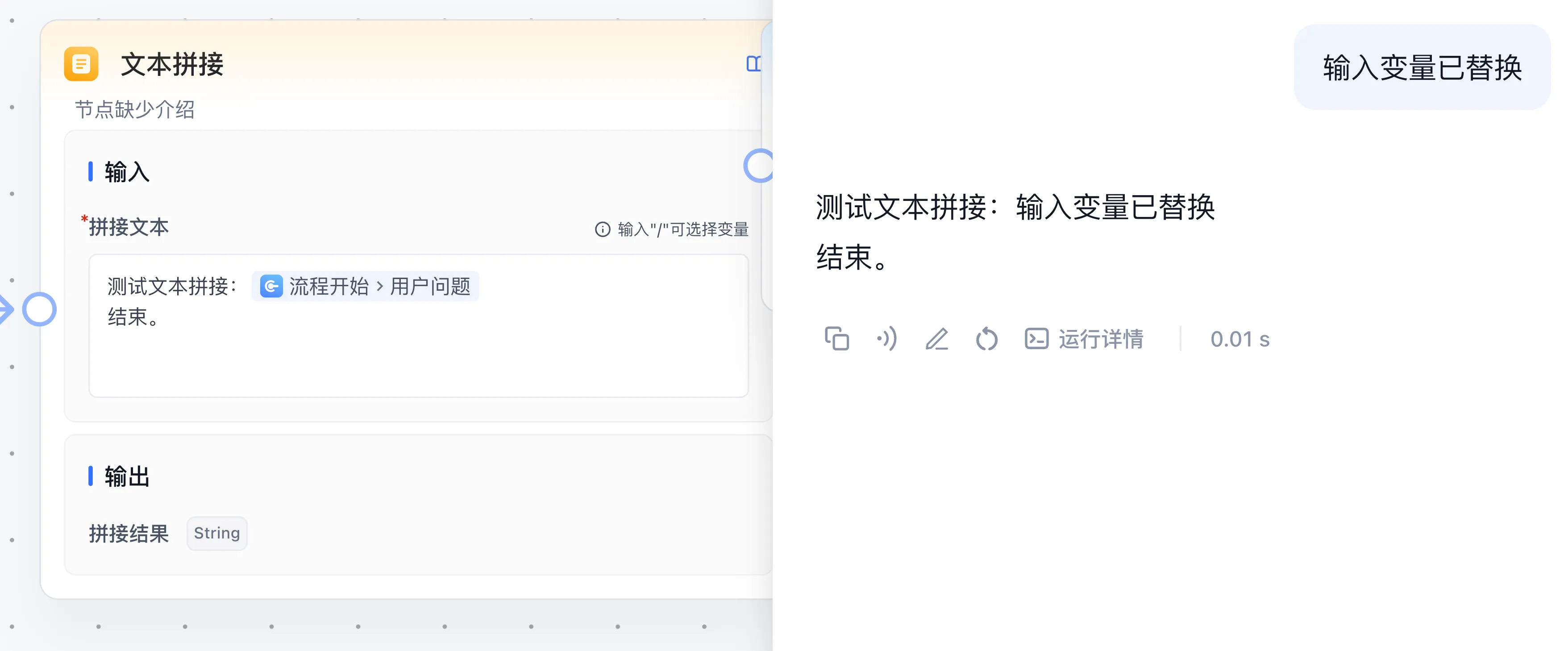
The screenshot prefixes the input with a test concatenation label and appends an ending line. The example below uses Question: to demonstrate the same variable substitution.
Use Cases
Provide custom-formatted text to any node, or preprocess system prompts for AI nodes.
Configuration and output
Write fixed text and use the editor's variable selector to insert upstream outputs or global variables. Execution returns Concatenation result as a string for AI Chat, HTTP, or Assigned Reply. Let the editor generate node references so they identify the intended source.
Example: prefix the input
- Connect Start → Text Editor → Assigned Reply.
- Enter
Question:in the concatenation text, then insert the start node's user question with the variable selector. - Reference Concatenation result in Assigned Reply.
- Debug with
Helloand expectQuestion: Hello.
For empty values or unresolved placeholders, inspect variable keys, upstream execution order, and input values. This node combines text from a template. Use Code Run for arithmetic or structured transformations.
Last updated