
HTTP Request
Configure the FastGPT Workflow HTTP Request node to call external REST APIs, pass authentication headers, and handle response payloads.
Characteristics
- Can be added multiple times
- Manual configuration
- Trigger-based execution
- Core node for integrating external services
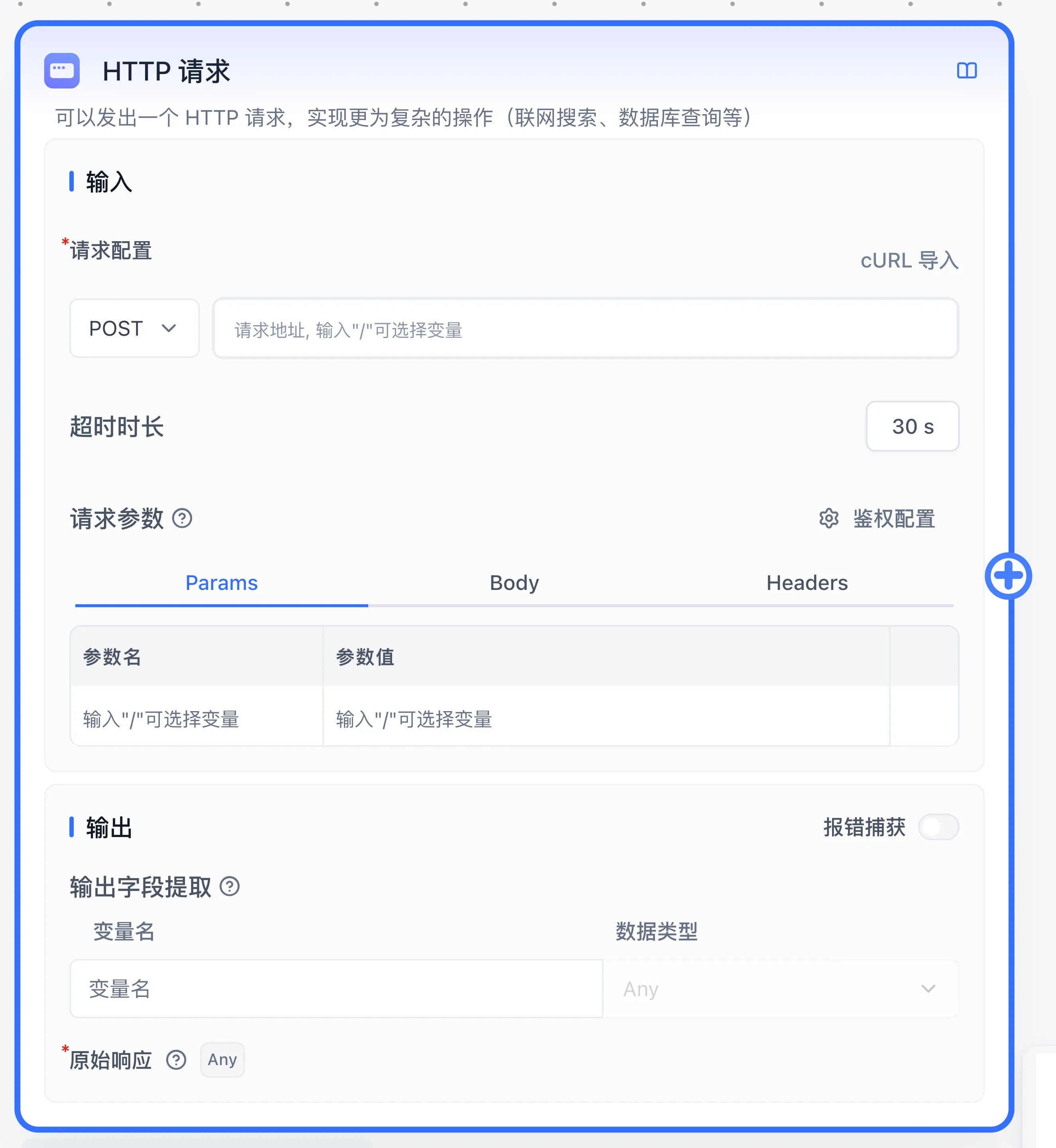
Overview
The HTTP node sends an HTTP request to a specified URL. It works similarly to tools like Postman and ApiFox.
- Params are query parameters, commonly used in GET requests.
- Body is the request body, commonly used in POST/PUT requests.
- Headers are request headers for passing additional information.
- Type
/or{inside the URL, Params, Body, or Headers inputs to open the variable picker ({{variable}}) and reference global variables, system variables, and upstream node outputs directly.
Parameter Structure
System Variables
You can reference the following runtime system variables in the URL, Headers, Params, and Body:
- userId: Current user ID
- appId: App ID
- chatId: Current conversation ID (generated in both live chats and debug runs)
- responseChatItemId: Response message ID in the current conversation (generated in both live chats and debug runs)
- variables: Global variables for the current conversation
- cTime: Current time
- histories: Chat history (defaults to max 10 entries, length is not configurable)
Params, Headers
Usage is the same as Postman and ApiFox.
Use {{key}} to reference variables. For example:
| key | value |
|---|---|
| appId | {{appId}} |
| Authorization | Bearer {{token}} |
Body
Only takes effect with certain request types.
Write a custom JSON body and use {{key}} to reference variables. For example:
{
  "string": "string",
  "number": 123,
  "boolean": true,
  "array": [1, 2, 3],
  "obj": {
    "name": "FastGPT",
    "url": "https://fastgpt.io"
  }
}
When referencing a string in the Body, wrap it in quotes: "{{string}}".
{
  "string": "{{string}}",
  "token": "Bearer {{string}}",
  "number": {{number}},
  "boolean": {{boolean}},
  "array": [{{number}}, "{{string}}"],
  "array2": {{array}},
  "object": {{obj}}
}
{
"string": "string",
"token": "Bearer string",
"number": 123,
"boolean": true,
"array": [123, "string"],
"array2": [1, 2, 3],
"object": {
"name": "FastGPT",
"url": "https://fastgpt.io"
}
}Extracting Return Values
FastGPT lets you define multiple outputs, each with a rule for extracting a value from the API response. Use JSONPath syntax to select the values you need.
See the JSONPath-Plus syntax reference.
{
  "message": "test",
  "data": {
    "user": {
      "name": "xxx",
      "age": 12
    },
    "list": [
      {
        "name": "xxx",
        "age": 50
      },
      [{ "test": 22 }]
    ],
    "psw": "xxx"
  }
}
{
"$.message": "test",
"$.data.user": { "name": "xxx", "age": 12 },
"$.data.user.name": "xxx",
"$.data.user.age": 12,
"$.data.list": [{ "name": "xxx", "age": 50 }, [{ "test": 22 }]],
"$.data.list[0]": { "name": "xxx", "age": 50 },
"$.data.list[0].name": "xxx",
"$.data.list[0].age": 50,
"$.data.list[1]": [{ "test": 22 }],
"$.data.list[1][0]": { "test": 22 },
"$.data.list[1][0].test": 22,
"$.data.psw": "xxx"
}Configure the key to extract values from FastGPT's parsed format, following standard JavaScript object access rules. For example:
- To get the
messagecontent, set thekeytomessage. - To get the user's name, set the
keytodata.user.name. - To get the second element in the list, set the
keytodata.list[1]. If you select string as the output type, it will automatically return the JSON string[ { "test": 22 } ].
Node Output Ports
- Raw response (
httpRawResponse,Any): Built-in output port containing the complete raw response payload. - Custom extracted fields: Output ports configured via JSONPath expressions.
- Error text (
error,String): Available when Error catch is enabled; outputs the failure reason string. - Full error (
system_httpRawError,Object): Available when Error catch is enabled; outputs the structured error object.
Error responses and troubleshooting
When the HTTP node receives a non-2xx response whose body lacks message or msg, the node error text includes a capped snippet of that response body (up to 2000 characters) to help troubleshoot the failure.
Auto-format Output
Starting from FastGPT v4.6.8, output formatting was added, primarily converting JSON to string. If you select string as the output type, the HTTP node will convert the corresponding key's value to a JSON string. This lets you pipe HTTP output directly into a Text Editor node, append appropriate prompts, and feed the result into AI Chat.
HTTP Service Integration Example
Here is a POST request service example:
type RequestType = {
  appId: string;
  appointment: string;
  action: 'post' | 'delete' | 'put' | 'get';
};

export async function handleAppointmentRequest(body: RequestType) {
  try {
    const { appId, appointment, action } = body;

    const parseBody = JSON.parse(appointment);
    if (action === 'get') {
      return await getRecord(appId, parseBody);
    }
    if (action === 'post') {
      return await createRecord(appId, parseBody);
    }
    if (action === 'put') {
      return await putRecord(appId, parseBody);
    }
    if (action === 'delete') {
      return await removeRecord(appId, parseBody);
    }

    return {
      response: 'Error'
    };
  } catch (err) {
    return {
      response: 'Error'
    };
  }
}
Use Cases
The HTTP node enables unlimited extensibility, such as:
- Database operations
- External data source calls
- Web searches
- Sending emails
- ....
Last updated