
Skills Overview
Learn how FastGPT packages, versions, and executes reusable AI Agent Skills inside sandbox environments.
In FastGPT, a Skill packages domain instructions (SKILL.md), scripts, reference templates, and assets into a versioned, reusable directory that Agents load and execute inside an isolated virtual machine sandbox.
What is an AI Agent "Skill"?
Under the latest ecosystem designs of mainstream AI providers, a "Skill" is defined as a persistent, reusable, and modular workflow and capability package.
For example, to compare two complex financial spreadsheets and generate an analysis, package the calculation code and report template into a Skill. In later chats, upload the spreadsheets and let the Agent use the Skill to calculate the results and format the report.
Core Design Philosophy: From Tools to Skills
An Agent combines three kinds of capability:
- Brain: Responsible for reasoning and planning (the LLM itself).
- Tools: Simple execution interfaces (such as sending a web request or running a temporary line of code), resembling the AI's "hands and feet".
- Skills: Providing the complete "operational knowledge and professional logic" (Know-how).
A skill is typically a modular package encapsulating instruction markdown (how to do it) and executable scripts (actually doing it). If a tool is a "screwdriver" in your toolbox, then a skill is a "furniture assembly guide". The AI can automatically grab this guide from its skill library based on the current context, execute the code inside a background sandbox, and complete the complex assembly.
Skills in FastGPT
Following the industry-standard design of Skills, FastGPT provides you with a "dedicated code execution workspace" featuring the following core designs:
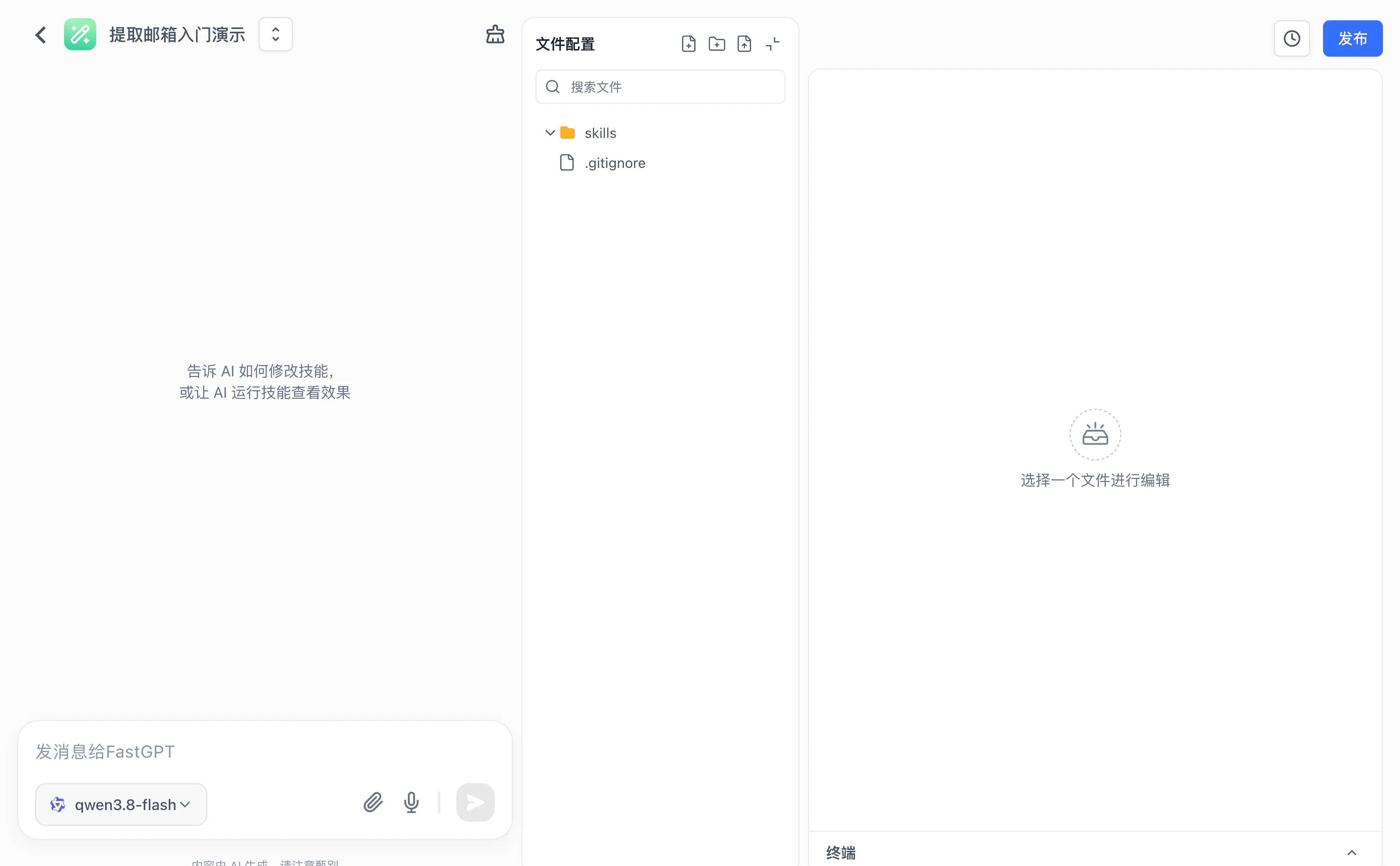
1. Isolated Secure Runtime Sandbox
Skill editing uses a sandbox workspace supplied by the configured execution service, such as Sealos Devbox or OpenSandbox. Isolation, network access, filesystem permissions, and resource limits depend on that service and its deployment configuration.
2. Instant Hot-Reloading Debugging
Provides an online debugging environment integrating a file tree, code editor, and console terminal. Equipped with an agent debug panel on the left supporting hot reloading, allowing you to troubleshoot the skill before publishing.
3. Isolation of Production & Debugging
Edits in the workspace will only take effect instantly in the "Debug Chat" area. Publish a version to apply the changes to production Agents and Workflows.
4. Auto-Sleep & Seamless Invocation
Idle-workspace archiving and restoration depend on the execution service and storage configuration. Reopening an archived workspace may require initialization. Check the service or subscription terms for compute and storage charges, and save required artifacts before cleanup.
Last updated