
Use Skills in Agents
Associate a published Skill with Chat Agent V2 or a workflow Agent node.
Prerequisites
Prepare a published Skill, resource access permissions, a model supporting tool calls, and an available virtual-machine service. Self-hosted installations need a configured execution environment. SaaS license, plan, and quota availability follow the current account interface.
Bind a Skill to an application
Chat Agent V2
Open the App editor, click + Choose in the Skills section on the left, and select published Skills. Confirm the virtual-machine settings. Associating Skills enables the required virtual machine and keeps that capability enabled while Skills remain associated. Set clear task instructions, save, and debug.
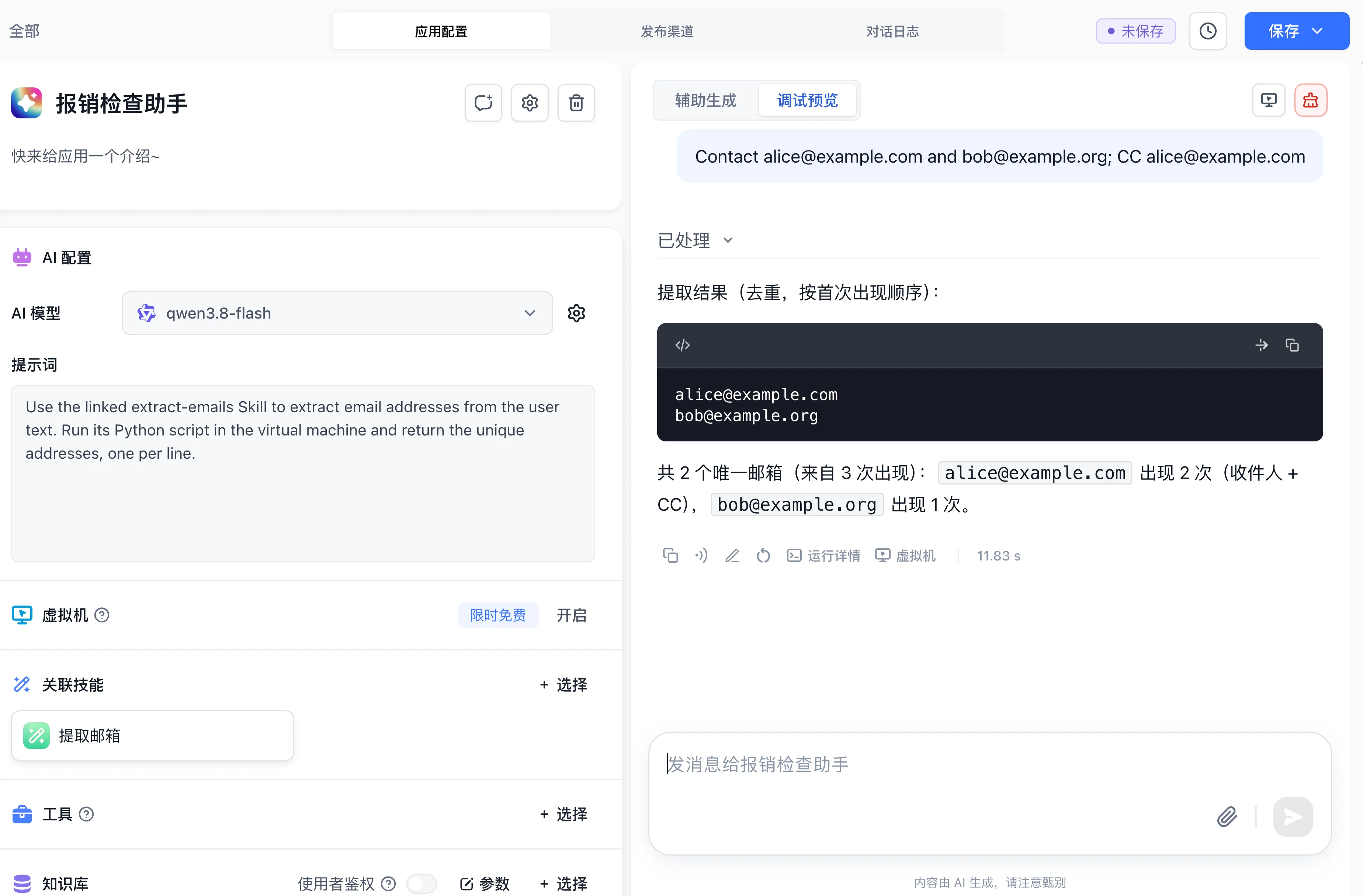
Associate Extract Emails from the development tutorial (the screenshot below reuses the Expense Check Assistant demo app to illustrate attaching the Skill). Set the system prompt:
When the user provides text, run the Python script in the extract-emails skill to extract all email addresses, deduplicate them in first-seen order, and return one address per line.Enter Contact [email protected] and [email protected]; CC [email protected] in the debug panel. Expect two unique addresses: [email protected] and [email protected]. Expand Processed, then Virtual machine / Execute command to inspect the script input and result.
Workflow invocation (App Call or legacy Agent node)
In new workflows, bind the Skill to a Chat Agent V2 app first, then open the + node panel on the workflow canvas, switch to the Agent tab, and add that Chat Agent V2 app (App Call node). In legacy workflows that already contain a standalone Agent node, select the Agent node on the canvas and click + Choose in its Skill field to attach published Skills. See Agent node.
| Host Carrier | Configuration Entry | Sandbox and Execution Scope | Typical Use Case |
|---|---|---|---|
| Chat Agent V2 | Left panel of the App editor → Skills → + Choose | Session-scoped sandbox (sessions/<chatId>), preserving workspace files and initialized Skill environments across multi-turn chats | Open-ended multi-turn spreadsheet analysis, interactive report generation, and iterative file processing |
| Workflow (App Call / Legacy Agent Node) | New workflows: canvas + → Agent tab → select a Skill-enabled Chat Agent V2; legacy workflows: select Agent node → Skill → + Choose | Provisions the sandbox for the workflow session, accepts upstream variables and file URLs, and passes its output to downstream nodes | Embedding an autonomous script-execution or Skill-driven step inside a deterministic business pipeline |
How Agents use Skills
At runtime, selected Skill versions are prepared in the execution environment. The Agent chooses relevant instructions and tools according to the task and model planning. One Skill resource can include multiple instruction sets and supporting files, and an Agent can use multiple resources.
Debug with an input explicitly supported by the Skill. Inspect execution details, virtual-machine files, and the final result. Once the result satisfies the Skill's instructions, publish application changes and verify in a new conversation.
For missing Skills, inspect published versions and permissions. For environment startup or dependency failures, inspect initialization scripts and virtual-machine logs. Skill publishing and application publishing apply to their respective resources; publish the resource you changed.
Last updated