
Upgrade Guide
Follow the standard FastGPT self-hosted upgrade procedure covering image tag conventions, startup migrations, background migrations, and version steps.
Version Policy
Starting with 4.14.11, FastGPT uses separate version names for stable releases and rapid-development releases:
- Two stable release lines are maintained. For example, while new features are developed in 4.17.x, fixes are maintained for 4.14.x and 4.15.x.
- Stable releases have no suffix, such as 4.15.0, 4.15.1, 4.17.0, and 4.17.3. A fix for 4.15.0 is released as 4.15.1 and applied to the active stable lines. These maintenance releases contain fixes and preserve the existing feature set.
- Rapid-development releases use a beta suffix, such as 4.17.0-beta1, 4.17.0-beta2, and 4.17.0-beta3.
- A development line becomes a stable release approximately every 2 months. Starting with 4.17.0, registered system migration tasks run automatically when the main app starts; for 4.16.x and earlier, a consolidated upgrade script applies all migrations from that development cycle with one request.
For stable deployments, choose releases without a beta suffix. Dedicated maintenance releases provide fixes while preserving the existing feature set.
Upgrade Steps
Upgrading FastGPT usually involves two steps:
- Update the image
- Run the upgrade initialization script
If you use FastGPT's bundled MongoDB 5.x and want to move to 8.x, see Migrate MongoDB 5.x to 8.x (Dump/Restore).
Image Names
GitHub Container Registry
- FastGPT main image: ghcr.io/labring/fastgpt
- Plugin image: ghcr.io/labring/fastgpt-plugin
- Code sandbox image: ghcr.io/labring/fastgpt-code-sandbox
- AI Proxy image: ghcr.io/labring/aiproxy
- Agent Sandbox Volume Manager image: ghcr.io/labring/fastgpt-agent-volume-manager
- Agent Sandbox image: ghcr.io/labring/fastgpt-agent-sandbox
- Agent Sandbox Proxy image: ghcr.io/labring/fastgpt-agent-sandbox-proxy
- Commercial edition image: ghcr.io/c121914yu/fastgpt-pro
Alibaba Cloud
- FastGPT main image: registry.cn-hangzhou.aliyuncs.com/fastgpt/fastgpt
- Plugin image: registry.cn-hangzhou.aliyuncs.com/fastgpt/fastgpt-plugin
- Code sandbox image: registry.cn-hangzhou.aliyuncs.com/fastgpt/fastgpt-code-sandbox
- AI Proxy image: registry.cn-hangzhou.aliyuncs.com/labring/aiproxy
- Agent Sandbox Volume Manager image: registry.cn-hangzhou.aliyuncs.com/fastgpt/fastgpt-agent-volume-manager
- Agent Sandbox image: registry.cn-hangzhou.aliyuncs.com/fastgpt/fastgpt-agent-sandbox
- Agent Sandbox Proxy image: registry.cn-hangzhou.aliyuncs.com/fastgpt/fastgpt-agent-sandbox-proxy
- Commercial edition image: registry.cn-hangzhou.aliyuncs.com/fastgpt/fastgpt-pro
Pin each service to the image tag specified in the target release deployment template. Companion services may use different version tags; record the complete image set and configuration before upgrading.
Updating Images on Sealos
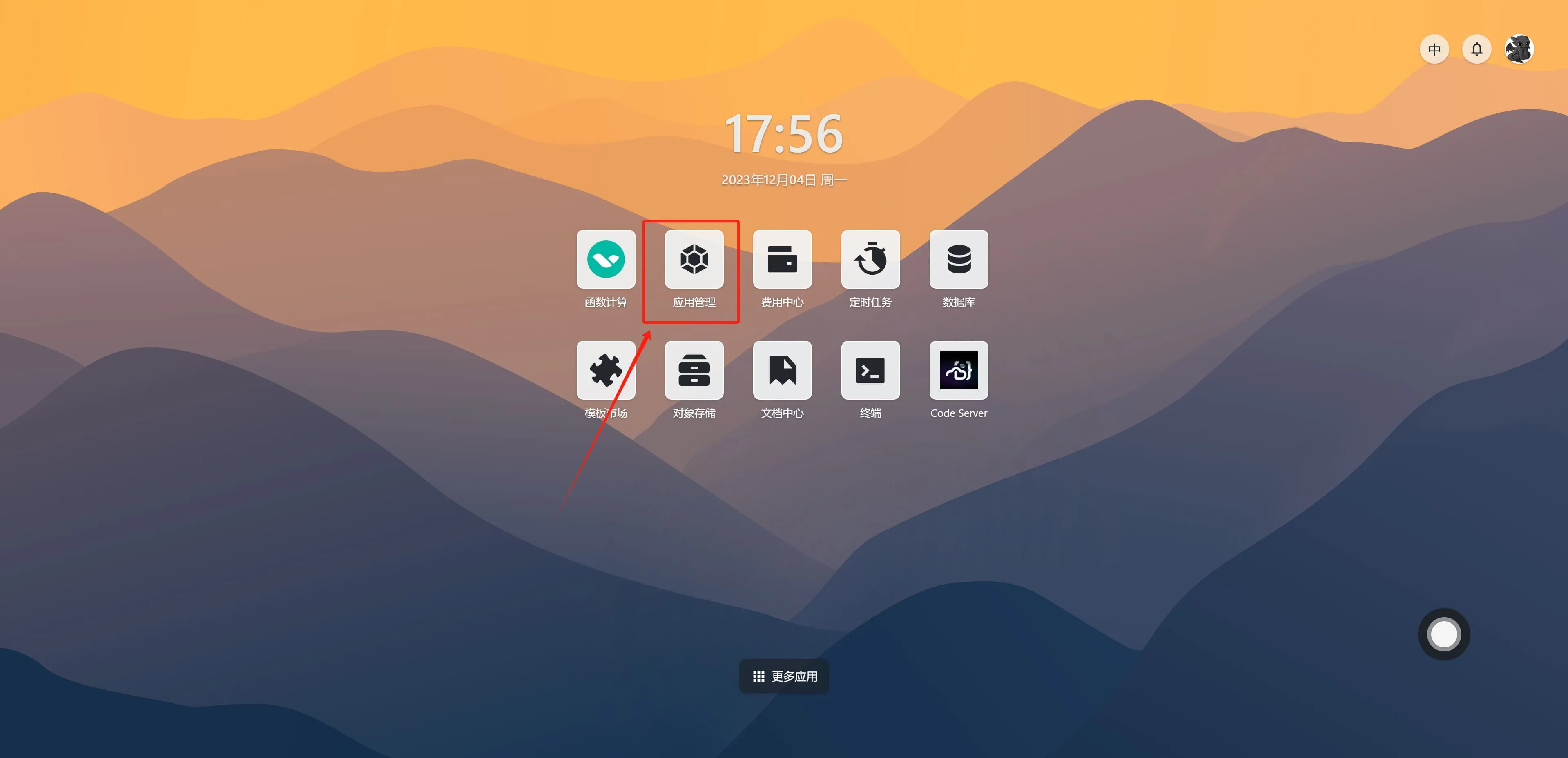
- Open Sealos Cloud and find App Management on the desktop.
- Select the corresponding app - click the three dots on the right - Update.
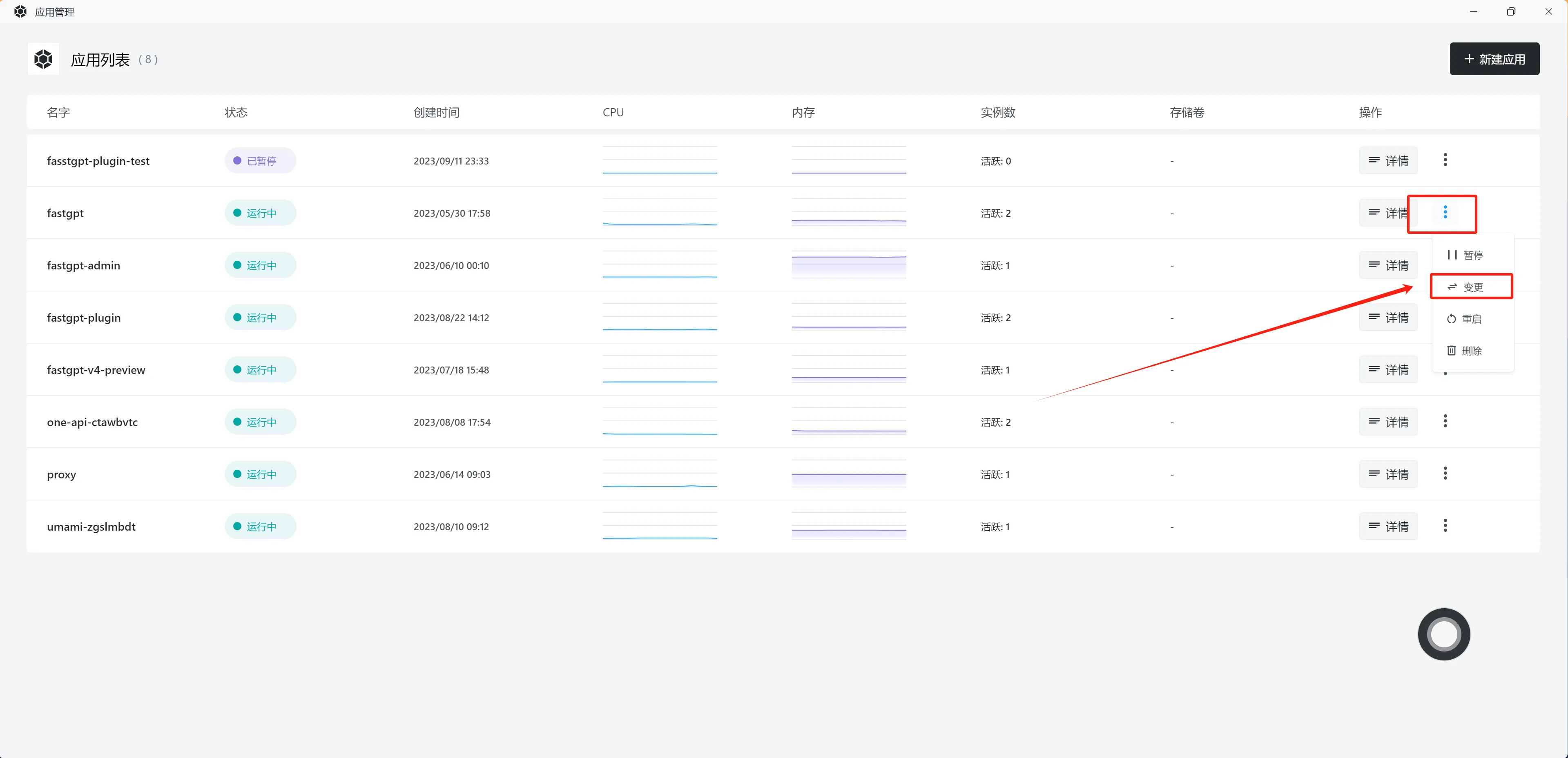
-
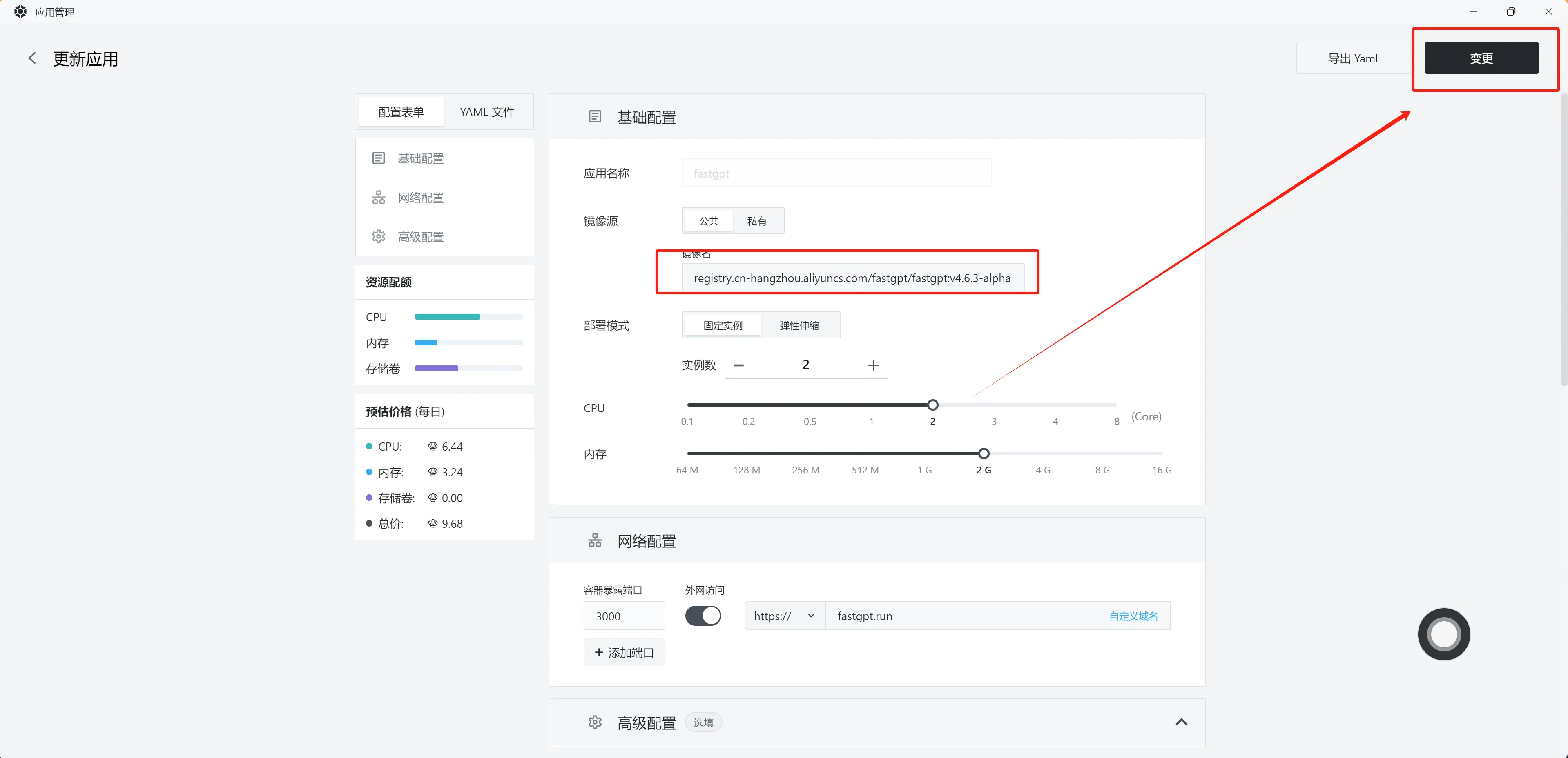
Update the image - Confirm changes.
If you need to modify the configuration file, scroll down to the
Configuration Filesection to make changes.
Updating Images with Docker Compose
Simply modify the image: field in the yml file, then run:
docker compose pull
docker compose up -d
Running the Upgrade Initialization Script
After updating the images, check the release notes for the target version. Versions that require an upgrade script carry the MIGRATION tag. Open the corresponding page and follow its instructions: starting with 4.17.0, registered migration tasks run automatically after the main app starts, and manual tasks are run from Admin > System upgrade. For 4.16.x and earlier, most upgrade scripts require sending a POST request.
Upgrade Execution and Rollback Notes
Why do I need to run an upgrade script?
Upgrade scripts migrate and backfill existing data into the structures used by the new version. Starting with FastGPT 4.17+, the application automatically runs a distributed startup migration executor. Nodes coordinate via MongoDB leases to run registered schema transformations sequentially with checkpoint cursors. For large datasets, schedule upgrades during maintenance windows to allow sufficient time for data backfill.
What is {{host}}?
{{}} denotes a variable. {{host}} refers to a variable named "host", which is your server's domain name or IP address.
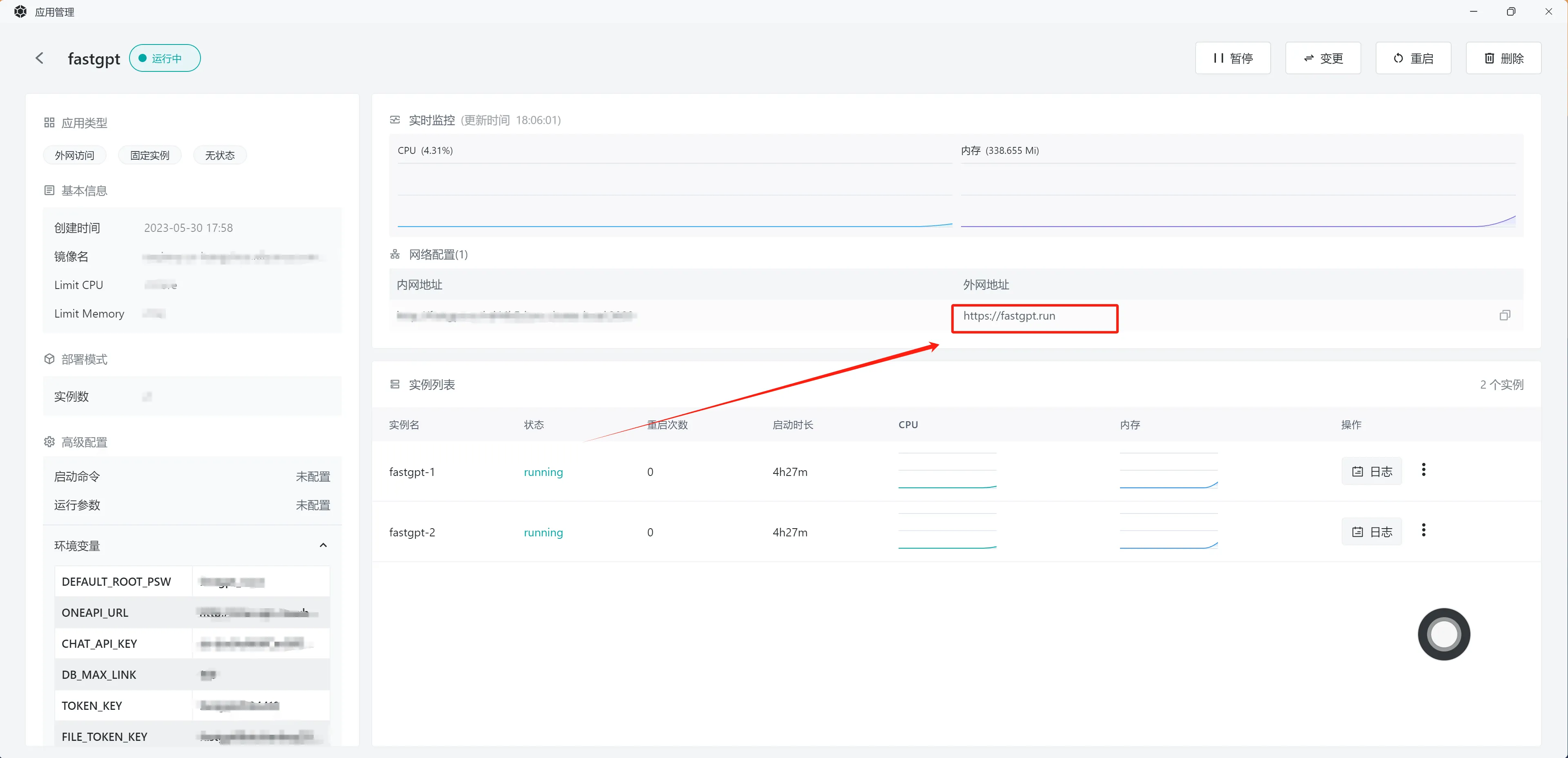
On Sealos, open the app details and look under Network Configuration. The External Address column shows the public URL; use its domain name for {{host}} when the request already includes https://.
How to get the rootkey
Find the value of ROOT_KEY in your docker-compose.yml file. The official template sets ROOT_KEY: *x-system-key; the actual value is on the x-system-key line at the top of the file.
On Sealos, you can find it in the environment variables panel shown in the image above.
How to upgrade across multiple versions
- Read every intervening release note and follow the documented upgrade path, including required intermediate versions.
- Back up MongoDB, vector storage, object storage, and configuration consistently; verify restoration in a separate environment.
- Rehearse the upgrade with a copy of production data. Check startup migrations and run only the manual steps required by those releases.
- Upgrade during a maintenance window and verify login, ingestion, retrieval, chat, and file downloads before restoring traffic.
- Prepare a rollback using compatible application images and data backups. Data migrations can require restoring the prior data state together with the prior version.
Last updated